MCP server · Developer tools · official
ReviewGate MCP server
by ReviewGate · official
Lets your AI check code changes against your team's written rules before you push.
ReviewGate is a free tool that reviews code changes against the rules your team actually wrote down, like your conventions and decision notes. It runs in your editor, before you push, and again on the pull request. It is handy if you write code and want your AI helper to catch rule breaks before a human reviewer does.
What is an MCP server? The 30-second version
On its own, your AI can only chat with you. An MCP server is a small helper program that gives your AI a new skill or a connection to another tool. This one connects your AI to ReviewGate, so the AI can ask ReviewGate to check your changes against your team's rules. You stay in the chat, and the AI does the checking for you.
What this MCP server does
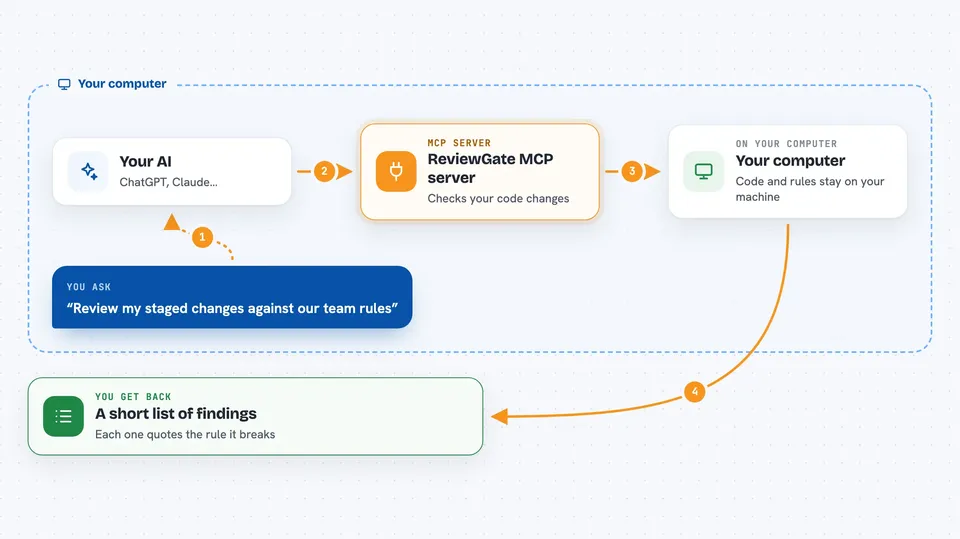
You ask your AI to review the code you just changed. The AI calls this helper, which runs ReviewGate on those changes. ReviewGate first has a quick pass look for problems, then a second, stronger pass tries to disprove each one against the actual code. Only the findings that survive both passes come back. Your AI then shows you the list, with the rule each finding points to.
 Click to zoom
What you can do with it
- Check your uncommitted changes against your team's rules
- Fetch the rules your team wrote so the AI knows what to check
- Review staged, uncommitted, or already committed changes
- Catch rule breaks before you push your branch
- Get a short list of findings instead of a wall of noise
- See which of your written rules each finding refers to
Try asking your AI
- “Review my staged changes against our team rules”
- “What rules does our project have written down?”
- “Check my last commit and tell me if it breaks any of our conventions”
- “Look at the changes on this branch and list any problems”
What it gives back to you
You get back a list of findings, each one pointing at a spot in your code and quoting the rule it breaks. Your AI shows this in the chat as a short summary with the details underneath. If nothing is wrong, you get a clean result. You can then fix things before you push.
Before you start
What you need
- The ReviewGate CLI program installed on your computer
- A key for the AI model you want to use (a kind of password from your model provider)
- The Claude Code plugin or a manual MCP setup in your AI app
Good to know
It reads your code changes and your team's rule files, so keep in mind it looks at your source code when you ask it to review.
Install it with your AI
Add ReviewGate MCP server to your AI, no technical skills needed
You don't install anything by hand. You copy one prompt, paste it into an AI that can work on your computer, and it checks, installs and connects the server for you, asking you when it needs something.
Sign in to get the install prompt
Members get a ready-made prompt that lets the Claude desktop app check ReviewGate MCP server, install it and connect it for them, step by step. You don't need any technical skills: you copy, paste and answer a few questions. Your connected AI can also find and install any of the 4,361 MCP servers here for you.
Who it's for
Developers and small teams who already write down their coding rules and want an AI to check changes against them.