
MCP server · Developer tools
System Prompts MCP server
by JamesANZ
Lets your AI look up and use the system prompts behind tools like Cursor, Devin, and Claude.
This is a small helper that gives your AI assistant a library of system prompts. A system prompt is the hidden set of instructions that shapes how an AI tool like Cursor or Devin behaves. If you are curious how those tools are told to act, or you want your own AI to behave a bit like them, this is for you.
What is an MCP server? The 30-second version
On its own, your AI can only chat with you. An MCP server is a small helper program that gives your AI a new skill or a connection to something useful. This one connects your AI to a collection of system prompts gathered from popular coding assistants. So when you ask about a prompt, your AI can actually go and fetch it instead of guessing.
What this MCP server does
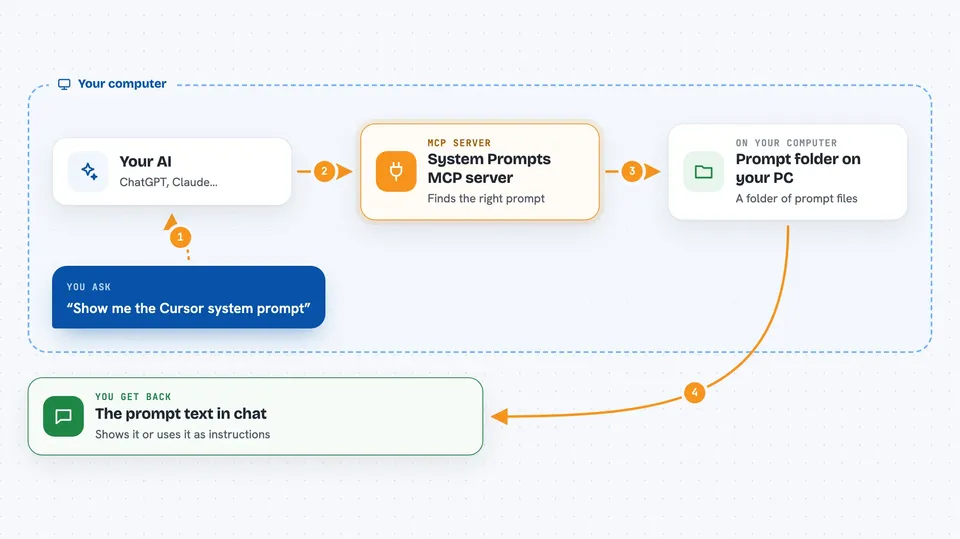
You ask your AI something like which prompt fits your task, or to show you the Cursor prompt. Your AI passes that request to this helper. The helper looks through its folder of prompt files, finds the matching one, and hands it back. Your AI then shows it to you or uses it as instructions for the rest of the conversation. It can also suggest prompts based on which AI model you are using and what you are trying to do.
 Click to zoom
What you can do with it
- Browse the list of available prompts, filtered by service or type
- Get prompt suggestions based on your AI model and keywords
- Fetch a specific prompt, like the Cursor agent prompt or a Devin summary
- Ask for just the details about a prompt instead of the full text
- Add your own prompt files and have them show up automatically
Try asking your AI
- “List the system prompts you have for Cursor”
- “Which prompt would suit Claude for pair programming on code?”
- “Show me the Devin summary prompt”
- “Give me the details for the cursor agent system prompt, not the full text”
What it gives back to you
You get back text in the chat: lists of prompt names, a suggested prompt with a short reason, or the full text of a prompt you asked for. If you ask for details only, you get a short summary of what that prompt is about. Nothing on your computer is changed; it just reads from the prompt folder and replies.
Before you start
What you need
- Node.js 18 or newer and npm installed on your computer
- The Claude desktop app or Cursor, if you want to use it there
- A folder of prompt files, which comes with the project when you install it
Good to know
It only reads prompt files, so it will not change or delete anything, but the prompts it shows are other companies' instructions and may not fit your own work.
Install it with your AI
Add System Prompts MCP server to your AI, no technical skills needed
You don't install anything by hand. You copy one prompt, paste it into an AI that can work on your computer, and it checks, installs and connects the server for you, asking you when it needs something.
Sign in to get the install prompt
Members get a ready-made prompt that lets the Claude desktop app check System Prompts MCP server, install it and connect it for them, step by step. You don't need any technical skills: you copy, paste and answer a few questions. Your connected AI can also find and install any of the 4,361 MCP servers here for you.
Who it's for
Developers, prompt writers, and anyone curious about how AI coding tools are instructed to behave.



