
MCP server · Security
JamJet Policy MCP server
by jamjet-labs
Put one simple rules file between your AI and its tools, so risky actions get blocked or flagged before they happen.
This is a small helper that sits between your AI assistant and the tools it can use. You write one plain rules file that says which actions are allowed, blocked, or need a second look. It is handy if you let your AI touch real systems and want a safety net, without being technical.
What is an MCP server? The 30-second version
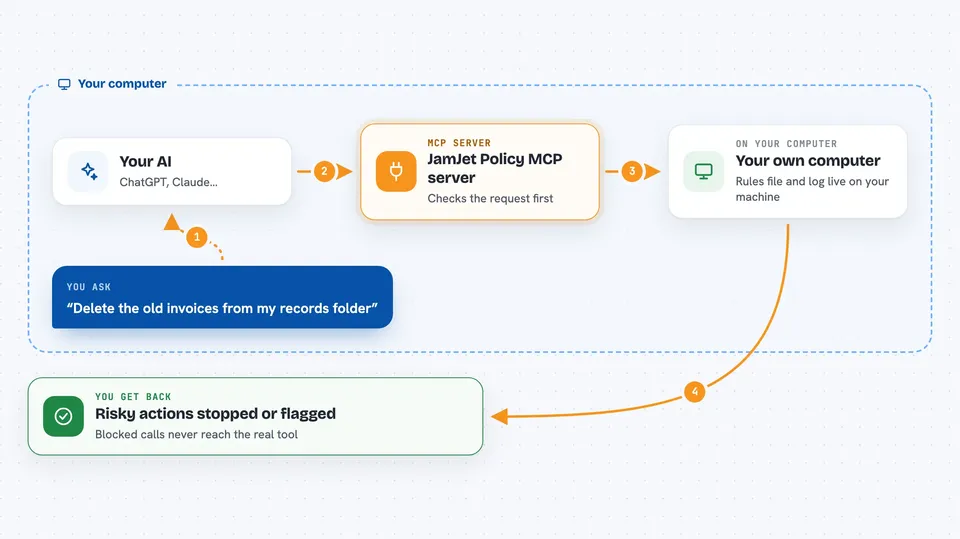
On its own, your AI can only chat. An MCP server is a small helper program that gives your AI a new skill or a connection to something else. This one is a guard that stands in the middle between your AI and other tools, checking each request against your rules file first. If a request breaks a rule, the AI gets a polite refusal back and the real tool never even hears about it.
What this MCP server does
You write a short rules file listing patterns to watch for, like anything with the word delete or drop. When your AI tries to use a tool, this helper checks the request against those rules before it goes anywhere. If the request matches a blocked pattern, the helper sends a refusal back to your AI and the real tool is never called. If it matches an approval rule, the helper marks it for review. Everything that passes through gets written to a dated log file so you can look back later and see what happened.
 Click to zoom
What you can do with it
- Block risky tool calls before they reach the real service
- Flag certain actions so they need a human to approve them
- Keep a daily log of every tool call that passed through
- Let your AI check whether a planned action is allowed before it tries
- List all the rules in your policy so you can review them
- Show which rules file is loaded and how many rules it has
- Run as a standalone policy server when there is no other tool to guard
What it gives back to you
You mostly see this in what does not happen: blocked calls simply never reach the real tool, and your AI gets a short refusal message explaining a rule was hit. When you ask your AI to check a rule, it comes back with a decision like allow, block, or require approval, plus the pattern that matched. The log file quietly collects a line for each call, so you can open it later and see the history.
Before you start
What you need
- Node.js installed on your computer (the free runtime that runs this helper)
- A rules file saved somewhere on your computer, usually at ~/.jamjet/policy.yaml
- Your AI app set up to launch MCP servers, like Claude Desktop or Cursor
Good to know
This only blocks calls that match the patterns you wrote, so a rule you forgot to add will not stop anything, and the approval flow is not finished yet in this version.
Install it with your AI
Add JamJet Policy MCP server to your AI, no technical skills needed
You don't install anything by hand. You copy one prompt, paste it into an AI that can work on your computer, and it checks, installs and connects the server for you, asking you when it needs something.
Sign in to get the install prompt
Members get a ready-made prompt that lets the Claude desktop app check JamJet Policy MCP server, install it and connect it for them, step by step. You don't need any technical skills: you copy, paste and answer a few questions. Your connected AI can also find and install any of the 4,609 MCP servers here for you.
Who it's for
Anyone who lets an AI assistant touch real tools and wants a simple safety rulebook, especially people in operations, support, or small teams without a dedicated security engineer.



