MCP server · Health and learning
TrainingPeaks MCP server
Ask your AI to look up workouts, plan sessions, and track your fitness in TrainingPeaks.
This is a helper that connects your AI assistant to your TrainingPeaks account. Once it is set up, you can talk to your AI in normal words about your training and it will look things up or make changes in TrainingPeaks for you. It is handy for athletes and coaches who already keep their training in TrainingPeaks and want to save time clicking around.
What is an MCP server? The 30-second version
On its own, your AI can only chat. It cannot see your TrainingPeaks calendar or change anything there. An MCP server is a small helper program that gives your AI a new skill, in this case a connection to your TrainingPeaks account. You install it on your own computer, sign in once, and then your AI can read your workouts and make changes when you ask.
What this MCP server does
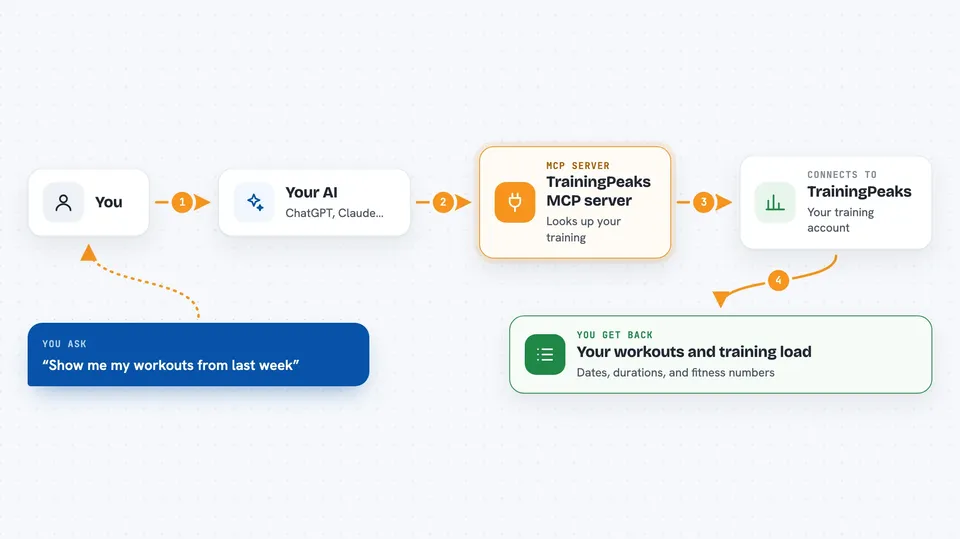
You ask your AI something about your training, like what you did last week or to add a session on Tuesday. Your AI passes that request to this helper program. The helper talks to TrainingPeaks using your own login, so it sees the same data you see in the app. It brings the answer back and your AI explains it to you in the chat. If you asked for a change, like a new workout or a note, the helper makes that change in your account.
 Click to zoom
What you can do with it
- Look up your workouts for any date range
- Create a structured interval workout with warm-up and cool-down
- Copy a workout from one day to another
- Check your fitness, fatigue, and form trends over time
- Compare your power or pace personal records
- Log your weight, sleep, and other health numbers
- Add races and notes to your calendar
- Update your FTP or heart rate zones
Try asking your AI
- “Show me my workouts from last week and the total training load”
- “Build me a 4x8 minute threshold session for Tuesday with warm-up and cool-down”
- “What is my fitness, fatigue, and form right now?”
- “Log my weight at 74.5kg and sleep at 7.5 hours for today”
What it gives back to you
You get answers in plain text in the chat, like a list of workouts with dates and durations, a summary of your weekly training load, or your current fitness numbers. When you ask for a change, it tells you what it did, for example that a workout was created or a note was added. Some clients can also show a small chart inside the conversation, but the text answer is always complete on its own.
Before you start
What you need
- A TrainingPeaks account
- Python 3 installed on your computer
- Your TrainingPeaks login cookie (the helper walks you through getting it from your browser)
- The Claude desktop app or another AI app that supports MCP servers
Good to know
It can change or delete things in your TrainingPeaks account, so check what your AI is about to do before you say yes, and keep your login cookie private like a password.
Install it with your AI
Add TrainingPeaks MCP server to your AI, no technical skills needed
You don't install anything by hand. You copy one prompt, paste it into an AI that can work on your computer, and it checks, installs and connects the server for you, asking you when it needs something.
Sign in to get the install prompt
Members get a ready-made prompt that lets the Claude desktop app check TrainingPeaks MCP server, install it and connect it for them, step by step. You don't need any technical skills: you copy, paste and answer a few questions. Your connected AI can also find and install any of the 4,361 MCP servers here for you.
Who it's for
Athletes and coaches who already use TrainingPeaks and want to manage their training by talking to their AI instead of clicking through the app.