MCP server · Privacy
Ollama Bridge MCP server
by jaspertvdm
Lets your AI talk to a local Ollama server so it can run models like Llama, Mistral and Qwen on your own computer.
This is a small helper that connects your AI assistant to Ollama, a program that runs AI models on your own computer instead of in the cloud. It is handy if you already use Ollama and want your chat assistant to be able to send questions to those local models. You do not need to be technical to use it, but someone has to set up Ollama first.
What is an MCP server? The 30-second version
On its own, your AI can only chat with you using the model it already runs on. An MCP server is a small helper program that gives your AI a new skill or a connection to another app or service. This one connects your AI to Ollama, which is a tool that runs AI models locally on your machine. Once it is connected, your AI can send a question to Ollama and bring the answer back into your chat.
What this MCP server does
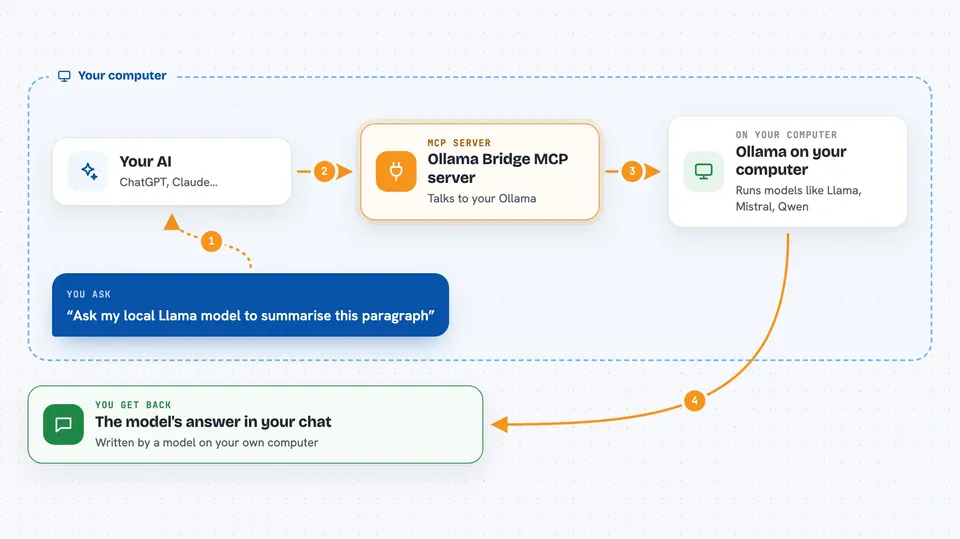
You ask your AI something in your normal chat window. The AI notices this helper is available and passes your question to it. The helper then talks to your Ollama server, which runs the local model you have installed, like Llama, Mistral or Qwen. The local model writes an answer, and the helper sends it back so it appears in your chat. You get a reply from a model running on your own computer, without sending your question to an outside company.
 Click to zoom
What you can do with it
- Ask a local Ollama model a question from inside your AI chat
- Run prompts on models like Llama, Mistral or Qwen that you have installed
- Get answers streamed back to you as the local model writes them
- Use your own computer's models instead of a cloud service
- Point the helper at a different Ollama address if yours is not on the default one
Try asking your AI
- “Ask my local Llama model to summarise this paragraph”
- “Use Ollama to answer this question in plain English”
- “Send this prompt to my local Mistral model and show me the reply”
- “Ask the Qwen model running on my computer what it thinks of this idea”
What it gives back to you
You get the local model's answer written back into your chat, just like a normal reply. If the model streams its answer, you may see the words appear bit by bit as it writes. The helper itself does not add lists, files or numbers unless the model includes them in its reply. What you see is whatever the Ollama model decided to say.
Before you start
What you need
- Ollama installed and running on your computer
- At least one model pulled into Ollama, like llama3 or mistral
- Python with pip so you can install the helper package
- The address of your Ollama server if it is not the default http://localhost:11434
Good to know
Your questions and the model's answers stay on your own computer through Ollama, but anything you type into the chat is still seen by your main AI assistant, so do not paste secrets you would not share with it.
Install it with your AI
Add Ollama Bridge MCP server to your AI, no technical skills needed
You don't install anything by hand. You copy one prompt, paste it into an AI that can work on your computer, and it checks, installs and connects the server for you, asking you when it needs something.
Sign in to get the install prompt
Members get a ready-made prompt that lets the Claude desktop app check Ollama Bridge MCP server, install it and connect it for them, step by step. You don't need any technical skills: you copy, paste and answer a few questions. Your connected AI can also find and install any of the 4,609 MCP servers here for you.
Who it's for
People who already run Ollama locally and want their AI assistant to be able to send questions to those local models.