
MCP server · Coding
Veto MCP server
by jigyasudham
Give your AI a council of specialist helpers that plan, review, and remember your coding work.
Veto is a helper you install on your own computer. It plugs into the AI coding tools you already use, like Claude Code, Cursor, or Codex, and gives them a team of specialist advisors. It is handy if you write code with an AI and want a second opinion, a safety check, or a memory that survives between chats.
What is an MCP server? The 30-second version
On its own, your AI can only chat with you. An MCP server is a small helper program that gives your AI a new skill or a connection to a service. Veto is that helper, and it lives on your machine. Once it is connected, your AI can call on Veto's specialist agents, memory, and review tools whenever you ask.
What this MCP server does
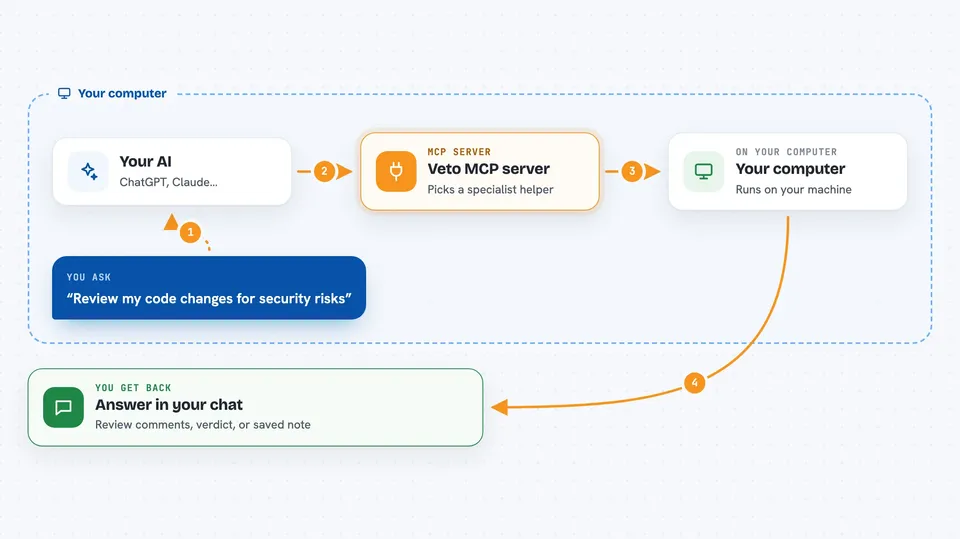
You ask your AI something like "review my changes" or "plan this feature." Your AI passes the request to Veto. Veto picks the right specialist agent, such as a security scanner or a task planner, and runs it. The agent looks at your code or your notes, then sends back a structured answer. Your AI shows you that answer in the chat, and Veto can also save the result to its memory for next time.
 Click to zoom
What you can do with it
- Run a security scan on your code changes
- Debate a design choice with a council of seven specialist agents
- Save and search project decisions and notes across sessions
- Check whether a package name your AI suggested actually exists
- Review a pull request and get comments you can post
- Plan a new feature from a plain English description
- Catch when an AI gets stuck retrying the same broken action
Try asking your AI
- “Review my uncommitted changes and tell me if anything looks risky”
- “Should we use Postgres or MongoDB for this project? Ask the council”
- “Check if these npm packages are real before I install them: axios, axois, left-padd”
- “Save this decision: we use Postgres, no Mongo. Block any code that imports mongoose”
What it gives back to you
You get answers in the chat: review comments, a council verdict, a list of verified or risky packages, or a saved decision. Some tools return structured lists, like a table of package names with a status next to each. Others return a short summary or a plan you can follow. If a tool changes something, like saving a memory or a decision rule, it tells you what it did.
Before you start
What you need
- Node.js 18 or newer on your computer
- One of the supported AI coding tools, like Claude Code, Cursor, or Codex CLI
- A subscription plan for that tool if you want to avoid extra token costs
Good to know
Some tools can change your project files or block your commits, so review what Veto suggests before you accept it.
Install it with your AI
Add Veto MCP server to your AI, no technical skills needed
You don't install anything by hand. You copy one prompt, paste it into an AI that can work on your computer, and it checks, installs and connects the server for you, asking you when it needs something.
Sign in to get the install prompt
Members get a ready-made prompt that lets the Claude desktop app check Veto MCP server, install it and connect it for them, step by step. You don't need any technical skills: you copy, paste and answer a few questions. Your connected AI can also find and install any of the 4,609 MCP servers here for you.
Who it's for
People who write code with an AI assistant and want extra checks, planning, and memory without leaving their chat.



