
MCP server · Coding
LeetCode MCP server
by jinzcdev
Lets your AI look up LeetCode problems, solutions, and your own stats right in the chat.
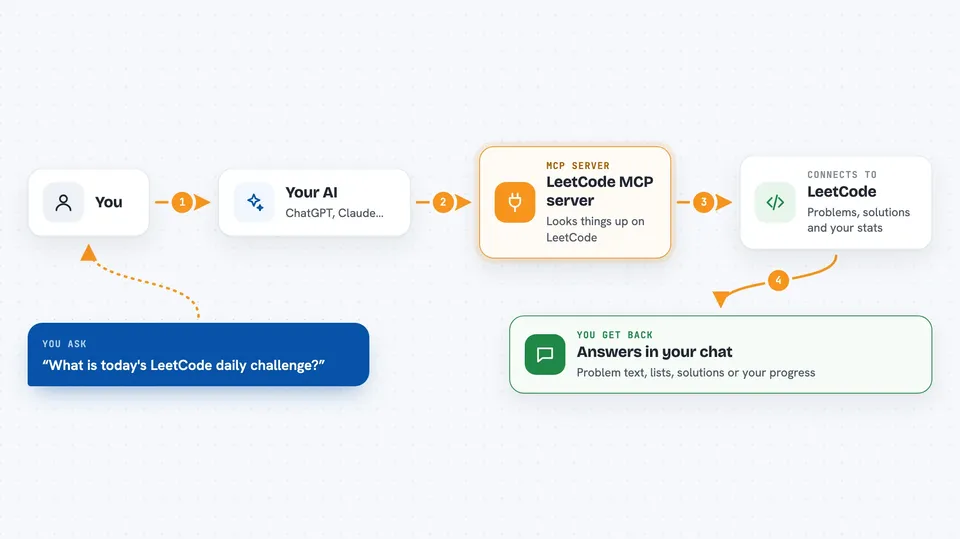
This is a small helper that connects your AI assistant to LeetCode, the site where people practice coding problems. Once it is set up, you can ask your AI about a problem, a user, or your own progress, and it will go fetch the answer for you. It is handy if you practice coding, prepare for interviews, or just like keeping track of your solved problems.
What is an MCP server? The 30-second version
On its own, your AI can only chat with you using what it already knows. An MCP server is a small helper program that gives your AI a new skill or a connection to an app or website. This one connects your AI to LeetCode, so it can look up problems, read solutions, and check your submissions when you ask. You do not need to understand how it works inside; you just add it once and then talk to your AI like usual.
What this MCP server does
You ask your AI something about LeetCode, like the daily challenge or a problem you are stuck on. The AI passes your request to this helper. The helper talks to LeetCode's own systems and brings the answer back. Then the AI shows it to you in the chat, as a list, a summary, or a block of text. If you log in, it can also read and change your private things, like your notes.
 Click to zoom
What you can do with it
- Get today's daily challenge problem
- Look up any problem by name, with its description and examples
- Search problems by topic, difficulty, or keyword
- Read community solutions for a problem
- Check a user's profile and contest rankings
- See your own recent submissions and progress
- Create or update your notes on a problem (China site only)
Try asking your AI
- “What is today's LeetCode daily challenge?”
- “Find me three easy problems about arrays.”
- “Show me the recent accepted submissions for user jinzcdev.”
- “Explain the top solution for the two-sum problem.”
What it gives back to you
You get answers in the chat: problem descriptions, lists of problems, solution text, user stats, or your own submission history. It can also show you a report on a specific submission, like whether it passed or failed. If you create or update a note, it tells you the change was made. Everything appears as normal text you can read and copy.
Before you start
What you need
- Node.js version 20 or newer installed on your computer
- A LeetCode account (free) if you want to use your own private data
- Your LeetCode session cookie if you want the private features (a long code you copy from your browser after logging in)
Good to know
If you connect your LeetCode account, the helper can read your private data and, on the China site, create or change your notes, so be careful about what you ask it to do.
Install it with your AI
Add LeetCode MCP server to your AI, no technical skills needed
You don't install anything by hand. You copy one prompt, paste it into an AI that can work on your computer, and it checks, installs and connects the server for you, asking you when it needs something.
Sign in to get the install prompt
Members get a ready-made prompt that lets the Claude desktop app check LeetCode MCP server, install it and connect it for them, step by step. You don't need any technical skills: you copy, paste and answer a few questions. Your connected AI can also find and install any of the 4,609 MCP servers here for you.
Who it's for
People who practice coding on LeetCode, prepare for job interviews, or want to track their problem-solving progress with help from an AI.



