
MCP server · Research
Apify Public Data MCP server
by jlucasmcrell
Lets your AI pull public data like business leads, job listings, and government records from many sources.
This is a helper that gives your AI a set of tools for gathering public information from the web. It can look up business listings, job ads, company filings, government records, and more. It is handy if you often need to collect or check public data without doing all the clicking and copying yourself.
What is an MCP server? The 30-second version
On its own, your AI can only chat with you using what it already knows. An MCP server is a small helper program that gives your AI a new skill or a connection to an outside service. This one connects your AI to Apify, a service that runs small data-collecting programs for you. So when you ask for public records or leads, your AI can use this helper to fetch them and bring the results back into your chat.
What this MCP server does
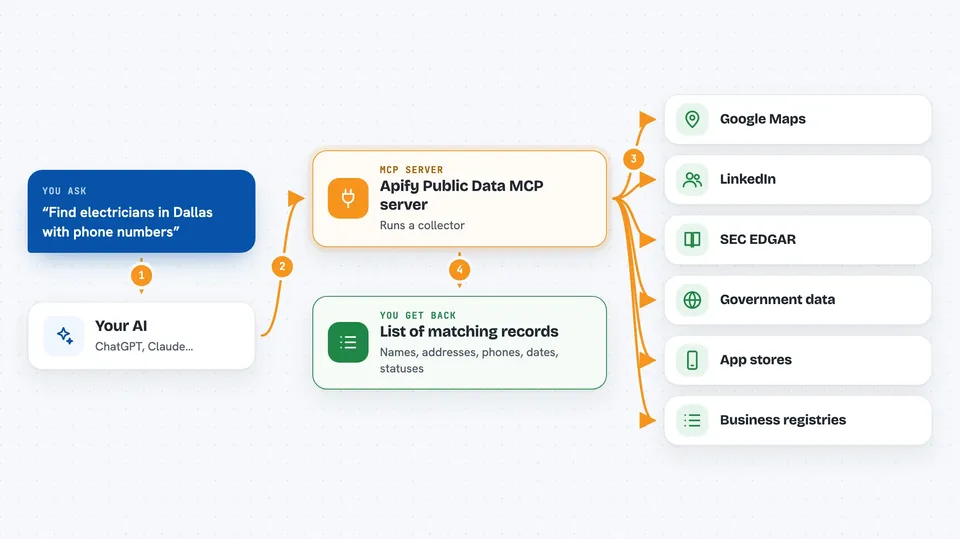
You ask your AI a question, like finding electricians in Dallas or recent SEC filings from a company. Your AI passes that request to this helper, which runs a small data-collecting program on your Apify account. That program visits the public source, gathers the matching information, and sends it back. Your AI then shows you the results, often as a list or table you can read or copy. Each run costs a small amount through your own Apify account.
 Click to zoom
What you can do with it
- Find business leads from Google Maps, like names, phones, and websites
- Search job listings on LinkedIn and Glassdoor
- Look up company filings on SEC EDGAR
- Check contractor licenses in US states
- Pull government data like grants, tenders, and recalls
- Gather app reviews from Google Play and the Apple App Store
- Search business registries in several US states and countries
What it gives back to you
You get back a list of matching records, each with fields like names, addresses, phone numbers, dates, or statuses. Your AI can show this as a table or a summary in the chat. Sometimes it will tell you the result is empty or only partial, with a note about what happened. It may also give you a run ID if you want to check the details later.
Before you start
What you need
- An Apify account (free to start, but runs cost money)
- Your Apify API token (a kind of password for apps; you copy it from your Apify account settings)
- An MCP client like Claude Desktop or Cursor
- Python 3.10 or newer if you install with uvx
Good to know
Each run costs money through your Apify account, so set a small result limit and check the price before running large jobs.
Install it with your AI
Add Apify Public Data MCP server to your AI, no technical skills needed
You don't install anything by hand. You copy one prompt, paste it into an AI that can work on your computer, and it checks, installs and connects the server for you, asking you when it needs something.
Sign in to get the install prompt
Members get a ready-made prompt that lets the Claude desktop app check Apify Public Data MCP server, install it and connect it for them, step by step. You don't need any technical skills: you copy, paste and answer a few questions. Your connected AI can also find and install any of the 4,609 MCP servers here for you.
Who it's for
People who need to collect or check public data for leads, research, due diligence, or monitoring, like sales reps, recruiters, analysts, and small business owners.


