
MCP server · Developer tools
rustunnel MCP server
by joaoh82
Let your AI open and manage public tunnels to services running on your own computer.
rustunnel is a tool that puts a service running on your own computer onto the internet, behind a public web address. This MCP server lets your AI assistant create and manage those tunnels for you, so you do not have to type the commands yourself. It is handy if you share a local website, app, or game server with someone outside your network.
What is an MCP server? The 30-second version
On its own, your AI can only chat. An MCP server is a small helper program that gives your AI a new skill or a connection to another service. This one connects your AI to rustunnel, so it can open a tunnel from your computer to a public address and keep track of it. You just ask in plain words, and the helper does the clicking and typing behind the scenes.
What this MCP server does
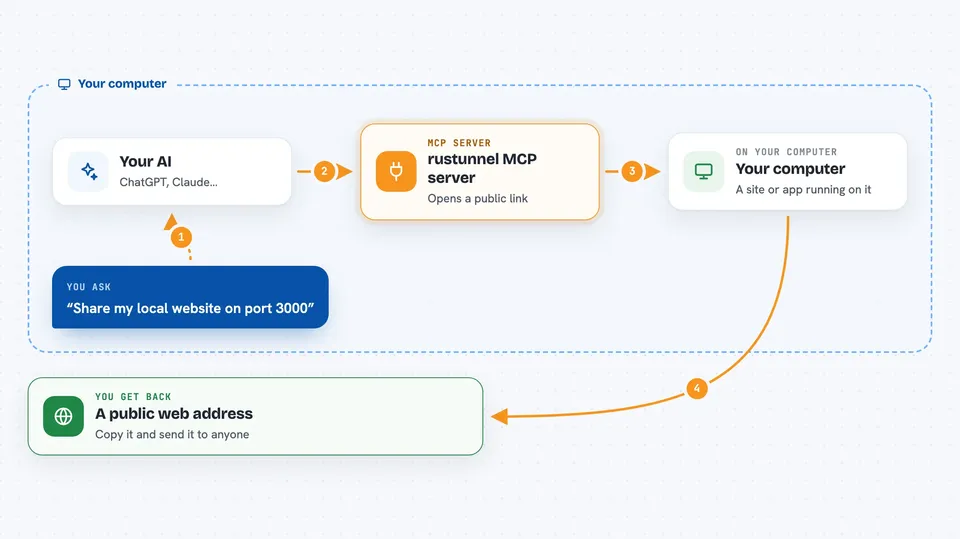
You tell your AI something like "share my local site on port 3000". The AI passes that request to this helper, which talks to rustunnel. rustunnel then creates a public web address that points back to the service on your machine. The helper reports the address back to you in the chat, and can also list, check, or close the tunnels you have open.
 Click to zoom
What you can do with it
- Open a public web address for a service running on your computer
- Create tunnels for web, database, or game server traffic
- Pick a region close to you, or a custom name for the address
- List the tunnels you currently have open
- Check whether a tunnel is still running
- Close a tunnel when you are done with it
Try asking your AI
- “Share my local website on port 3000 with a public link”
- “Open a tunnel to my local database on port 5432”
- “Show me all the tunnels I have running right now”
- “Close the tunnel I opened for my game server”
What it gives back to you
You get back the public web address of your tunnel, usually as a short link you can copy and send to someone. When you ask for a list, you get the tunnels you have open with their addresses and status. If you close one, the AI confirms it is gone. Everything shows up as plain text in the chat.
Before you start
What you need
- A rustunnel account (the free plan works to start)
- An API token from your rustunnel dashboard (a kind of password for apps; the site gives you one)
- The rustunnel client installed on your computer
Good to know
Opening a tunnel puts a service on your computer onto the public internet, so only share things you are comfortable exposing.
Install it with your AI
Add rustunnel MCP server to your AI, no technical skills needed
You don't install anything by hand. You copy one prompt, paste it into an AI that can work on your computer, and it checks, installs and connects the server for you, asking you when it needs something.
Sign in to get the install prompt
Members get a ready-made prompt that lets the Claude desktop app check rustunnel MCP server, install it and connect it for them, step by step. You don't need any technical skills: you copy, paste and answer a few questions. Your connected AI can also find and install any of the 4,609 MCP servers here for you.
Who it's for
Developers and anyone who needs to share a service running on their own machine with other people.



