
MCP server · Developer tools
shadcn/ui MCP server
by Jpisnice
Lets your AI look up shadcn/ui components, blocks and demos and pull their code into your project.
This is a small helper that connects your AI assistant to the shadcn/ui component library. shadcn/ui is a popular set of ready-made building blocks for websites and apps, like buttons, forms and dashboards. If you or your team build interfaces and use an AI assistant to help, this makes the assistant able to fetch the real component code for you instead of guessing.
What is an MCP server? The 30-second version
On its own, your AI can only chat with you. An MCP server is a small helper program that gives your AI a new skill or a connection to an app or service. This one connects your AI to shadcn/ui, so when you ask for a component, the AI can go and look it up there and bring the real code back. You do not need to understand how it works under the hood, you just install it once and then ask in plain words.
What this MCP server does
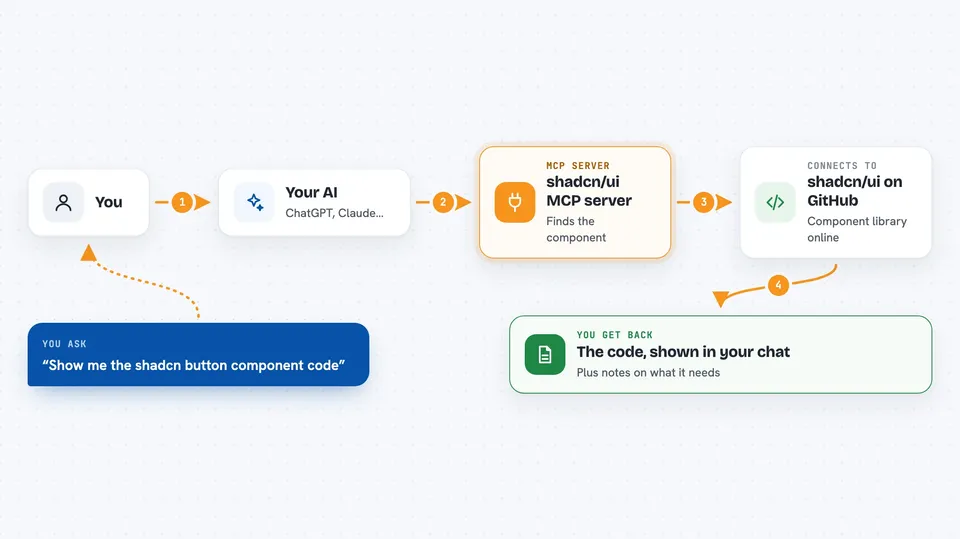
You ask your AI something like "show me the shadcn button component". The AI sends that request to this helper. The helper goes to the shadcn/ui project on GitHub and finds the component you asked about. It brings back the code, plus any notes about what it needs and how it is used. The AI then shows you that in the chat, ready for you to copy or adapt.
 Click to zoom
What you can do with it
- Look up any shadcn/ui component and get its source code
- See example demos that show how a component is used
- Get full blocks like dashboards, calendars and forms
- Check what other packages a component depends on
- Browse the list of available components and folders
- Switch between React, Svelte, Vue and React Native versions
Try asking your AI
- “Show me the shadcn/ui button component code”
- “What does the shadcn card component look like and what does it need?”
- “Give me a shadcn dashboard block I can start from”
- “List the shadcn/ui components available for forms”
What it gives back to you
You get the actual code for the component or block you asked about, shown right in the chat. You also get supporting details like which other packages it needs and short notes on how it is meant to be used. Sometimes you get a list of components or folders when you are just browsing. Nothing is changed on your computer unless you copy the code yourself.
Before you start
What you need
- Node.js version 18 or newer installed on your computer
- The Claude desktop app or another AI tool that supports MCP servers
- Optional: a free GitHub token, which is a kind of password that lets the helper ask GitHub for more requests per hour
Good to know
It only reads public shadcn/ui code from GitHub, so it will not change anything on your computer, but without a GitHub token you are limited to about 60 requests per hour.
Install it with your AI
Add shadcn/ui MCP server to your AI, no technical skills needed
You don't install anything by hand. You copy one prompt, paste it into an AI that can work on your computer, and it checks, installs and connects the server for you, asking you when it needs something.
Sign in to get the install prompt
Members get a ready-made prompt that lets the Claude desktop app check shadcn/ui MCP server, install it and connect it for them, step by step. You don't need any technical skills: you copy, paste and answer a few questions. Your connected AI can also find and install any of the 4,609 MCP servers here for you.
Who it's for
Developers and designers who build web or app interfaces and want their AI assistant to fetch real shadcn/ui component code for them.




