
MCP server · Security
Openterms MCP server
by jstibal
Give your AI signed permission slips and spending limits before it takes actions.
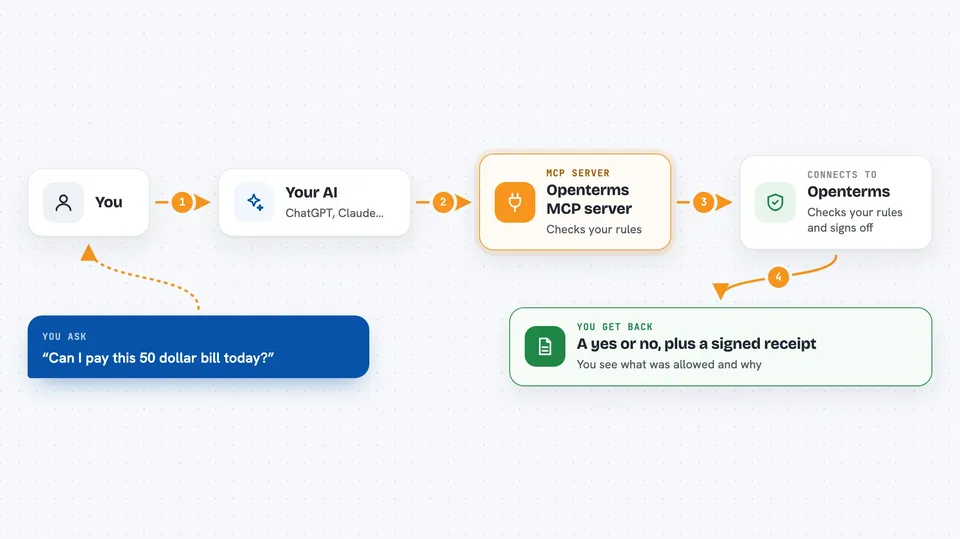
Openterms is a helper that sits between your AI assistant and the actions it takes on your behalf. Before the AI does something, Openterms checks your rules and hands back a signed permission slip, like a receipt, that proves what was agreed. It is handy for anyone who lets an AI spend money or call other services and wants a clear record and a safety net.
What is an MCP server? The 30-second version
On its own, your AI can only chat. An MCP server is a small helper program that gives your AI a new skill or a connection to another service. This one connects your AI to Openterms, so when you ask it to do something, it can first ask Openterms for a signed permission slip and check your rules. That way your AI can act, but only within the limits you set.
What this MCP server does
You ask your AI to do something, like pay a bill or call another service. The AI uses this helper to check your rules first, such as a daily spending cap or a list of allowed actions. If the action passes, Openterms signs a receipt and gives it back. The AI then includes that receipt when it makes the call, and the other service can quickly check it is real. You end up with a clear record of what was allowed, what was blocked, and why.
 Click to zoom
What you can do with it
- Get a signed receipt before your AI takes an action
- Set daily spending caps and allowed action types
- Pre-check whether an action would be allowed
- Look up and verify past receipts
- See an audit trail of every allow, deny, or escalate decision
- Check your workspace balance and per-receipt pricing
- Register as a provider and verify agent consent
Try asking your AI
- “Check my Openterms policy before doing anything today”
- “Would a payment of 50 dollars to this vendor be allowed right now”
- “Show me the last five receipts from this workspace”
- “Verify this receipt hash and tell me if it is valid”
What it gives back to you
You get back clear answers in the chat, like whether an action is allowed, a signed receipt, a list of recent receipts, or a summary of past decisions. When something is blocked, you see why. When something goes through, you get the receipt and its details.
Before you start
What you need
- An Openterms account and API key (a kind of password for apps; you get one when you sign up)
- Python 3 installed on your computer if you run the helper yourself
- The Claude desktop app or another AI tool that supports MCP servers
Good to know
This helper can block or allow actions and record what your AI did, so make sure your rules match what you actually want to permit.
Install it with your AI
Add Openterms MCP server to your AI, no technical skills needed
You don't install anything by hand. You copy one prompt, paste it into an AI that can work on your computer, and it checks, installs and connects the server for you, asking you when it needs something.
Sign in to get the install prompt
Members get a ready-made prompt that lets the Claude desktop app check Openterms MCP server, install it and connect it for them, step by step. You don't need any technical skills: you copy, paste and answer a few questions. Your connected AI can also find and install any of the 4,609 MCP servers here for you.
Who it's for
People who let an AI spend money or call other services and want clear limits and a record of what happened.



