MCP server · Research
Google Ad Manager seller MCP server
by juan-sibbo
Lets your AI look up ad products, prices and availability from a publisher's ad system, safely.
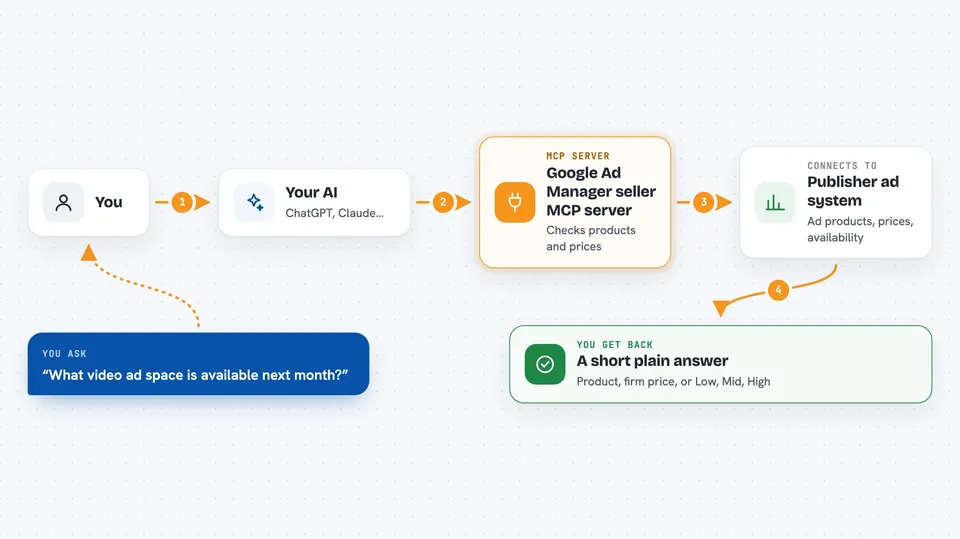
This is a small helper program that connects your AI assistant to the sell side of online advertising. It lets the AI ask what ad space is for sale, what it costs, and whether there is enough of it, without ever touching the real ad system. It is handy for people who buy or plan advertising and want an AI to do the first round of checking for them.
What is an MCP server? The 30-second version
On its own, your AI can only chat. An MCP server is a small helper program that gives your AI a new skill or a connection to an app or service. This one connects your AI to a publisher's ad inventory, so the AI can look up products, prices and availability for you when you ask. You stay in the chat, and the helper does the quiet work in the background.
What this MCP server does
You ask your AI something like what video ad space is available next month. The AI passes that question to this helper program. The helper checks the publisher's catalog and forecast, and only shares the parts the publisher allows. Then it hands back a short answer, such as a product family, a firm price, or a Low, Mid or High availability bucket. If you decide to move forward, the helper can record a soft buying intent that a human sales team can pick up later.
 Click to zoom
What you can do with it
- See which ad product families you are allowed to buy
- Check the firm list price of a product family
- Ask how available a product family is next quarter
- Check whether a specific number of impressions can be delivered in a month
- Record a time-limited buying intent at the current firm price
- Withdraw one of your own active intents
- See a signed document describing what the server can do
Try asking your AI
- “What pre-roll video products can I buy here, and what do they cost?”
- “How available is the Pre-Roll Video family next quarter?”
- “Can you deliver 2.8 million impressions of Pre-Roll Video in October?”
- “Create an intent for the Pre-Roll Video family at its current firm price”
What it gives back to you
You get short, plain answers in the chat. Product lists come back as family names with formats, channels and firm prices. Availability comes back as Low, Mid or High, or as available, partial or unavailable with a nearby month if it does not fit. When you create or revoke an intent, you get a confirmation with an id and an expiry time.
Before you start
What you need
- Node.js 18 or newer if you run it with npx
- A buyer token from the publisher (the node prints a demo one on startup so you can try it)
- Your own config files if you want to use real publisher data instead of the demo
Good to know
It can record a soft buying intent on your behalf, but that is not a real ad order or a hold on inventory, so a human still has to confirm anything with the publisher.
Install it with your AI
Add Google Ad Manager seller MCP server to your AI, no technical skills needed
You don't install anything by hand. You copy one prompt, paste it into an AI that can work on your computer, and it checks, installs and connects the server for you, asking you when it needs something.
Sign in to get the install prompt
Members get a ready-made prompt that lets the Claude desktop app check Google Ad Manager seller MCP server, install it and connect it for them, step by step. You don't need any technical skills: you copy, paste and answer a few questions. Your connected AI can also find and install any of the 4,609 MCP servers here for you.
Who it's for
People who buy, plan or sell digital advertising and want an AI assistant to do the first round of product and availability checks.