MCP server · Health and learning
Pronunciation Coach MCP server
by JuhongPark
Speak to your AI and get English pronunciation, grammar, and fluency feedback in the same chat.
This is a local voice coach for English practice. You talk into your microphone, your AI replies, and it also tells you how your pronunciation, grammar, and fluency sounded. It is handy if you want to practice speaking without booking a tutor.
What is an MCP server? The 30-second version
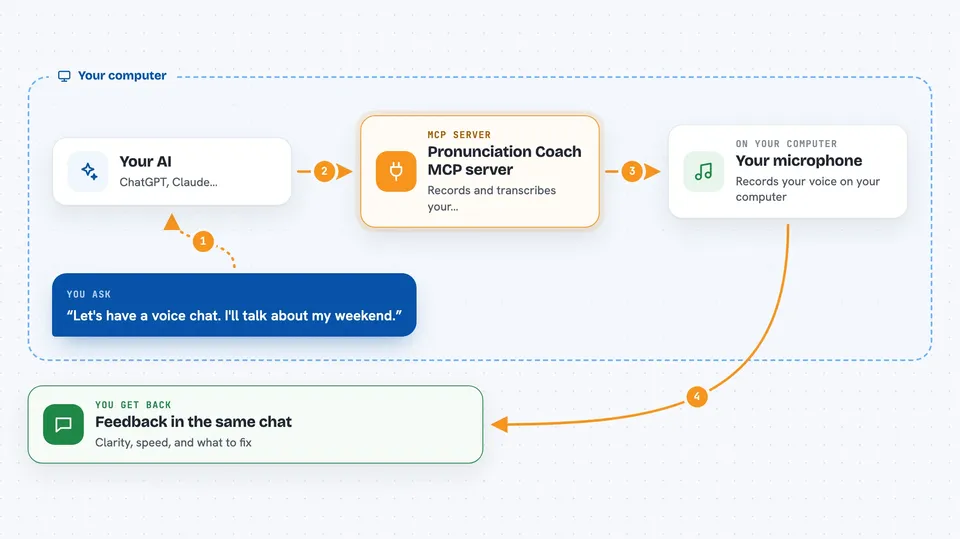
On its own, your AI can only chat with you by typing. An MCP server is a small helper program that gives your AI a new skill. This helper connects your AI to your microphone and to a speech-to-text engine on your own computer, so it can hear what you say and turn it into text. Then it adds coaching notes about your English, all inside the same reply.
What this MCP server does
You ask your AI to start a voice chat or a practice drill. Your AI uses this helper to record your voice through your microphone and stop when you go quiet. The helper transcribes your speech on your own machine, so the audio never leaves your computer. It then checks your words for pronunciation, grammar, and fluency, and hands the results back to your AI. Your AI weaves those notes into a normal reply, so you get a conversation plus light coaching.
 Click to zoom
What you can do with it
- Have a spoken conversation with your AI and get feedback in the same turn
- Practice reading a specific sentence and see word-by-word pronunciation notes
- Get a suggested practice sentence for a sound you want to work on, like the th sound
- Retry the same sentence and compare your new attempt with the last one
- See your speaking speed and where you paused too long
- Catch common grammar slips, like saying buyed instead of bought
- Check which microphones are available on your computer
Try asking your AI
- “Let's have a voice chat. I'll talk about my weekend and you give me light feedback.”
- “Give me a sentence to practice with th sounds.”
- “Record me reading this sentence and tell me what to fix: The three brothers thought thoroughly about their future.”
- “Let me try that sentence again and compare it with my last attempt.”
What it gives back to you
You get a transcript of what you said, a clarity percentage, your speaking speed in words per minute, and the top issue to work on. In drill mode you also get a word-by-word comparison against the reference sentence, notes on specific sounds, and tips about stress and pauses. Your AI shows this as a short written report in the chat, and can also use the structured data behind it to offer a retry.
Before you start
What you need
- Python 3.11 or newer
- A working microphone
- About 150 MB of free disk space for the default speech model
- An MCP client that supports local servers, like Claude Desktop, Claude Code, Cursor, or VS Code
Good to know
This is a practice tool, not a real exam or clinical test, and its feedback can be wrong, so treat it as a friendly hint rather than a final score.
Install it with your AI
Add Pronunciation Coach MCP server to your AI, no technical skills needed
You don't install anything by hand. You copy one prompt, paste it into an AI that can work on your computer, and it checks, installs and connects the server for you, asking you when it needs something.
Sign in to get the install prompt
Members get a ready-made prompt that lets the Claude desktop app check Pronunciation Coach MCP server, install it and connect it for them, step by step. You don't need any technical skills: you copy, paste and answer a few questions. Your connected AI can also find and install any of the 4,609 MCP servers here for you.
Who it's for
English learners who want to practice speaking out loud, and anyone who wants spoken feedback on pronunciation, grammar, and fluency without a human tutor.