
MCP server · API
RAGMap MCP server
by khalidsaidi
Helps your AI find the right retrieval MCP server for a task, then routes you to it.
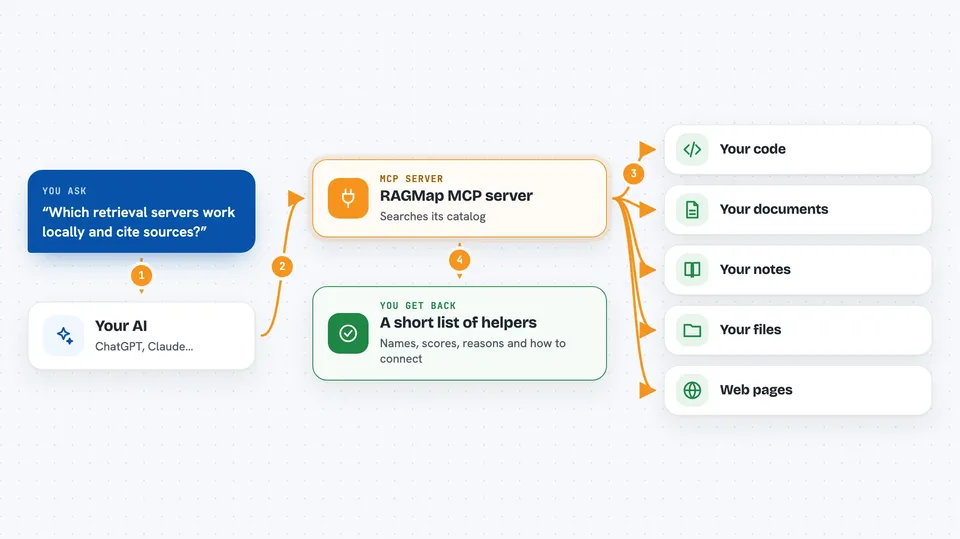
RAGMap is a directory of MCP servers that do retrieval, meaning servers that can look things up in documents, code, or the web for your AI. It does not do the looking up itself. It helps you and your AI pick the right one for your task and your constraints, like privacy, citations, or freshness.
What is an MCP server? The 30-second version
On its own, your AI can only chat with you using what it already knows. An MCP server is a small helper program that gives your AI a new skill or a connection to an app or service. This one connects your AI to RAGMap, a catalog of retrieval MCP servers. When you ask your AI to find a retrieval tool, it asks RAGMap, and RAGMap answers with a ranked list and reasons.
What this MCP server does
You ask your AI something like which retrieval server should I use for searching my code. Your AI calls this helper, RAGMap, with your constraints such as local only, needs citations, or must be reachable. RAGMap searches its catalog of retrieval-capable MCP servers, ranks them, and explains why each one fits. You get back a short list with names, scores, and connect info. Then your AI (or you) connects to the chosen server to do the actual retrieval.
 Click to zoom
What you can do with it
- Find retrieval MCP servers that match your task and constraints
- Filter by remote reachability, citations, local only, or transport type
- Get the install or connect config for a specific server
- List the categories RAGMap uses to group servers
- Ask why a server got a certain score
- Look up details for one server by name
Try asking your AI
- “Find me retrieval MCP servers that work locally and support citations”
- “Which reachable remote retrieval servers are good for searching code?”
- “Show me the install config for ai.filegraph/document-processing”
- “Why did this server get a high ragScore?”
What it gives back to you
You get a ranked list of retrieval MCP servers with names, scores, and short reasons. You can also get one server's details, its install or connect config, the list of categories, or an explanation of a score. It all shows up as normal text in your chat. RAGMap does not return documents or search results itself, only pointers to servers that can.
Before you start
What you need
- The Claude desktop app or another app that supports MCP servers
- Internet access to reach the hosted RAGMap service, or a local setup if you self-host
Good to know
RAGMap only points you to other servers and does not do retrieval itself, so check that the server it suggests fits your privacy and data needs before you connect it.
Install it with your AI
Add RAGMap MCP server to your AI, no technical skills needed
You don't install anything by hand. You copy one prompt, paste it into an AI that can work on your computer, and it checks, installs and connects the server for you, asking you when it needs something.
Sign in to get the install prompt
Members get a ready-made prompt that lets the Claude desktop app check RAGMap MCP server, install it and connect it for them, step by step. You don't need any technical skills: you copy, paste and answer a few questions. Your connected AI can also find and install any of the 4,609 MCP servers here for you.
Who it's for
People who build or use AI assistants and need help choosing the right retrieval tool without reading a long list of servers by hand.


