MCP server · Developer tools
RepoCrunch MCP server
by kimwwk
Lets your AI look up any public GitHub repo and report its tech stack, health, and security signals.
RepoCrunch is a small tool that studies a GitHub repository and writes up a tidy report about it. It works with your AI assistant through something called an MCP server, so you can just ask in plain words instead of clicking around GitHub. It is handy if you review code projects, compare tools, or want a quick read on how healthy a project looks.
What is an MCP server? The 30-second version
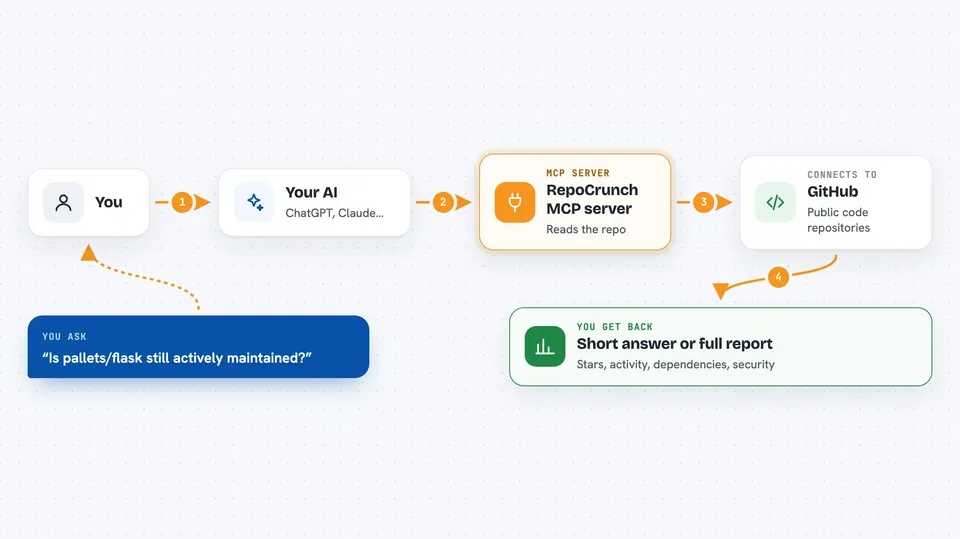
On its own, your AI can only chat with you. An MCP server is a small helper program that gives your AI one new skill or one new connection. This one connects your AI to GitHub repositories, so when you ask about a project, the AI can go look it up and bring the facts back to you. You do not need to know how it works under the hood; you just ask, and the AI uses this helper.
What this MCP server does
You ask your AI something like how active a GitHub project is. The AI passes that request to RepoCrunch, which fetches the public information about that repository. RepoCrunch then sorts it into clear sections: summary stats, tech stack, architecture, health, and security signals. The AI hands you back a short answer or the full report, depending on what you asked. No guessing is involved; RepoCrunch reads the repo files and returns consistent facts.
 Click to zoom
What you can do with it
- Check the tech stack of any public GitHub repo
- See how many stars, forks, and contributors a project has
- Find out if a project is actively maintained or slowing down
- Spot basic security signals like a committed .env file or Dependabot
- Compare the language and framework a project uses
- Get a quick read on a repo before you depend on it
Try asking your AI
- “What tech stack does fastapi/fastapi use?”
- “Is pallets/flask still actively maintained?”
- “Show me the health and security signals for facebook/react”
- “Analyze the repo gin-gonic/gin and tell me its main dependencies”
What it gives back to you
You get back a structured report with sections for summary, tech stack, architecture, health, and security. In chat, your AI will usually turn that into a short written answer, like the number of stars, the main language, or whether the project looks active. If you want the raw detail, you can ask for the full JSON and it will show up in the chat. It only reads information; it does not change anything on GitHub.
Before you start
What you need
- Python 3.11 or newer installed on your computer
- The repocrunch package installed (pip install repocrunch)
- A GitHub token is optional but gives you more requests per hour and access to your private repos
Good to know
It only reads public GitHub data, but without a GitHub token you are limited to 60 lookups per hour.
Install it with your AI
Add RepoCrunch MCP server to your AI, no technical skills needed
You don't install anything by hand. You copy one prompt, paste it into an AI that can work on your computer, and it checks, installs and connects the server for you, asking you when it needs something.
Sign in to get the install prompt
Members get a ready-made prompt that lets the Claude desktop app check RepoCrunch MCP server, install it and connect it for them, step by step. You don't need any technical skills: you copy, paste and answer a few questions. Your connected AI can also find and install any of the 4,609 MCP servers here for you.
Who it's for
Developers, tech leads, and anyone who reviews or compares open source projects and wants quick facts without clicking through GitHub.