
MCP server · Finance and crypto
agentmail MCP server
by kindrat86
Check names, wallets and countries against real OFAC sanctions data before your AI pays or trusts someone.
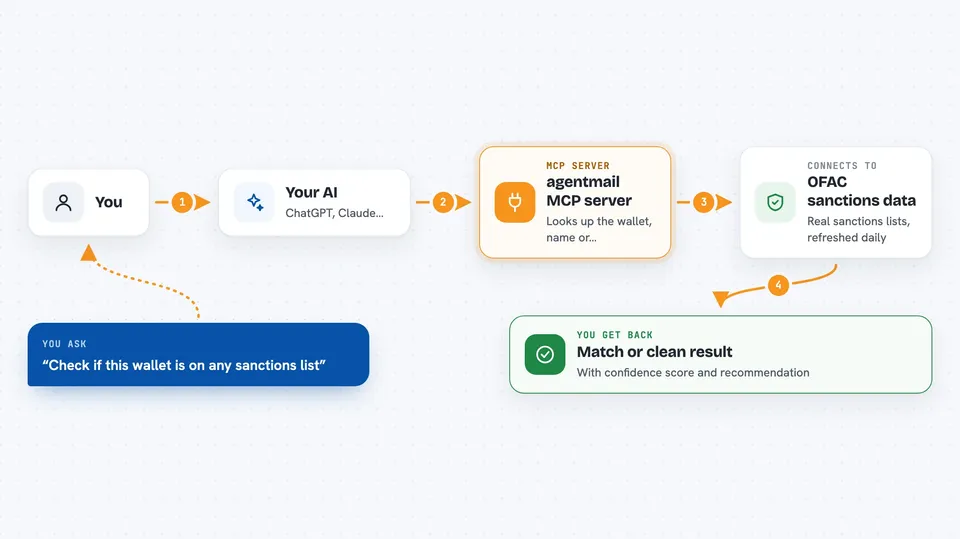
agentmail is a small helper that lets your AI check whether a person, a crypto wallet or a country is on official sanctions lists before it sends money or trusts someone. It also gives your AI a temporary email inbox and phone number for receiving verification codes. It is handy if you use AI agents that pay for things or sign up for services on their own.
What is an MCP server? The 30-second version
On its own, your AI can only chat. An MCP server is a small helper program that gives your AI a new skill or a connection to an app or service. This one connects your AI to real OFAC sanctions data, plus a disposable email inbox and rentable phone number. Once it is set up, your AI can look things up and take actions there for you when you ask.
What this MCP server does
You ask your AI to check a wallet, a name or a country. Your AI passes that to this helper. The helper looks it up against real OFAC data, which it keeps in a small cache on your computer and refreshes daily. It comes back with a match or a clean result, and your AI tells you what it found. For email and SMS, the helper creates a temporary inbox or number, waits for the code to arrive, and hands the code back to your AI.
 Click to zoom
What you can do with it
- Screen a crypto wallet, a person's name or a country against OFAC sanctions lists
- Get a risk score from 0 to 100 with a recommendation to allow, review or decline a payment
- Verify another AI agent's identity and trust level before working with it
- Open a dispute when a paid transaction goes wrong
- Create a temporary email inbox to receive a signup code or magic link
- Rent a phone number to receive an SMS code
- Check the status of the sanctions data, including whether it is up to date
Try asking your AI
- “Check if this wallet is on any sanctions list: 0x098B716B8Aaf21512996dC57EB0615e2383E2f96”
- “Score the risk of paying 5000 USDC to this wallet”
- “Create a temporary email inbox and wait for the verification code”
- “Is this country under sanctions? Country code IR”
What it gives back to you
You get back a short answer in the chat. For a sanctions check, that is a list of matches with a confidence score and a clean or flagged result. For a risk score, you get a number from 0 to 100 and a recommendation. For email and SMS, you get the code or the magic link your AI needs.
Before you start
What you need
- Python installed on your computer
- The sanctions-mcp package installed with pip
- An MCP client like Claude Code or Cursor if you want to use it that way
Good to know
A clean result means no match was found in the OFAC data, not that the person or wallet is safe, so use it as one check among others and keep an eye on payments your AI makes on its own.
Install it with your AI
Add agentmail MCP server to your AI, no technical skills needed
You don't install anything by hand. You copy one prompt, paste it into an AI that can work on your computer, and it checks, installs and connects the server for you, asking you when it needs something.
Sign in to get the install prompt
Members get a ready-made prompt that lets the Claude desktop app check agentmail MCP server, install it and connect it for them, step by step. You don't need any technical skills: you copy, paste and answer a few questions. Your connected AI can also find and install any of the 4,609 MCP servers here for you.
Who it's for
People whose AI agents send payments or sign up for services, and who want a quick sanctions check before money moves.



