
MCP server · Productivity
Excel Workbook MCP server
Turn Excel files into F#, C#, XML or JSON, and build new workbooks from that text.
This is a small helper that lets your AI read and write Excel files for you. It can take an existing .xlsx or .xlsm workbook and hand back code, XML or JSON that rebuilds it, and it can also build a new workbook from XML or JSON you already have. It is handy if you work with spreadsheets and want your AI to inspect them, convert them, or generate them without you touching Excel.
What is an MCP server? The 30-second version
On its own, your AI can only chat. It cannot open a file on your computer or save anything. An MCP server is a small helper program that gives your AI a new skill. This helper gives your AI the ability to work with Excel workbooks: to read one, to write one, and to turn one into text that describes it. You install it once, connect it to your AI app, and then you just ask in plain words.
What this MCP server does
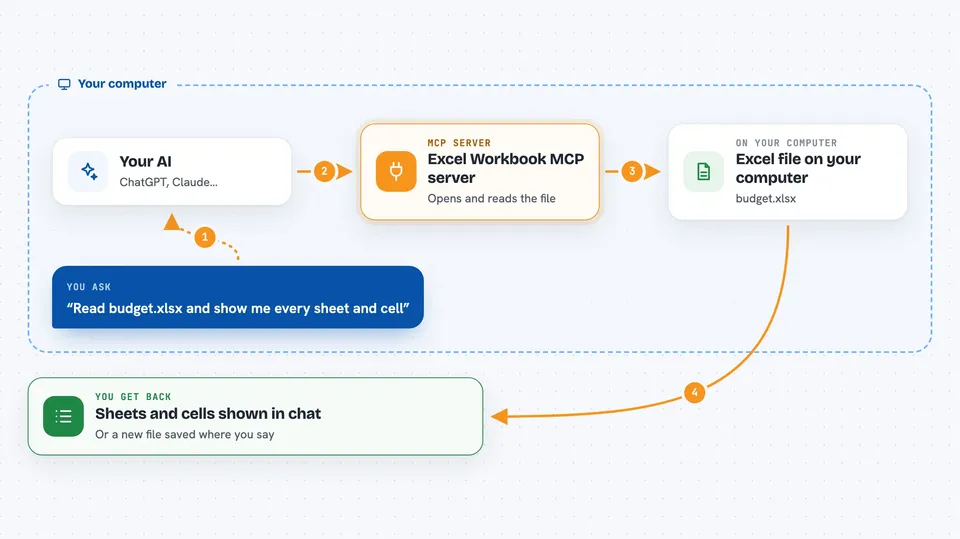
You ask your AI something like "read this spreadsheet and tell me what is in it" or "turn this workbook into JSON". Your AI passes the request to this helper. The helper opens the file on your computer, reads its sheets and cells, and works out the structure. It sends the result back to your AI, which shows it to you in the chat. You can also go the other way: give your AI some XML or JSON, and the helper builds a real .xlsx file from it and saves it where you say.
 Click to zoom
What you can do with it
- Read an existing .xlsx or .xlsm file and list its sheets and cells
- Create a new Excel workbook from a simple list of sheets, rows and cells
- Turn an existing workbook into a runnable F# script that rebuilds it
- Turn an existing workbook into a runnable C# file that rebuilds it
- Convert a workbook to XML or JSON, useful for tracking changes in version control
- Build a new .xlsx directly from XML or JSON you already have
- Fetch the XML or JSON schema so you can see the exact shape expected
Try asking your AI
- “Read budget.xlsx and show me every sheet and cell”
- “Turn report.xlsx into JSON and save it as report.json”
- “Create a new workbook called sales.xlsx with one sheet named January and a few rows of numbers”
- “Take report.xml and build report.xlsx from it”
What it gives back to you
You get back text in the chat: a list of sheets and cells, a block of F#, C# or XML or JSON, or a short confirmation that a file was saved. When you ask it to read a workbook, you see the cell values laid out by sheet and row. When you ask it to generate code or data, you see the full text, which you can copy or save. When it builds a file, it tells you the path it wrote to.
Before you start
What you need
- The .NET runtime installed, or a self-contained build from the Releases page
- An MCP-compatible AI app, such as the Claude desktop app, that can launch a local command
Good to know
It can create and overwrite files on your computer, so check the path before you let it save.
Install it with your AI
Add Excel Workbook MCP server to your AI, no technical skills needed
You don't install anything by hand. You copy one prompt, paste it into an AI that can work on your computer, and it checks, installs and connects the server for you, asking you when it needs something.
Sign in to get the install prompt
Members get a ready-made prompt that lets the Claude desktop app check Excel Workbook MCP server, install it and connect it for them, step by step. You don't need any technical skills: you copy, paste and answer a few questions. Your connected AI can also find and install any of the 4,361 MCP servers here for you.
Who it's for
Anyone who works with Excel files and wants their AI to read, convert or generate them without writing code, especially analysts, finance and operations people.




