MCP server · API
Sports Hub MCP server
Lets your AI look up live scores, standings, player stats and betting odds across many sports.
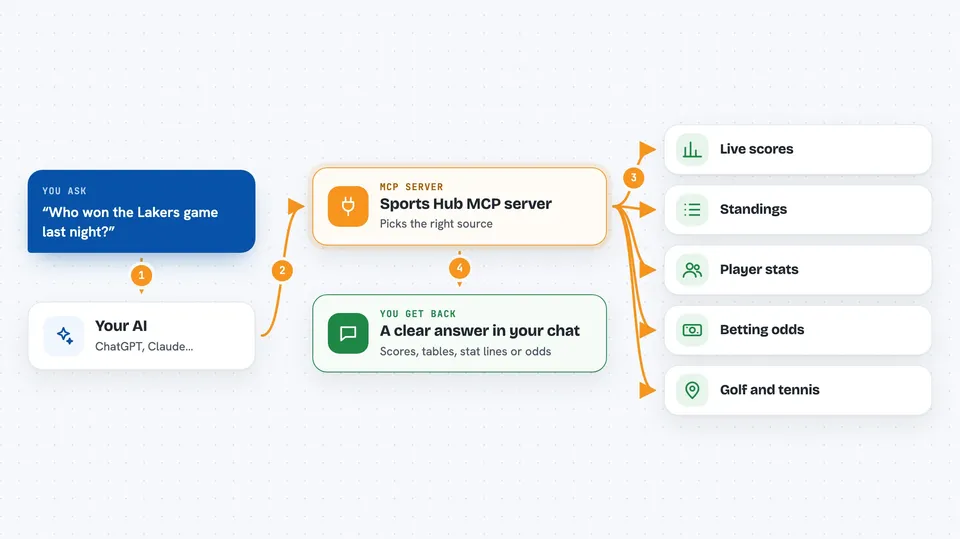
Sports Hub is a helper you connect to your AI so it can fetch real sports information for you. It pulls together many sports data sources into one place, so you can ask about scores, standings, stats and odds in plain words. It is handy if you follow sports and want quick answers without opening ten different websites.
What is an MCP server? The 30-second version
On its own, your AI can only chat with you using what it already knows. An MCP server is a small helper program that gives your AI a new skill or a connection to an app or service. This one connects your AI to lots of sports data sources, so it can look things up for you when you ask. You just type your question, and the AI uses this helper behind the scenes to get the answer.
What this MCP server does
You ask your AI something like who won last night or what the current standings are. The AI passes your question to this helper, which picks the right sports data source for that sport. The helper talks to that source and brings back the details. The AI then turns those details into a clear answer in your chat. Some parts work right away with no signup, and others need a free key from a sports data site.
 Click to zoom
What you can do with it
- Check live and recent scores for many sports
- Look up league standings and team records
- Pull player stats and head-to-head history
- Compare betting odds across sports
- Follow esports, chess, motorsport and college sports
- Get golf course details and tournament info
- Ask about AFL, boxing, cricket and tennis matches
Try asking your AI
- “What was the score of the Lakers game last night?”
- “Show me the current Premier League standings.”
- “What are the odds for the next F1 race?”
- “How did this tennis player do in their last five matches?”
What it gives back to you
You get answers written in plain language in your chat, like scores, standings tables, stat lines or odds. When there is a lot of data, the helper trims it down so you see the useful parts instead of a giant dump. You can also ask it to keep only certain details, like team names and records. Everything shows up as normal text you can read and copy.
Before you start
What you need
- Node.js 18 or newer and npm installed on your computer
- An MCP client like Claude Desktop, Cursor or another supported app
- Optional: free API keys from sports data sites for the extra providers you want
Good to know
If you turn on the network mode, anyone who can reach it can use your saved API keys, so keep it on your own computer unless you know what you are doing.
Install it with your AI
Add Sports Hub MCP server to your AI, no technical skills needed
You don't install anything by hand. You copy one prompt, paste it into an AI that can work on your computer, and it checks, installs and connects the server for you, asking you when it needs something.
Sign in to get the install prompt
Members get a ready-made prompt that lets the Claude desktop app check Sports Hub MCP server, install it and connect it for them, step by step. You don't need any technical skills: you copy, paste and answer a few questions. Your connected AI can also find and install any of the 4,609 MCP servers here for you.
Who it's for
Sports fans, fantasy players and anyone at work who wants quick sports facts without juggling many websites.