
MCP server · Research · official
Litescrape MCP server
by litescrape · official
Lets your AI run Google, Bing, DuckDuckGo and Google Maps searches and hand you the results.
This is a small helper that gives your AI assistant the ability to search the web for you. It runs searches on Google, Bing, DuckDuckGo and Google Maps and brings back the results as clean text your AI can read. It is handy for anyone who wants fresh answers, links or place details without opening a browser and copying things by hand.
What is an MCP server? The 30-second version
On its own, your AI can only chat with what it already knows. An MCP server is a small helper program you connect once, and it gives your AI a new skill. This one gives your AI a connection to search engines and Google Maps, so when you ask a question it can go look things up and come back with real results. You do not need to be technical to use it, you just add it once and then talk to your AI like normal.
What this MCP server does
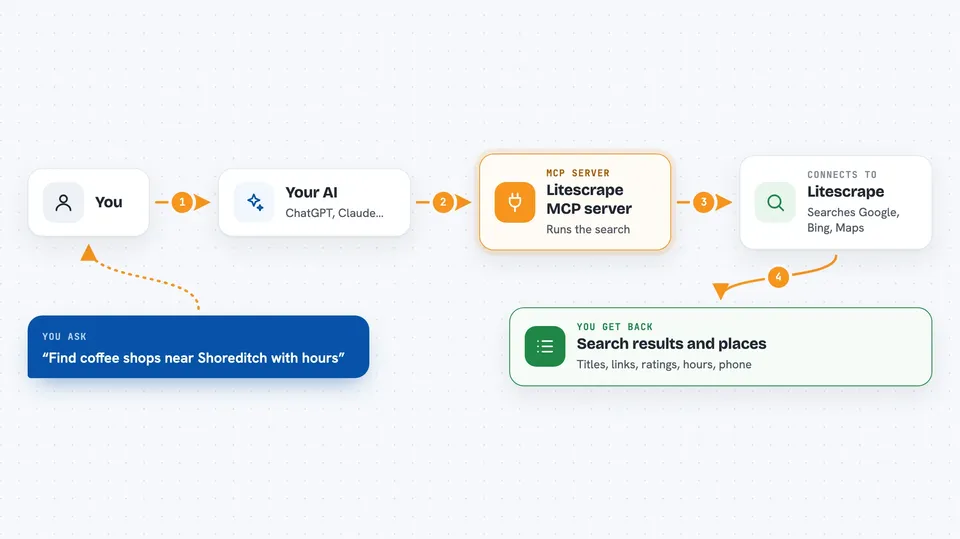
You ask your AI something like a search question or a request for places nearby. Your AI passes that request to this helper. The helper sends it to the Litescrape service, which reads the actual search engine pages and turns them into structured text. That text comes back to your AI, and your AI writes the answer for you in the chat. Everything runs fresh each time, and the links you get are the real destinations, not tracking redirects.
 Click to zoom
What you can do with it
- Search Google and get the top results with titles, links and snippets
- Search Bing or DuckDuckGo as a backup when you want a different view
- Look up places on Google Maps with address, rating, hours and phone
- Pull the AI Overview that Google shows at the top of some searches (needs a key)
- Get Google Shopping product listings and prices (needs a key)
- Read the Google Maps reviews of one place (needs a key)
- Fetch a public web page and turn it into readable text (needs a key)
Try asking your AI
- “Search Google for the best noise cancelling headphones under 200 euros and list the top five with links”
- “Find coffee shops near Shoreditch London with their opening hours and ratings”
- “What does Google's AI Overview say about intermittent fasting, with sources”
- “Compare prices on Google Shopping for a standing desk around 400 euros”
What it gives back to you
You get a short summary line first, like how many results were found and what else came back, then the full result data. Your AI reads that and writes it up for you as a list, a short answer, a table of places, or a set of links. If you asked about a place, you get its name, address, rating, hours and phone. If a limit is reached, the reply tells you so and explains how to add a key.
Before you start
What you need
- Node.js 20 or newer if you install it on your own computer
- An MCP client such as Claude Desktop, Claude Code, Cursor, Windsurf, VS Code, Codex or Gemini CLI
- Nothing else for basic Google, Bing, DuckDuckGo and Google Maps searches
- A Litescrape API key from litescrape.com (a kind of password for apps) only if you want the extra tools and no daily limits
Good to know
Without a key you get a small free number of searches per day per network, and the key-only tools will not run until you add one.
Install it with your AI
Add Litescrape MCP server to your AI, no technical skills needed
You don't install anything by hand. You copy one prompt, paste it into an AI that can work on your computer, and it checks, installs and connects the server for you, asking you when it needs something.
Sign in to get the install prompt
Members get a ready-made prompt that lets the Claude desktop app check Litescrape MCP server, install it and connect it for them, step by step. You don't need any technical skills: you copy, paste and answer a few questions. Your connected AI can also find and install any of the 4,361 MCP servers here for you.
Who it's for
Anyone who wants their AI to look things up on the web for them, like researchers, marketers, sales people, analysts and everyday office workers.


