
MCP server · Developer tools
ROS MCP server
by lpigeon
Let your AI send commands to a robot and read back what the robot is doing, in plain words.
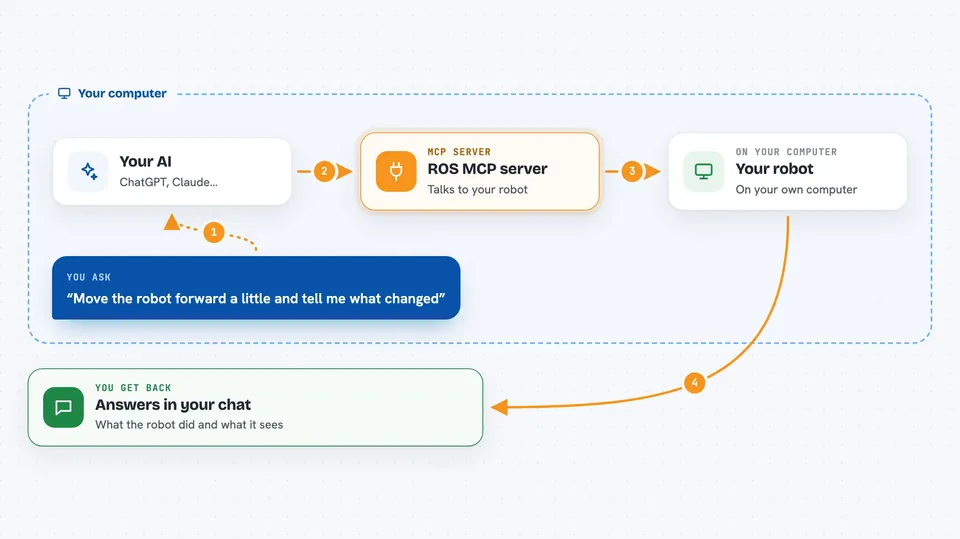
This is a small helper that connects your AI assistant to a robot running ROS or ROS 2, the software many robots use to move and sense things. You type a normal sentence, and the AI turns it into robot commands and sends them over. It is handy for robotics students, hobbyists, and engineers who want to test or drive a robot without writing code by hand.
What is an MCP server? The 30-second version
On its own, your AI can only chat. An MCP server is a small helper program that gives your AI a new skill or a connection to something outside the chat. This one connects your AI to a robot running ROS or ROS 2, so the AI can look at what the robot is doing and send it instructions. You just ask in normal words, and the helper passes your request to the robot.
What this MCP server does
You ask your AI something like move the robot forward, or check what the robot is seeing. The AI uses this helper to talk to your robot's ROS setup through a small piece called rosbridge, which you add to the robot. The helper looks up which topics, services, and actions the robot offers, then sends the right command or reads the right data. The answer comes back into your chat as text, so you can see what happened or what the robot reported.
 Click to zoom
What you can do with it
- Send movement or action commands to a robot in plain language
- Ask what topics, services, and actions the robot has available
- Read live sensor data and robot state
- Call a service or trigger an action on the robot
- Set or read robot parameters
- Watch what is happening on the robot in real time
- Test a robot feature and get a report back
Try asking your AI
- “What topics and services does this robot have right now?”
- “Move the robot forward a little and tell me what changed.”
- “Read the current sensor values and summarize them.”
- “Test the gripper and tell me if anything looks wrong.”
What it gives back to you
You get answers in the chat: lists of the robot's topics, services, and actions, plus their types. You also get readings from sensors and the robot's current state, and short reports on what happened after a command. If the AI sends a command, it tells you what it sent and what the robot replied.
Before you start
What you need
- A robot or simulator running ROS 2 or ROS 1
- The rosbridge node added to that robot setup
- An MCP-compatible AI app such as Claude Desktop, Claude Code, Cursor, or ChatGPT
Good to know
It can send real commands to a real robot, so a wrong request could make the robot move or change settings, and you should test carefully, ideally in a simulator first.
Install it with your AI
Add ROS MCP server to your AI, no technical skills needed
You don't install anything by hand. You copy one prompt, paste it into an AI that can work on your computer, and it checks, installs and connects the server for you, asking you when it needs something.
Sign in to get the install prompt
Members get a ready-made prompt that lets the Claude desktop app check ROS MCP server, install it and connect it for them, step by step. You don't need any technical skills: you copy, paste and answer a few questions. Your connected AI can also find and install any of the 4,609 MCP servers here for you.
Who it's for
Robotics students, hobbyists, and engineers who already have a ROS or ROS 2 robot and want to control or inspect it by chatting instead of coding.



