
MCP server · Developer tools
Kivgraph MCP server
by Luqueee
Lets your AI look up who calls a piece of code, what depends on it, and what breaks if you change it.
Kivgraph is a helper you run on your own computer that gives your AI coding assistant a map of your code. It reads your projects once and then answers questions about how the pieces connect. It is handy for developers who work in larger codebases, especially across more than one project.
What is an MCP server? The 30-second version
On its own, your AI can only chat with you. An MCP server is a small helper program that gives your AI a new skill or a connection to something else. This one connects your AI to a local map of your code, so it can look up where things are declared, who uses them, and what would break if you changed them. You ask in plain words, and the AI uses this helper behind the scenes.
What this MCP server does
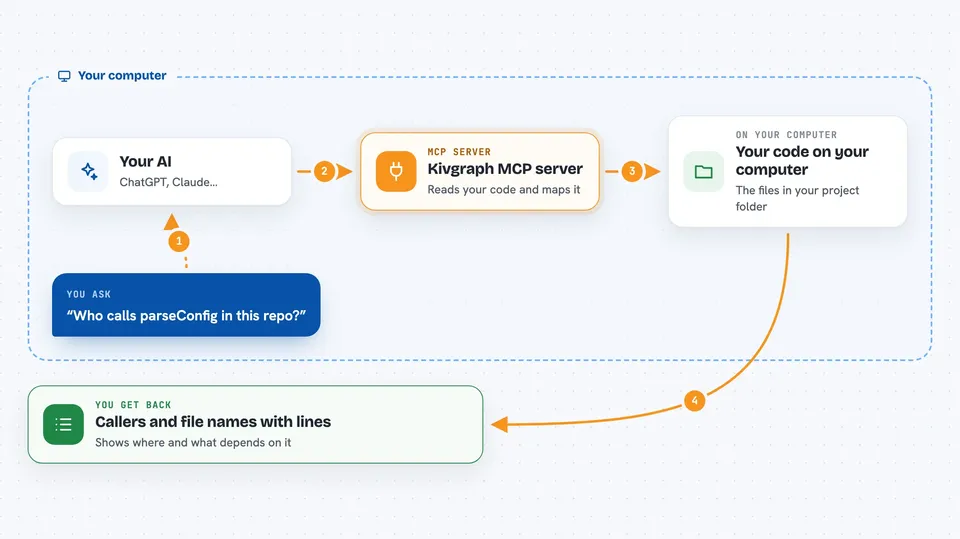
First, Kivgraph reads your code and builds a map of it. Then, when you ask your AI something like who calls this function, the AI passes that question to Kivgraph. Kivgraph looks it up in its map and sends back the answer with file names and line numbers. Your AI shows you the result in the chat. It can also tell you when nothing uses a piece of code, which a simple text search cannot do.
 Click to zoom
What you can do with it
- Find who calls a function or references a name
- See what would break if you change something
- Trace what a piece of code depends on
- Find where a symbol is declared
- Search for code by what it does when you do not know its name
- See which other repositories use something
- Get the source code of specific symbols
Try asking your AI
- “Who calls the function parseConfig in this repository?”
- “What breaks if I change the UserService class?”
- “Find where the symbol OrderTotal is declared.”
- “Which other repositories use the auth helper?”
What it gives back to you
You get back lists of results, each with the repository, file path, full name, and line numbers. You also get short answers, like a list of callers or a list of things that depend on a symbol. When you ask for source code, it shows the code itself. Sometimes the answer is empty, and that means nothing uses it, not that the search failed.
Before you start
What you need
- A computer running Linux, macOS, or Windows
- Node.js 22 or later
- Python 3.10 or later if you want to index Python code
- A coding agent that supports MCP, like Claude Code or Codex
Good to know
It reads your code to build its map, so it can see private files, and the two indexing tools can register repositories and publish a new map, but only if you approve them.
Install it with your AI
Add Kivgraph MCP server to your AI, no technical skills needed
You don't install anything by hand. You copy one prompt, paste it into an AI that can work on your computer, and it checks, installs and connects the server for you, asking you when it needs something.
Sign in to get the install prompt
Members get a ready-made prompt that lets the Claude desktop app check Kivgraph MCP server, install it and connect it for them, step by step. You don't need any technical skills: you copy, paste and answer a few questions. Your connected AI can also find and install any of the 4,609 MCP servers here for you.
Who it's for
Developers and engineers who work in larger or multi-project codebases and want their AI assistant to understand how the code connects.




