MCP server · Research
Cute Web Scraper MCP server
by maccydee
Lets your AI fetch web pages, pull out products, emails or contacts, and save big results as tables you can query.
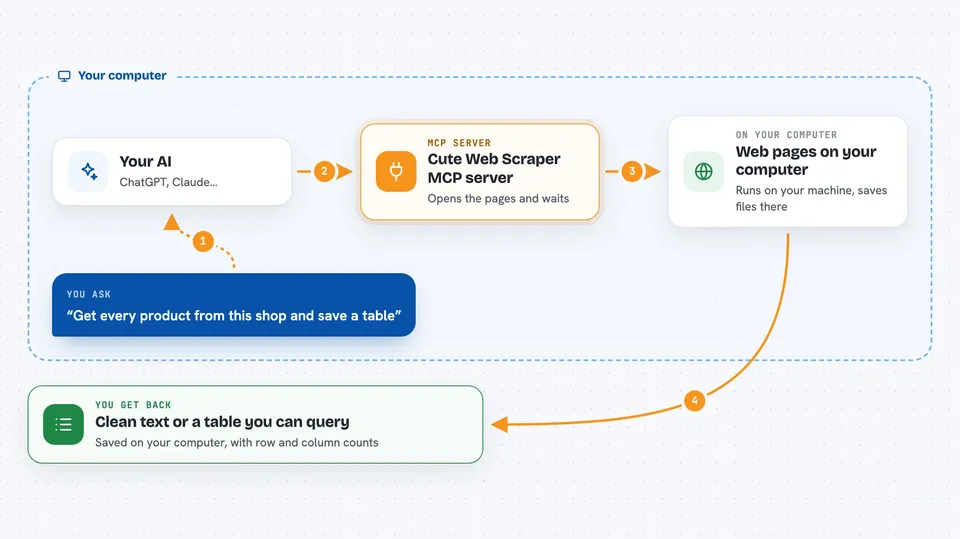
This is a small helper you connect to your AI so it can go out and read web pages for you. You ask in plain English, and it brings back clean text, lists of products, emails, phone numbers or places. It is handy for anyone who collects information from websites by hand today.
What is an MCP server? The 30-second version
On its own, your AI can only chat with what it already knows or what you paste in. An MCP server is a small helper program that gives your AI a new skill, in this case the ability to visit websites and read them. Once it is connected, your AI can fetch a page, pull out the bits you care about, and hand you a tidy result. You never touch the technical parts, you just ask.
What this MCP server does
You ask your AI something like "get every product from this shop". The AI passes that request to this helper. The helper opens the pages, waits for any JavaScript to finish, and gets past simple blocks if a site refuses. It then strips out menus, cookie banners and footers, and gives back clean text or a neat table. If the result is huge, it saves it as a table you can ask questions about instead of dumping it all into the chat.
 Click to zoom
What you can do with it
- Fetch a single web page and get clean readable text back
- Pull product names, prices and stock from a shop page
- Collect email addresses or phone numbers from a list of pages
- Find every business of a type near a place, like dentists in Bath
- Crawl a whole site by following its sitemap
- Save a big scrape as a table and ask questions about it
- Watch a page and tell you when it changes
Try asking your AI
- “Scrape every product from this shop and give me a CSV of name and price”
- “Find all email addresses on this company site and its contact pages”
- “What platform is this blog on, and does it need JavaScript to scrape”
- “Find every dentist within 4km of Bath and tell me how many have a website but no phone”
What it gives back to you
You get back plain text, a list of rows, or a short summary in the chat. For big jobs it saves a table and tells you the row count and columns, then answers your follow-up questions about it. It can also write files to your computer, like a CSV or a screenshot. Every result says which method was used to fetch the page, so you can see if a site pushed back.
Before you start
What you need
- Python and pipx installed on your computer
- The Claude desktop app or Claude Code
- About 130MB of free space for the browser it downloads the first time
Good to know
It can read pages that sites would rather block, and it does not follow robots.txt rules, so use it politely and check you are allowed to scrape the sites you point it at.
Install it with your AI
Add Cute Web Scraper MCP server to your AI, no technical skills needed
You don't install anything by hand. You copy one prompt, paste it into an AI that can work on your computer, and it checks, installs and connects the server for you, asking you when it needs something.
Sign in to get the install prompt
Members get a ready-made prompt that lets the Claude desktop app check Cute Web Scraper MCP server, install it and connect it for them, step by step. You don't need any technical skills: you copy, paste and answer a few questions. Your connected AI can also find and install any of the 4,361 MCP servers here for you.
Who it's for
Anyone who gathers information from websites by hand, like market researchers, sales people building lead lists, and small business owners comparing prices.