MCP server · Research
AgentFetch MCP server
by bch1212
Let your AI fetch web pages, PDFs, and search results as clean text, with a size limit so it never floods the chat.

AgentFetch is a small helper that lets your AI read web pages for you. You give it a link, and it brings back the page as tidy text your AI can actually use. It is handy if you often ask your AI to look things up online and want the answer to stay short and readable.
What is an MCP server? The 30-second version
On its own, your AI can only chat with what it already knows. An MCP server is a small helper program that gives your AI a new skill or a connection to an outside service. This one connects your AI to the web, so when you ask about a page, the AI can go fetch it and read it for you. You do not need to understand how it works, you just add it once and then ask questions like normal.
What this MCP server does
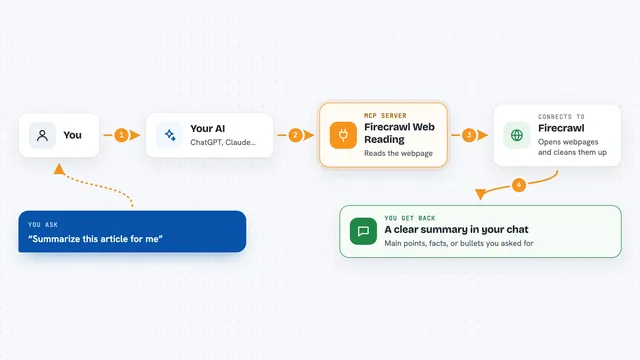
You ask your AI to look at a web page. The AI passes the link to AgentFetch. AgentFetch picks the best way to read that page, whether it is a normal article, a page that needs a real browser, or a PDF. It cleans the page into plain text, counts how big it is, and can cut it down to a size you set. Then your AI gets that clean text back and answers you.
 Click to zoom
What you can do with it
- Fetch any web page as clean readable text
- Check how big a page is before fetching it, so it does not flood the chat
- Fetch several links at once, up to 20
- Search the web and fetch the top results in one go
- Read PDF documents from a link
- Reuse a recent fetch from a short-term cache instead of downloading again
- Limit the answer to a set number of tokens so it stays short
Try asking your AI
- “Read this article and give me the main points: https://example.com/article”
- “How long is this page? https://example.com/huge-report”
- “Fetch these three docs and compare them: https://docs.python.org/3/, https://fastapi.tiangolo.com/, https://flask.palletsprojects.com/”
- “Search the web for the latest news on electric cars and summarize the top 3 results”
What it gives back to you
You get back the page as clean text, plus a few details like the title, the author, the word count, and the language. You also see how big it was in tokens and whether it came from the cache. If you set a size limit, the text is trimmed to fit. In the chat, this shows up as a short summary or the trimmed text your AI can quote from.
Before you start
What you need
- Python installed on your computer
- A free Jina Reader key from jina.ai (a kind of password for apps; the site gives you one for free)
- Optional: a FireCrawl key for pages that need a real browser, like Twitter or LinkedIn
- Optional: a Redis address if you want caching
Good to know
It reads web pages and PDFs from links you give it, so avoid pointing it at private or internal pages you would not want fetched.
Install it with your AI
Add AgentFetch MCP server to your AI, no technical skills needed
You don't install anything by hand. You copy one prompt, paste it into an AI that can work on your computer, and it checks, installs and connects the server for you, asking you when it needs something.
Sign in to get the install prompt
Members get a ready-made prompt that lets the Claude desktop app check AgentFetch MCP server, install it and connect it for them, step by step. You don't need any technical skills: you copy, paste and answer a few questions. Your connected AI can also find and install any of the 4,361 MCP servers here for you.
Who it's for
Anyone who asks their AI to read web pages or PDFs and wants the answers to stay short and tidy, especially researchers, writers, and analysts.