
MCP server · Research
Company Firmographic Enricher MCP server
by mambalabsdev
Turn a company website address into facts about that company, like size, industry, and location.
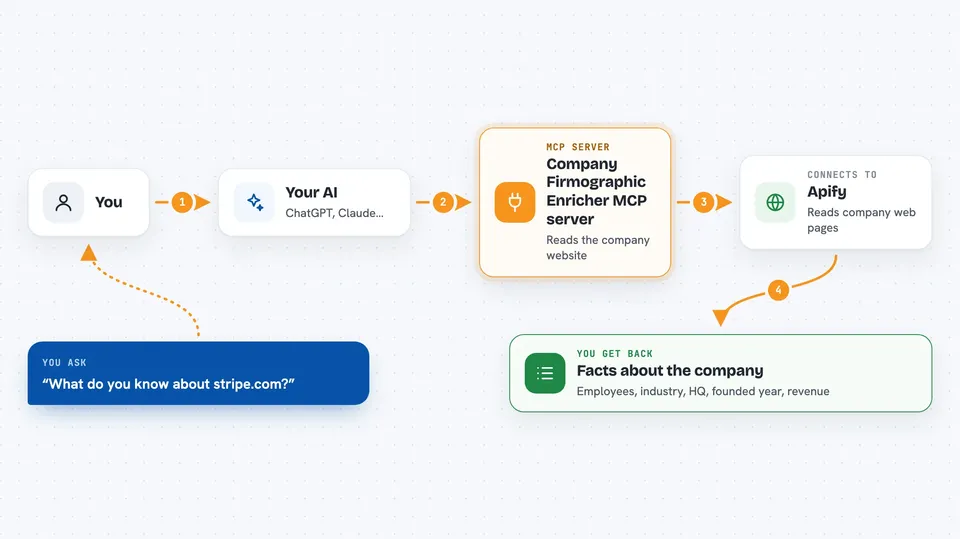
This is a small helper that lets your AI look up basic facts about a company just from its website address. You give it something like stripe.com, and it comes back with details such as how many people work there, what industry they are in, and where they are based. It is handy if you work in sales, marketing, or research and need quick company background without opening ten browser tabs.
What is an MCP server? The 30-second version
On its own, your AI can only chat with you using what it already knows. An MCP server is a small helper program that gives your AI a new skill or a connection to an outside service. This one connects your AI to a service called Apify that reads company websites. So when you ask about a company, your AI quietly asks this helper, the helper fetches the facts, and your AI tells you the answer.
What this MCP server does
You ask your AI something like what do you know about stripe.com. Your AI passes that website address to this helper. The helper sends the request to a service called Apify, which reads the company's own web pages and pulls out details like employee range, industry, headquarters, founding year, and a rough revenue estimate. Apify sends those details back, and your AI shows them to you in the chat. You can also hand it a whole list of websites at once and get everything back together.
 Click to zoom
What you can do with it
- Look up a company's employee size range from its website address
- Find the industry a company works in
- Get the headquarters location and founding year
- See a rough revenue estimate for the company
- Enrich a whole list of company websites in one go
- Check how complete the data is for each company
- See which signals on the page the facts came from
Try asking your AI
- “Enrich stripe.com: employees, industry, HQ, founded year, and revenue estimate.”
- “What firmographics can you find for gitlab.com, and how complete is the data?”
- “Pull company firmographics for these domains: stripe.com, gitlab.com, notion.so.”
- “Find the employee band and HQ location for acme.com.”
What it gives back to you
You get a tidy set of facts for each company: employee range, industry, headquarters, founding year, a rough revenue estimate, a logo, and a short description. Each record also tells you how complete the data is and which signals on the page the facts came from, so you can judge how much to trust it. In the chat this usually shows up as a short list or table you can read or copy. If you asked about several companies, you get one set of facts per company.
Before you start
What you need
- Node.js 18 or newer installed on your computer
- A free Apify account
- An Apify API token (a kind of password for apps; you copy it from your Apify account page)
- The Claude desktop app or another AI app that supports MCP servers
Good to know
Each lookup runs on Apify and may use up your Apify account credits, so keep an eye on usage if you enrich large lists.
Install it with your AI
Add Company Firmographic Enricher MCP server to your AI, no technical skills needed
You don't install anything by hand. You copy one prompt, paste it into an AI that can work on your computer, and it checks, installs and connects the server for you, asking you when it needs something.
Sign in to get the install prompt
Members get a ready-made prompt that lets the Claude desktop app check Company Firmographic Enricher MCP server, install it and connect it for them, step by step. You don't need any technical skills: you copy, paste and answer a few questions. Your connected AI can also find and install any of the 4,609 MCP servers here for you.
Who it's for
Sales, marketing, and research people who need quick background on companies without digging through websites by hand.


