
MCP server · Productivity
NeedHuman MCP server
by MariusAure
Hand tasks that need a real person, like accepting terms or filling in a form, to a human helper.
This is a small helper that lets your AI pass a job to a real human when it gets stuck. It is made by NeedHuman, a service where a person with a browser does the task for you. It is handy if you use an AI assistant that sometimes hits a wall, like a sign-up page or a terms-of-service box it cannot tick.
What is an MCP server? The 30-second version
On its own, your AI can only chat. An MCP server is a small helper program that gives your AI a new skill or a connection to another service. This one connects your AI to NeedHuman, a service where real people complete small web tasks. So when your AI cannot do something itself, it can ask NeedHuman through this helper, and a person takes over.
What this MCP server does
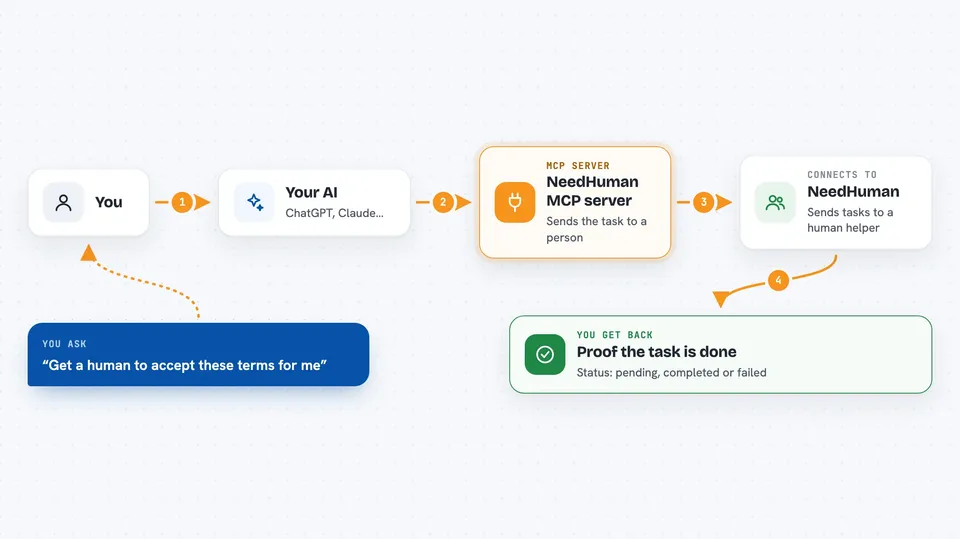
You ask your AI to do something, and it hits a step that needs a real person, like accepting terms of service or creating an account. The AI uses this helper to send that task to NeedHuman. A human reads the task and completes it in a browser, then submits proof. The AI can then check the task and carry on with your request.
 Click to zoom
What you can do with it
- Send a task to a human when your AI is stuck
- Ask for help accepting terms of service on a website
- Request that a human create an account somewhere
- Get help with identity verification steps
- Ask a person to fill in and submit a web form
- Check whether a task is still pending, done, or failed
- List all the tasks you have sent so far
Try asking your AI
- “I need to accept the terms of service at this link before we continue. Can you get a human to do it?”
- “Please have someone create an account on this site and tell me when it is done.”
- “This page is asking for identity verification and I cannot do it. Hand it to a human.”
- “Check the status of the task I sent earlier and show me the proof.”
What it gives back to you
You get back a task ID when you first send something, then a status you can check: pending, completed, or failed. When a task is completed, you also get the result and proof that the human submitted. In the chat, this usually shows up as a short answer or a small list, not a file.
Before you start
What you need
- A NeedHuman API key (you get 3 free tasks with no signup)
- An MCP client that supports HTTP or local servers, like Claude or Cursor
- Node.js if you use the local npx option
Good to know
A real person reads your task description, so never put passwords, card numbers, or private details in it, and tasks that need logins, stored passwords, or money are not accepted.
Install it with your AI
Add NeedHuman MCP server to your AI, no technical skills needed
You don't install anything by hand. You copy one prompt, paste it into an AI that can work on your computer, and it checks, installs and connects the server for you, asking you when it needs something.
Sign in to get the install prompt
Members get a ready-made prompt that lets the Claude desktop app check NeedHuman MCP server, install it and connect it for them, step by step. You don't need any technical skills: you copy, paste and answer a few questions. Your connected AI can also find and install any of the 4,066 MCP servers here for you.
Who it's for
People who use AI assistants for everyday web chores and sometimes need a real person to finish a step.





