
MCP server · Research
Sylex Search MCP server
Lets your AI search a big index of products, services and businesses and compare them for you.
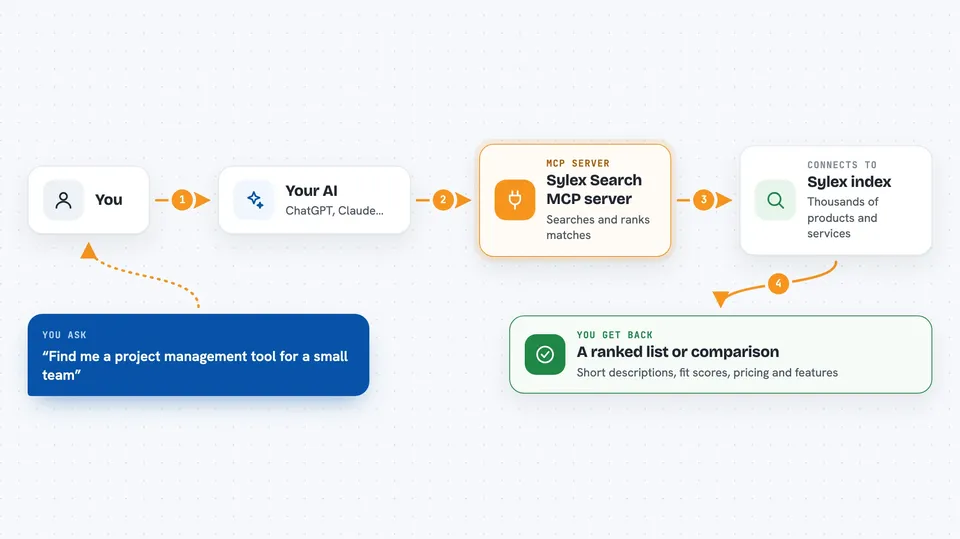
Sylex Search is a helper that gives your AI a search engine for products, services and businesses. You ask a normal question, and your AI looks things up in a large index instead of guessing. It is handy when you want to find or compare tools, packages or companies and get a straight answer.
What is an MCP server? The 30-second version
On its own, your AI can only chat with what it already knows. An MCP server is a small helper program that gives your AI a new skill or a connection to a service. This one connects your AI to the Sylex Search index, a big catalogue of products, services and businesses. Once it is connected, your AI can search that catalogue and bring answers back to you when you ask.
What this MCP server does
You type a question in plain words, like you would ask a colleague. Your AI passes that question to this helper. The helper searches the Sylex index, which holds thousands of entries, and ranks the matches. Your AI then reads the results and writes them back to you as a short list or a comparison. No web pages to open, no copy and paste.
 Click to zoom
What you can do with it
- Search for products, services or businesses by describing what you need
- Get full details on one entry, like pricing, features and integrations
- Compare two to five options side by side
- Browse categories to see what is in the index
- Find alternatives to something you already use
- Register or update a listing for a product or business
- Send feedback about a listing that looks wrong
Try asking your AI
- “Find me a project management tool for a small team”
- “Compare Notion, Linear and Asana for us”
- “What are some alternatives to HubSpot for a small business”
- “Show me Python web frameworks and what each one is good at”
What it gives back to you
You get back a ranked list of matches, each with a short description and a fit score. If you asked for details, you get pricing, features and integrations for that entry. If you asked to compare, you get the options lined up side by side. It all shows up as normal text in your chat, ready to read or copy.
Before you start
What you need
- An MCP client that supports remote servers, like the Claude desktop app or Cursor
- Nothing else. No account and no API key are needed
Good to know
The manage tools can add or change listings in the index, so only use them when you really mean to.
Install it with your AI
Add Sylex Search MCP server to your AI, no technical skills needed
You don't install anything by hand. You copy one prompt, paste it into an AI that can work on your computer, and it checks, installs and connects the server for you, asking you when it needs something.
Sign in to get the install prompt
Members get a ready-made prompt that lets the Claude desktop app check Sylex Search MCP server, install it and connect it for them, step by step. You don't need any technical skills: you copy, paste and answer a few questions. Your connected AI can also find and install any of the 4,066 MCP servers here for you.
Who it's for
Anyone who has to find, compare or pick products, tools or suppliers, like office workers, researchers and small business owners.


