
MCP server · Security
Mastyf.ai security gateway
by mastyf-ai
Adds a security checkpoint between your AI and its tools, so risky actions get blocked before they run.
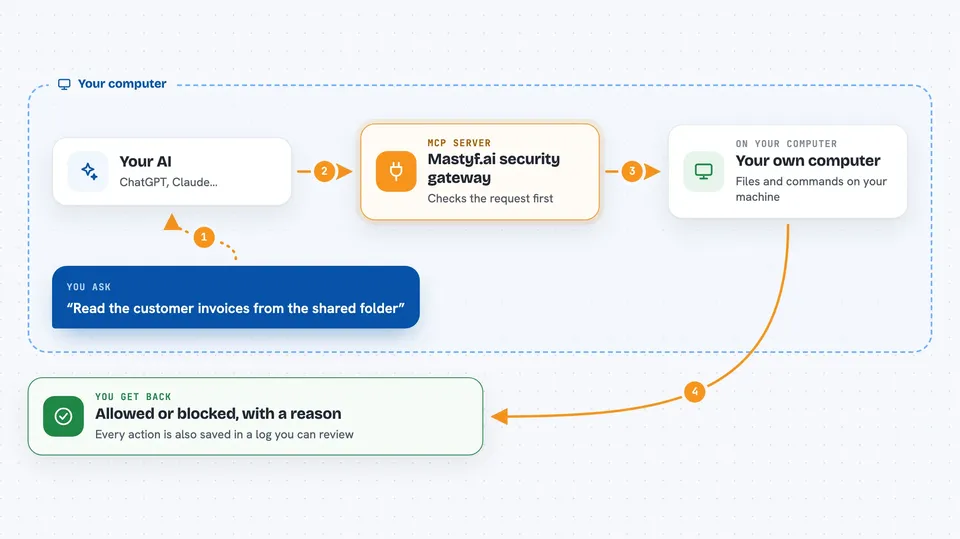
Mastyf.ai is a security guard that sits between your AI assistant and the tools it uses. When your AI wants to run a command, read a file, or call another service, Mastyf checks the request first and blocks it if it looks dangerous. It is handy for anyone who lets an AI agent touch real files, databases, or company systems and wants a safety net.
What is an MCP server? The 30-second version
On its own, your AI can only chat with you. An MCP server is a small helper program that gives your AI a new skill or a connection to an app or service. This one is a bit different: it is a security checkpoint that sits in front of your other MCP servers, watching every request your AI makes to them. So instead of adding a new ability, it adds a layer of protection around the abilities your AI already has.
What this MCP server does
You ask your AI to do something, like look up invoices or read a file. Before that request reaches the tool, it passes through Mastyf. Mastyf checks the request against rules you set, looking for things like sneaky instructions, dangerous file paths, leaked passwords, or odd shell commands. If the request breaks a rule, Mastyf blocks it and the tool never runs. If it passes, the request goes through and the action is logged so you can see what happened later.
 Click to zoom
What you can do with it
- Block requests that try to read sensitive files like passwords or keys
- Stop shell commands that look dangerous before they run
- Catch hidden instructions inside tool arguments
- Limit how often a tool can be called so runaway loops do not burn your budget
- Show a live dashboard of every action your AI tried to take
- Keep a tamper-evident log of every decision for later review
- Check trust scores for MCP packages before you install them
Try asking your AI
- “Read the customer invoices from the shared folder”
- “Delete all the old log files in the temp directory”
- “Run a shell command to list what is in my home folder”
- “Push my latest changes to the company repository”
What it gives back to you
You get a clear answer in the chat, plus a note about whether the action was allowed or blocked. If it was blocked, you see which rule stopped it and why. Everything is also recorded in a dashboard and a log file, so you can look back at what your AI tried to do and when.
Before you start
What you need
- Python installed on your computer (for the quickstart gateway)
- Git to download the project from GitHub
- A terminal or command prompt to run a few setup commands
- Optional: Ollama installed if you want the local AI review feature
Good to know
This tool decides whether your AI's actions are allowed to run, so a wrong rule can block work you actually wanted to do, and it reads the details of every request your AI makes.
Install it with your AI
Add Mastyf.ai security gateway to your AI, no technical skills needed
You don't install anything by hand. You copy one prompt, paste it into an AI that can work on your computer, and it checks, installs and connects the server for you, asking you when it needs something.
Sign in to get the install prompt
Members get a ready-made prompt that lets the Claude desktop app check Mastyf.ai security gateway, install it and connect it for them, step by step. You don't need any technical skills: you copy, paste and answer a few questions. Your connected AI can also find and install any of the 4,609 MCP servers here for you.
Who it's for
Anyone who lets an AI agent touch real files, databases, or company systems and wants a safety layer in front of it, especially IT and security-minded teams.



