
MCP server · Notes
RMS Memory MCP server
by max-ramas
Give your AI coding helper a lasting memory of your project, so you stop re-explaining things every session.
RMS Memory MCP is a small helper that gives your AI coding assistant a permanent memory of your project. It keeps notes about your architecture, decisions and preferences in a set of Markdown files on your own computer, and any AI tool that supports MCP can read from and write to those notes. It is handy if you keep switching between tools like Cursor, Zed or Claude Code and are tired of repeating yourself.
What is an MCP server? The 30-second version
On its own, your AI can only chat with you in the moment. An MCP server is a small helper program that gives your AI a new skill or a connection to something outside the chat. This one connects your AI to a memory vault on your machine, a folder of Markdown notes about your project. Once it is connected, your AI can look things up in that vault or add new notes when you ask.
What this MCP server does
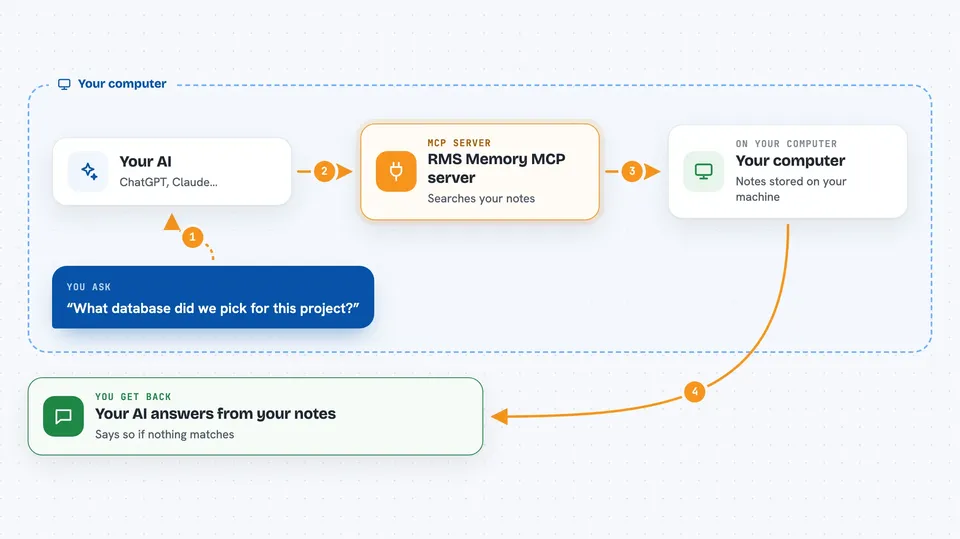
You ask your AI something about your project, like which database you picked or why a piece of code is shaped a certain way. Your AI passes that question to this helper program. The helper searches your local memory vault, using both keyword search and meaning-based search, and finds the notes that fit. It hands the best matches back to your AI, which then answers you in plain language. If nothing matches well enough, it says so instead of making something up.
 Click to zoom
What you can do with it
- Save project decisions and architecture notes into a memory vault
- Search your saved notes and code by keyword or by meaning
- Look up why a certain file was changed and when
- Save a checkpoint at the end of a session and load it again later
- Get a quick overview of a project you have not touched in a while
- Search across several projects at once when you allow it
- Keep notes tied to a specific project so they do not mix
What it gives back to you
You get answers in the chat, written by your AI from the notes it found. It can also show you a list of matching notes with short snippets, or a summary of a project. When it saves something, it tells you the note was written to your vault. If it cannot find anything reliable, it says so instead of guessing.
Before you start
What you need
- A computer running macOS, Linux or Windows
- The rms-memory program installed (Homebrew, a release download, or cargo)
- At least one AI coding tool that supports MCP, like Cursor, Zed or Claude Code
Good to know
It writes notes into a vault on your computer and can save or update files there, so check what it saved if the wording matters.
Install it with your AI
Add RMS Memory MCP server to your AI, no technical skills needed
You don't install anything by hand. You copy one prompt, paste it into an AI that can work on your computer, and it checks, installs and connects the server for you, asking you when it needs something.
Sign in to get the install prompt
Members get a ready-made prompt that lets the Claude desktop app check RMS Memory MCP server, install it and connect it for them, step by step. You don't need any technical skills: you copy, paste and answer a few questions. Your connected AI can also find and install any of the 4,609 MCP servers here for you.
Who it's for
Developers and technical teams who use several AI coding tools and want one shared, private memory of their project.


