
MCP server · Finance and crypto
EVM Blockchain MCP server
by mcpdotdirect
Lets your AI look up balances, tokens, NFTs and contracts across many blockchain networks for you.
This is a helper that connects your AI assistant to blockchain networks like Ethereum, Polygon and Base. Once it is set up, you can just ask your AI questions about wallets, tokens and contracts in normal words, and it goes and finds the answers. It is handy for anyone who works with crypto and does not want to click around block explorer websites all day.
What is an MCP server? The 30-second version
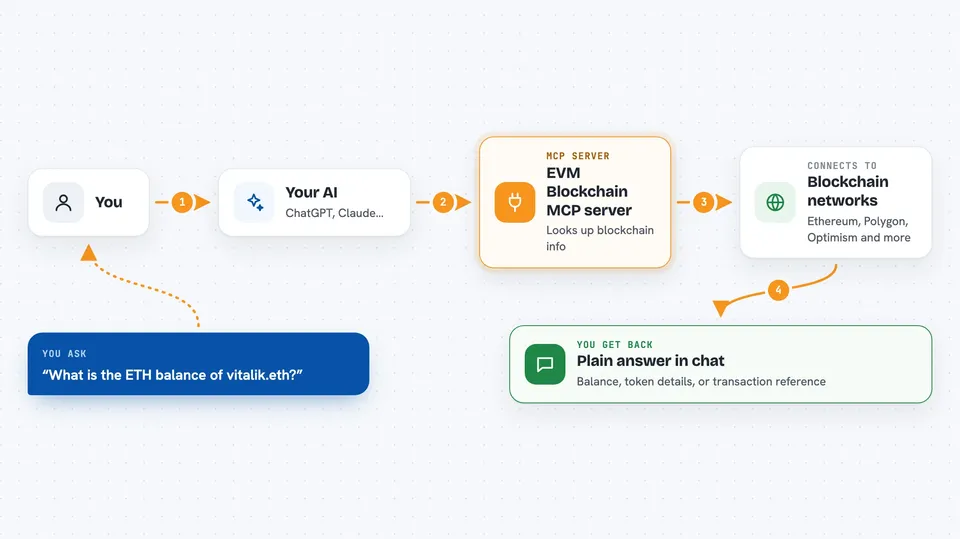
On its own, your AI can only chat with you using what it already knows. An MCP server is a small helper program that gives your AI a new skill, in this case a connection to blockchain networks. Here the helper talks to networks like Ethereum and Polygon, so your AI can look up balances, read contracts and even send transactions when you ask. You do not need to understand how it works under the hood, you just talk to your AI like normal.
What this MCP server does
You ask your AI something like what is the balance of this wallet, and the AI passes that request to this helper. The helper then connects to the blockchain network you mentioned, looks up the information, and hands it back to your AI. Your AI then explains the result to you in the chat, in plain words. If you have set up a wallet, it can also carry out actions like sending tokens or signing messages, not just reading.
 Click to zoom
What you can do with it
- Check the balance of any wallet on many blockchain networks
- Look up token details like name, symbol and total supply
- See which NFTs a wallet owns and what they are
- Read what a smart contract does without knowing any code
- Send tokens or native coins from your own wallet
- Sign messages and structured data for logins and approvals
- Use human-readable names like vitalik.eth instead of long addresses
Try asking your AI
- “What is the ETH balance of vitalik.eth on Ethereum?”
- “Show me the latest block on Optimism”
- “How much USDC does this wallet hold on Polygon?”
- “Is this address a smart contract or a normal wallet?”
What it gives back to you
You get answers written out in the chat, like a balance, a token name, a block number or a short summary of a contract. When it looks up lists, such as the NFTs a wallet owns, you get those listed back. If it sends a transaction or signs something, it tells you what it did and gives you the details, such as a transaction reference. Everything shows up as normal text in your conversation.
Before you start
What you need
- Node.js 20 or newer, or Bun 1.0 or newer, to run the helper
- A wallet private key or a 12 or 24 word recovery phrase, only if you want it to send tokens or sign things
- A free Etherscan API key, only if you want it to read smart contracts automatically
Good to know
If you give it your wallet key or recovery phrase, it can send your tokens and sign things, so only set that up if you trust the setup and keep those secrets safe.
Install it with your AI
Add EVM Blockchain MCP server to your AI, no technical skills needed
You don't install anything by hand. You copy one prompt, paste it into an AI that can work on your computer, and it checks, installs and connects the server for you, asking you when it needs something.
Sign in to get the install prompt
Members get a ready-made prompt that lets the Claude desktop app check EVM Blockchain MCP server, install it and connect it for them, step by step. You don't need any technical skills: you copy, paste and answer a few questions. Your connected AI can also find and install any of the 4,609 MCP servers here for you.
Who it's for
People who work with crypto, like analysts, finance staff or founders, and anyone who wants to check wallets and tokens by just asking their AI.



