MCP server · Chat
Counsel MCP server
Lets your AI run a structured debate on a tough question and hand you a written report with several viewpoints.
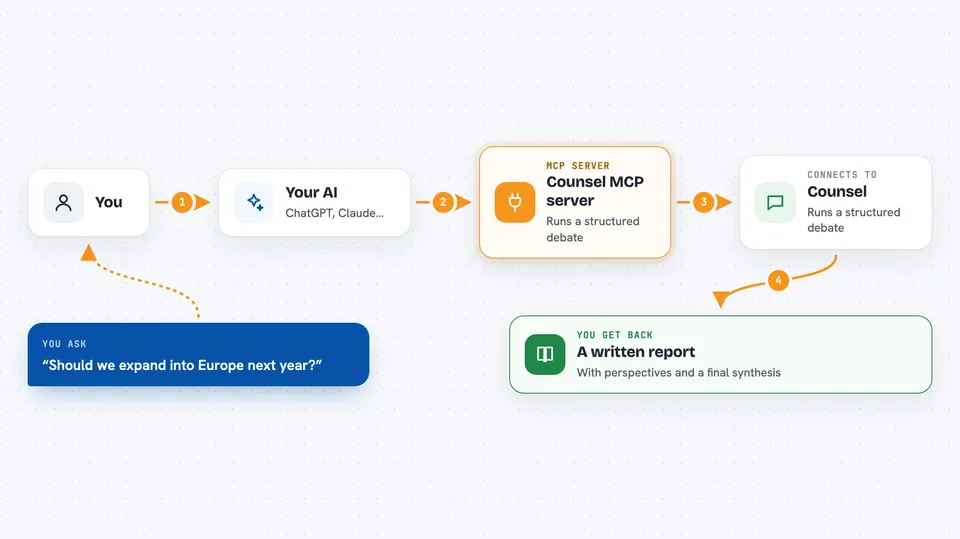
This is a helper that connects your AI assistant to Counsel, an online service for thinking through hard decisions. You give it a question, and it looks at that question from several angles and writes up what it found. It is handy if you have to make a tricky call at work and want more than one opinion.
What is an MCP server? The 30-second version
On its own, your AI can only chat with you using what it already knows. An MCP server is a small helper program that gives your AI one new skill or one new connection. This helper connects your AI to Counsel, a service that analyzes questions from multiple points of view. So when you ask your AI something like "should we expand into Europe?", it can send that question to Counsel and bring the answer back into your chat.
What this MCP server does
You ask your AI a strategic question, and it passes that question to this helper. The helper sends it to the Counsel service, which runs a kind of structured debate with several perspectives. You can pick how deep you want the analysis: quick, standard, or deep. When it is done, the helper brings back a written report, and your AI shows it to you in the chat. You can also ask about older consultations you ran before.
 Click to zoom
What you can do with it
- Start a new consultation on a business or strategy question
- Choose how deep the analysis should be: quick, standard, or deep
- List the stakeholders you want the analysis to consider
- Check whether a consultation is still running
- Fetch the final report from a finished consultation
- Browse your past consultations
- Sharpen a vague question before you send it
- Start an interactive advisor session to brainstorm or scope a problem
Try asking your AI
- “Use Counsel to analyze: should we expand into the European market next year? Consider the CEO, CFO, Head of Sales, and Legal. Use deep mode.”
- “Sharpen this question for me: how do we fix our company culture? Context: we are a 200-person startup growing fast.”
- “Check the status of consultation abc-123-def.”
- “Show me my last five consultations.”
What it gives back to you
You get text back in your chat, not files to download. For a finished consultation you get a written report that lays out the different perspectives and a final synthesis. For a running one you get a short status update. When you list past consultations, you get a list of them with their details.
Before you start
What you need
- A Counsel account at counsel.getmason.dev
- Node.js 18 or newer if you run it yourself
- A Counsel API key (a kind of password for apps) if you use the local setup, or just sign in through your AI app if you use the hosted version
Good to know
Your questions and context get sent to the Counsel service, so do not paste anything private or confidential you would not want stored there.
Install it with your AI
Add Counsel MCP server to your AI, no technical skills needed
You don't install anything by hand. You copy one prompt, paste it into an AI that can work on your computer, and it checks, installs and connects the server for you, asking you when it needs something.
Sign in to get the install prompt
Members get a ready-made prompt that lets the Claude desktop app check Counsel MCP server, install it and connect it for them, step by step. You don't need any technical skills: you copy, paste and answer a few questions. Your connected AI can also find and install any of the 4,361 MCP servers here for you.
Who it's for
Managers, founders, consultants, and anyone who has to make big decisions and wants a structured second opinion.