MCP server · Chat
Cross-LLM MCP server
by JamesANZ
Ask several AI models at once and compare their answers, all from your own chat window.
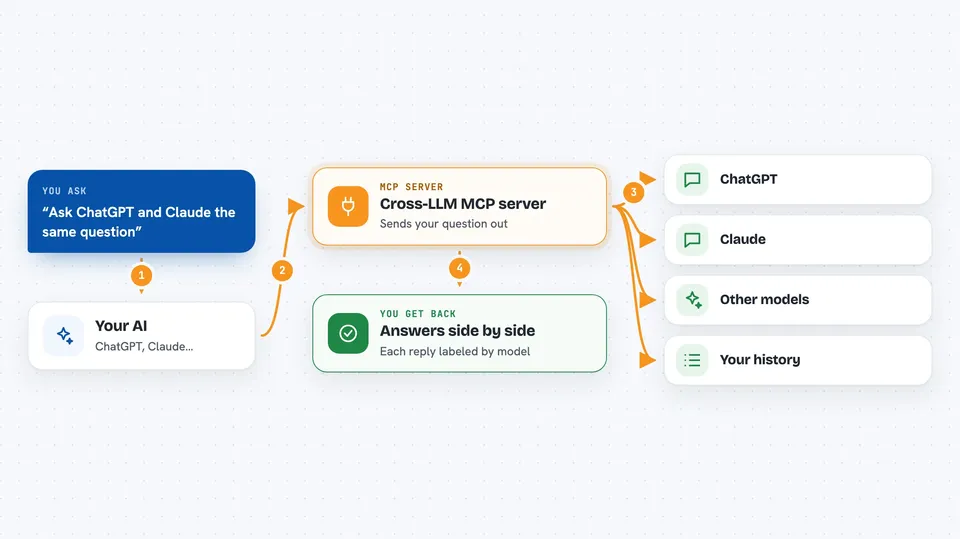
This is a helper that lets your AI assistant talk to other AI models for you. You can ask ChatGPT, Claude, Gemini, DeepSeek, Grok, Kimi, Perplexity, Mistral, and Hugging Face models from one place. It is handy if you like comparing answers or want a second opinion on something.
What is an MCP server? The 30-second version
On its own, your AI can only chat with you using what it already knows. An MCP server is a small helper program that gives your AI a new skill or a connection to another service. This one connects your AI to the online services behind ChatGPT, Claude, Gemini and several other models. So when you ask, your AI can send the question out to those models and bring their answers back to you.
What this MCP server does
You type a request in your chat, like asking for a poem or an explanation. Your AI passes that request to this helper. The helper sends it to the model you picked, using your own account key for that service. The model writes an answer, and the helper hands it back so your AI can show it to you. You can also send the same question to every model at once and see them side by side.
 Click to zoom
What you can do with it
- Ask one specific model, like ChatGPT or Claude, a question
- Send the same prompt to all connected models and compare the replies
- Set which model you want as your default for each kind of task
- Find models by strength, such as coding, math, or creative writing
- Look back at your past prompts and see simple usage statistics
- Delete old prompt logs or clear the whole history
Try asking your AI
- “Ask ChatGPT to explain quantum computing in simple terms”
- “Send this poem idea to all the models and show me each answer”
- “Use my coding model to review this function and suggest fixes”
- “Show me my last ten prompts to Claude”
What it gives back to you
You get the model's written answer right in your chat, just like a normal reply. When you ask several models at once, you get each one's answer labeled by provider so you can compare. The history and stats tools give you lists and simple numbers about what you have asked before. Preference tools confirm what settings you saved.
Before you start
What you need
- Node.js 18 or newer on your computer
- An account and API key for each model you want to use (an API key is like a password for apps; each provider's website gives you one)
- The Claude desktop app or the Cursor editor, set up to use MCP servers
Good to know
Each call uses your own paid account with those providers, so heavy use can cost money, and your prompts are saved in a log file on your computer unless you clear them.
Install it with your AI
Add Cross-LLM MCP server to your AI, no technical skills needed
You don't install anything by hand. You copy one prompt, paste it into an AI that can work on your computer, and it checks, installs and connects the server for you, asking you when it needs something.
Sign in to get the install prompt
Members get a ready-made prompt that lets the Claude desktop app check Cross-LLM MCP server, install it and connect it for them, step by step. You don't need any technical skills: you copy, paste and answer a few questions. Your connected AI can also find and install any of the 4,361 MCP servers here for you.
Who it's for
People who like comparing AI answers, writers and researchers who want a second opinion, and anyone curious about how different models respond to the same question.