
MCP server · API
MetaMCP MCP server
by metatool-ai
Lets your AI use many MCP tools at once through one connection you manage in a simple web page.
MetaMCP is a helper program that gathers other MCP servers together and gives your AI one single door to reach them all. Instead of adding each tool one by one, you set them up once in a web page, group them, and point your AI at that one address. It is handy for people who use several AI tools and want to keep the setup tidy.
What is an MCP server? The 30-second version
On its own, your AI can only chat with you. An MCP server is a small helper program that gives your AI a new skill or a connection to another app. MetaMCP is a special helper that connects to other MCP servers for you, then hands your AI one combined connection to all of them. So when you ask your AI to do something, it can reach the tools you grouped inside MetaMCP without you wiring each one up separately.
What this MCP server does
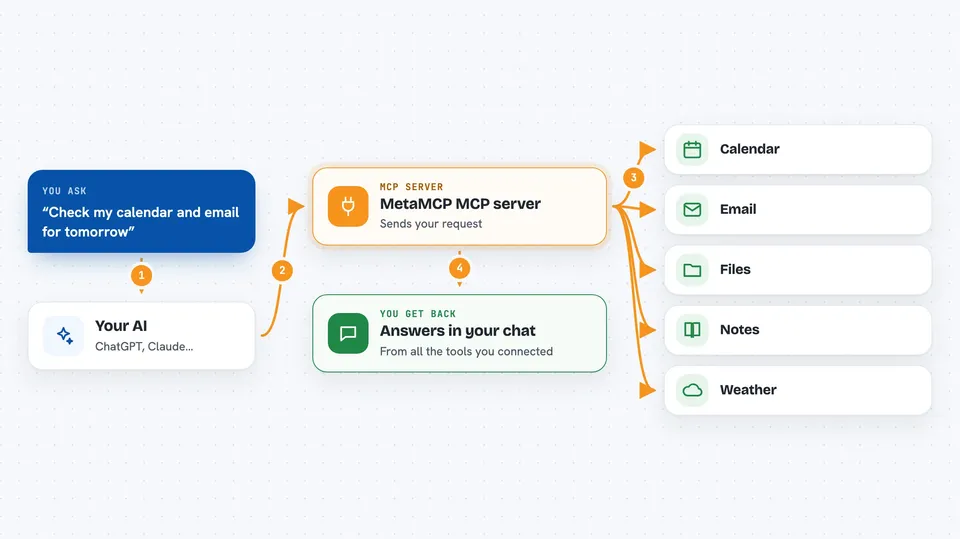
You add the MCP servers you want inside the MetaMCP web page, and it keeps track of how to start each one. You group them into a set and give that set an address. Then you tell your AI to use that address. When you ask your AI something, it sends the request to MetaMCP, MetaMCP passes it to the right tool, and the answer comes back to you in the chat.
 Click to zoom
What you can do with it
- Group several MCP servers into one set and share it with your AI
- Turn individual tools on or off inside a group
- Rename or rewrite a tool's description so your AI understands it better
- Create a private web address for your AI to connect to
- Protect that address with a key so only you can use it
- Test your setup with a built-in inspector before you rely on it
What it gives back to you
You get answers in your chat, just like normal, but they come from the tools you connected. MetaMCP can also show you lists of your servers, groups, and tools in its web page. When you change a setting, like turning a tool off, that change shows up the next time your AI asks.
Before you start
What you need
- Docker installed on your computer or a server
- The MetaMCP program running (the README shows a Docker command to start it)
- An API key from MetaMCP (the web page makes one for you)
- A way for your AI app to reach a web address (some apps need a small extra helper called mcp-proxy)
Good to know
MetaMCP can pass your requests to other tools, so only connect servers you trust and keep your API key private.
Install it with your AI
Add MetaMCP MCP server to your AI, no technical skills needed
You don't install anything by hand. You copy one prompt, paste it into an AI that can work on your computer, and it checks, installs and connects the server for you, asking you when it needs something.
Sign in to get the install prompt
Members get a ready-made prompt that lets the Claude desktop app check MetaMCP MCP server, install it and connect it for them, step by step. You don't need any technical skills: you copy, paste and answer a few questions. Your connected AI can also find and install any of the 4,361 MCP servers here for you.
Who it's for
People who use more than one AI tool and want a simple web page to manage them all in one place.


