MCP server · Research
App Store Operator MCP server
Ask your AI to research App Store keywords, rival apps, and write in-app event copy.
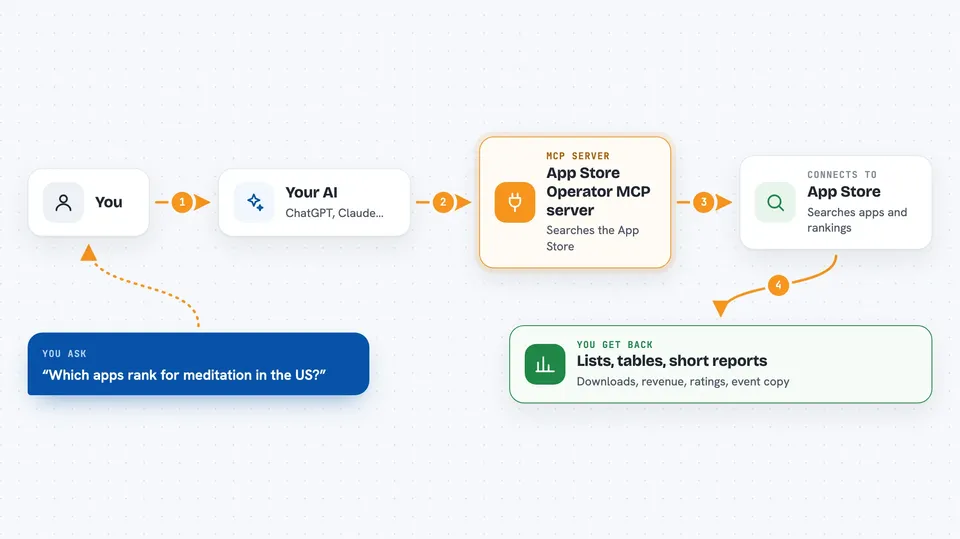
App Store Operator is a small helper that connects your AI assistant to App Store research. You ask a question in plain words, and it looks up ranked search results, competitor numbers, and even drafts in-app event text for you. It is made for indie iOS developers who would rather stay in the chat than open another dashboard.
What is an MCP server? The 30-second version
On its own, your AI can only chat with you. An MCP server is a small helper program that gives your AI a new skill or a connection to an app or service. This one connects your AI to the App Store and to SensorTower, a site that tracks app downloads and revenue. Once it is connected, your AI can look things up there for you when you ask.
What this MCP server does
You ask your AI something like which apps rank for a keyword, or how a rival is doing. The AI passes that request to this helper. The helper searches the App Store and, when needed, opens a browser to read SensorTower data. Then it hands the results back to your AI, which explains them to you in the same chat. For in-app event copy, it just writes the text locally, no outside service needed.
 Click to zoom
What you can do with it
- Search the App Store for a keyword and see which apps rank
- Get download, revenue, and rating estimates for rival apps
- Compare your app against the top apps for a keyword
- Find the top markets and publishers behind a competitor
- Generate in-app event copy in a chosen language and tone
- Draft new app name, subtitle, and keyword ideas
- Check which countries a keyword is worth targeting
Try asking your AI
- “Research rivals for meditation in the US App Store”
- “Search the App Store for habit tracker in Germany, top 10 results”
- “Prepare an in-app event for a summer fitness campaign in en-gb”
- “Compare my app 1234567890 against the top apps for journaling in the UK”
What it gives back to you
You get back lists, tables, and short reports right in the chat. For rivals, you see downloads, revenue, ratings, top markets, and publisher info for each app. For in-app events, you get three copy variations with character counts. Anything SensorTower keeps behind its paywall comes back as N/A, and the AI is told not to make up numbers.
Before you start
What you need
- Node.js version 18 or newer
- A desktop computer with a screen (the browser tools need a visible window)
- A free SensorTower account for the two tools that read analytics
Good to know
The analytics tools open a real browser window and need you to sign in to SensorTower once; the numbers you see depend on what SensorTower's free tier shows, and paywalled figures come back as N/A.
Install it with your AI
Add App Store Operator MCP server to your AI, no technical skills needed
You don't install anything by hand. You copy one prompt, paste it into an AI that can work on your computer, and it checks, installs and connects the server for you, asking you when it needs something.
Sign in to get the install prompt
Members get a ready-made prompt that lets the Claude desktop app check App Store Operator MCP server, install it and connect it for them, step by step. You don't need any technical skills: you copy, paste and answer a few questions. Your connected AI can also find and install any of the 4,609 MCP servers here for you.
Who it's for
Indie iOS developers and small app teams who want App Store research without leaving their AI chat.