
MCP server · Developer tools
quelllm MCP server
by MGM-FALCON
Lets your AI look up open-source AI models, compare them, and estimate memory and cost for you.
This is a small helper that connects your AI assistant to a catalog of over 190 open-source AI models listed on quelllm.fr. It is handy if you are trying to pick a model to run on your own computer or compare what different AI services cost. You ask in plain words, and your AI looks things up for you.
What is an MCP server? The 30-second version
On its own, your AI can only chat with you. An MCP server is a small helper program that gives your AI a new skill or a connection to an outside service. This one connects your AI to the quelllm.fr catalog of open-source AI models. Once it is connected, your AI can look up models, compare them, and do quick math for you when you ask.
What this MCP server does
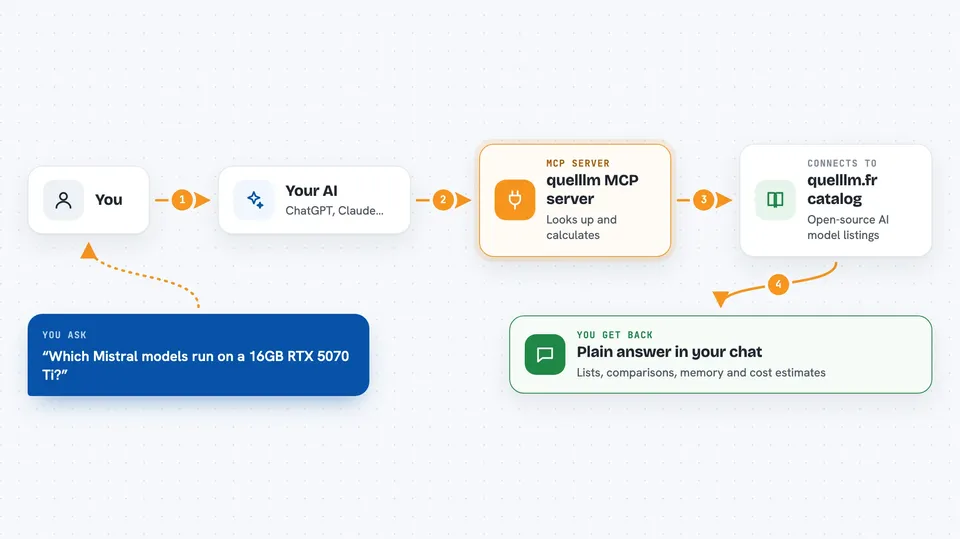
You ask your AI a question, like which models fit on a certain graphics card. Your AI sends that question to this helper. The helper looks it up in the quelllm.fr catalog and does the calculations. Then your AI tells you the answer in the chat, in normal words.
 Click to zoom
What you can do with it
- List open-source AI models that match a family, source, or size
- Look up full details for one model, like size, license, and links
- Compare two models side by side with a short verdict
- Estimate how much memory a model needs at a chosen compression level
- Estimate monthly cost for API providers versus running it yourself
- Search the catalog by name, author, or tag
Try asking your AI
- “Which Mistral models can run on an RTX 5070 Ti with 16GB of memory?”
- “Compare Llama 3.3 70B and Qwen 2.5 32B”
- “I use 10 million input tokens and 2.5 million output tokens per month. How much would OpenAI cost versus DeepSeek?”
- “Show me small models under 10 billion parameters”
What it gives back to you
You get back plain answers in the chat: lists of models, a side-by-side comparison, a memory estimate in gigabytes, or a cost table in euros. It also suggests which graphics cards or Macs could run a model. Nothing is changed anywhere; it only reads and calculates.
Before you start
What you need
- Python installed on your computer (for the pip install option)
- Or the uv tool installed (for the zero-install uvx option)
- An MCP-compatible app like Claude Code, Claude Desktop, Cursor, Continue, or Cline
Good to know
The pricing and hardware numbers are hardcoded as of May 2026, so treat cost and hardware estimates as rough and check them again later.
Install it with your AI
Add quelllm MCP server to your AI, no technical skills needed
You don't install anything by hand. You copy one prompt, paste it into an AI that can work on your computer, and it checks, installs and connects the server for you, asking you when it needs something.
Sign in to get the install prompt
Members get a ready-made prompt that lets the Claude desktop app check quelllm MCP server, install it and connect it for them, step by step. You don't need any technical skills: you copy, paste and answer a few questions. Your connected AI can also find and install any of the 4,609 MCP servers here for you.
Who it's for
People choosing which open-source AI model to run locally, and anyone comparing self-hosted versus paid API costs.



