
MCP server · Developer tools
microservices.sh MCP server
Let your AI plan, check, and prepare Cloudflare apps from ready-made microservices.sh building blocks.
This is a helper that connects your AI to microservices.sh, a place that keeps ready-made building blocks for Cloudflare apps. Instead of your AI inventing everything from scratch, it can look at those blocks, put together a plan, and check it before anything is built. It is handy for developers and technical teams who build apps and want a faster starting point.
What is an MCP server? The 30-second version
On its own, your AI can only chat with you. An MCP server is a small helper program that gives your AI a new skill or a connection to an app or service. This one connects your AI to microservices.sh, so it can look up templates and modules there and do planning work for you when you ask. You stay in the chat, and the helper does the looking up and the checking behind the scenes.
What this MCP server does
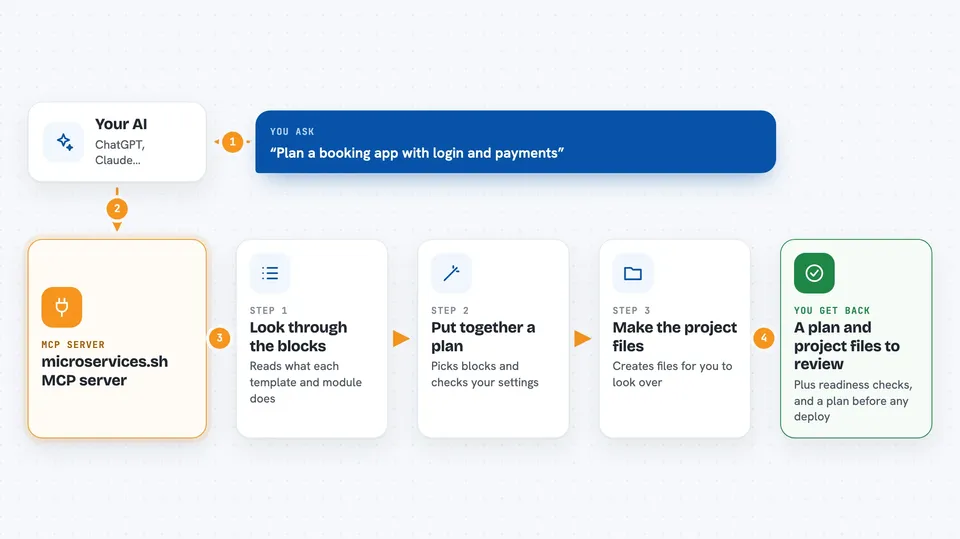
You ask your AI to help you build or plan a Cloudflare app. The AI uses this helper to browse the templates and modules that microservices.sh offers, like auth, booking, payments, files, and audit logs. The helper reads the details of each one and puts together a plan for your app. It can check your settings, create the project files for you to review, and run readiness checks. If you want a preview deployment, it first makes a plan and then waits for your clear confirmation before doing anything.
 Click to zoom
What you can do with it
- List the available templates and modules
- Inspect what a specific module does and what it needs
- Read the documentation for a module
- Compose a plan for a new app from modules
- Validate your configuration before building
- Generate project files for you to review
- Run readiness checks and plan a preview deployment
Try asking your AI
- “Show me the templates available for a booking app”
- “What does the payments module need to work?”
- “Put together a plan for an app with auth, files, and audit logs”
- “Check my settings and tell me if anything is missing”
What it gives back to you
You get back lists of templates and modules, short explanations of what each one does, and a plan for your app in the chat. It can also hand you generated project files to look over and the results of readiness checks. For deployments, it gives you a plan first and a status update after you confirm. Secret values are never shown back to you.
Before you start
What you need
- Node.js and pnpm installed on your computer
- An API key from microservices.sh (a kind of password for apps; the service gives you one)
- The address of the microservices.sh control plane, which is filled in by default
Good to know
The deploy_preview tool can actually start a preview deployment on microservices.sh, so only confirm it when you really mean to, and run the preview plan first.
Install it with your AI
Add microservices.sh MCP server to your AI, no technical skills needed
You don't install anything by hand. You copy one prompt, paste it into an AI that can work on your computer, and it checks, installs and connects the server for you, asking you when it needs something.
Sign in to get the install prompt
Members get a ready-made prompt that lets the Claude desktop app check microservices.sh MCP server, install it and connect it for them, step by step. You don't need any technical skills: you copy, paste and answer a few questions. Your connected AI can also find and install any of the 4,609 MCP servers here for you.
Who it's for
Developers and technical teams who build Cloudflare apps and want a faster, checked starting point.




