MCP server · Design tools
Fusion 360 MCP server
Ask your AI in plain words to build 3D models in Fusion 360, from sketches to bolts and fillets.
This is a helper that connects Claude to Autodesk Fusion 360, the 3D design program. You describe the part you want in normal words, and Claude builds it inside Fusion 360 for you. It is handy if you design simple parts, brackets, or standard hardware and you would rather type than click through menus.
What is an MCP server? The 30-second version
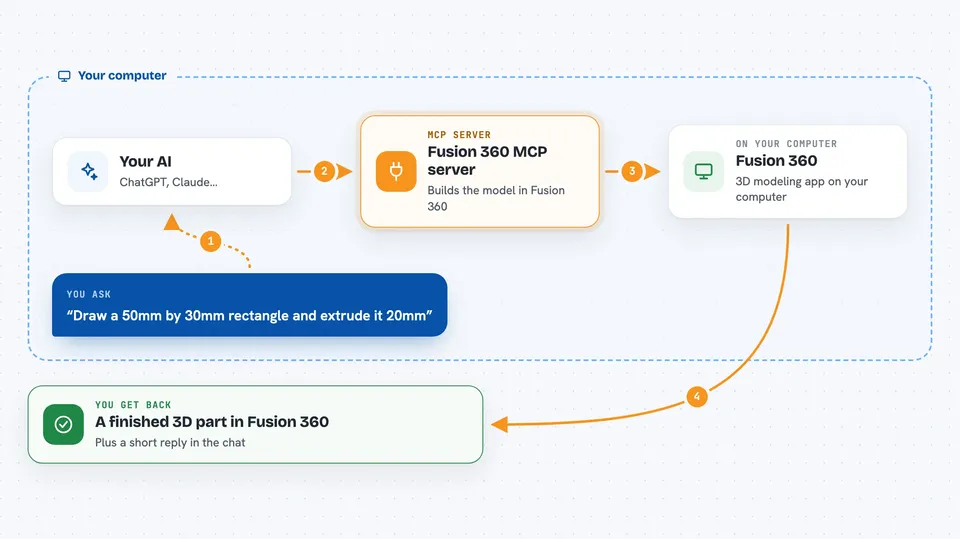
On its own, your AI can only chat. An MCP server is a small helper program that gives your AI a new skill or a connection to another app. This one connects Claude to Fusion 360 on your own computer, so when you ask for a part, Claude can actually create it in your open design. Think of it as giving your AI hands inside Fusion 360.
What this MCP server does
You type a request in Claude, like drawing a rectangle and pulling it up 20mm. Claude picks the right CAD actions and sends them to this helper. The helper passes them into Fusion 360, which draws the sketch, makes the shape, and adds the details you asked for. When it is done, you see the finished part in Fusion 360 and a short reply in the chat. You can keep going, adding holes, fillets, or standard bolts on top.
 Click to zoom
What you can do with it
- Draw sketches with circles, rectangles, lines, arcs, splines, and polygons
- Turn sketches into 3D shapes with extrude, revolve, sweep, and loft
- Round or bevel edges with fillet and chamfer, or hollow a part with shell
- Add JIS standard bolts, nuts, screws, and washers with correct dimensions
- Cut threaded holes, counterbores, and countersinks
- Make keyways, bearing holes, and O-ring grooves to JIS sizes
- Export your finished model as STEP or STL
Try asking your AI
- “Create an M8x30 hex socket head bolt at the origin”
- “Draw a 50mm by 30mm rectangle on the XY plane, extrude it 20mm, and add a 3mm fillet to the top long edges”
- “Draw a 20mm diameter circle, create a revolve, then add a keyway”
- “List the bodies in this design and export the model as STEP”
What it gives back to you
You get a short written reply in the chat, for example that the sketch was created or the bolt was placed. The real result is the model itself, which appears in Fusion 360 as you work. If you ask for information, like a list of bodies or the bounding box, Claude answers with the numbers in the chat. If you ask for an export, you get a STEP or STL file saved on your computer.
Before you start
What you need
- Autodesk Fusion 360 installed and open
- Claude Desktop or Claude Code
- Node.js installed (needed for the npx command)
- The TextToModel add-in copied into Fusion 360's add-in folder and running
Good to know
It changes your open Fusion 360 design directly, so save your work or use a copy before letting it make big edits, and note that one of its tools can run custom code in Fusion 360.
Install it with your AI
Add Fusion 360 MCP server to your AI, no technical skills needed
You don't install anything by hand. You copy one prompt, paste it into an AI that can work on your computer, and it checks, installs and connects the server for you, asking you when it needs something.
Sign in to get the install prompt
Members get a ready-made prompt that lets the Claude desktop app check Fusion 360 MCP server, install it and connect it for them, step by step. You don't need any technical skills: you copy, paste and answer a few questions. Your connected AI can also find and install any of the 4,361 MCP servers here for you.
Who it's for
People who design parts in Fusion 360, like mechanical engineers, makers, and students, who want to build models by typing instead of clicking.