
MCP server · API
MCP Gateway
Put all your AI tools behind one helper so your AI can find and use any of them on demand.
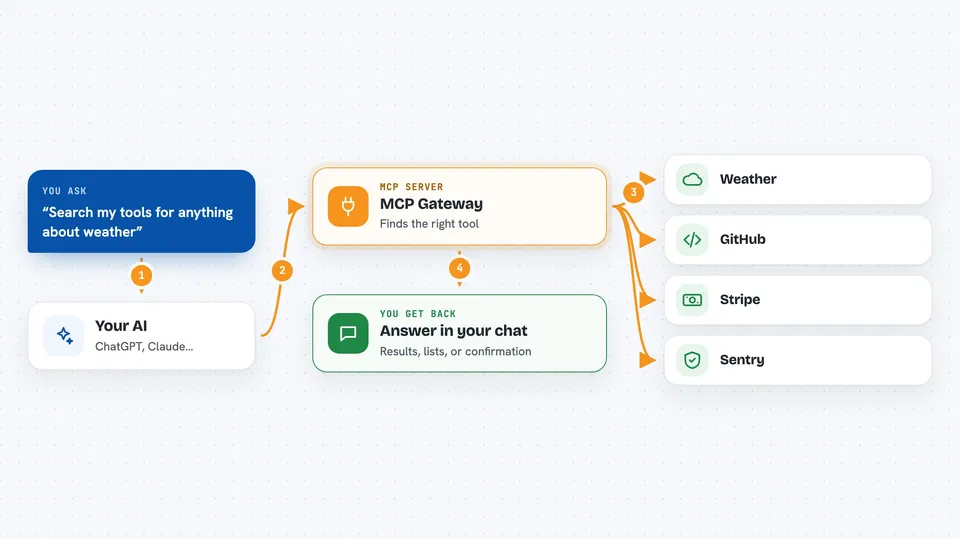
MCP Gateway is a small program that sits between your AI assistant and all the other tools it can use. Instead of your AI loading every tool up front, it loads a short list and asks the gateway for the rest when needed. It is handy if you have many tools connected and your AI feels slow or crowded.
What is an MCP server? The 30-second version
On its own, your AI can only chat with you. An MCP server is a small helper program that gives your AI a new skill or a connection to an app or service. This gateway is a helper that connects your AI to many other helpers and services at once, like web search or Sentry. When you ask your AI to do something, it can go through this gateway to reach the right tool for the job.
What this MCP server does
You ask your AI a question or give it a task. Your AI uses this gateway to search for the right tool among everything you connected. The gateway then calls that tool, whether it is another MCP server or a web service, and brings the result back. Your AI shows you the answer in the chat. It also keeps your list of tools small so your AI does not get overwhelmed.
 Click to zoom
What you can do with it
- Search across all your connected tools at once
- Call any connected tool by name when your AI needs it
- Add web services like GitHub or Stripe as tools
- Import tools from an OpenAPI description file
- Reload your tool settings without restarting your AI
- Check which tools are healthy and working
Try asking your AI
- “Search my tools for anything about weather”
- “Use the Tavily search tool to find recent news about electric cars”
- “List all the tools I have connected through the gateway”
- “Check if the Sentry tool is working”
What it gives back to you
You get answers, lists, or summaries in your chat, just like normal. If you ask for a list of tools, it shows you names and short descriptions. If you use a tool to search the web, you get the search results. If a tool makes a change, like creating an issue, it tells you it was done.
Before you start
What you need
- A computer where you can install small programs (Mac, Linux, or Windows)
- The Homebrew package manager on Mac or Linux, or Rust if you install with Cargo
- At least one other tool or service you want to connect
Good to know
This gateway can call other tools that might change or delete things, so be careful when you ask it to do something that sounds permanent.
Install it with your AI
Add MCP Gateway to your AI, no technical skills needed
You don't install anything by hand. You copy one prompt, paste it into an AI that can work on your computer, and it checks, installs and connects the server for you, asking you when it needs something.
Sign in to get the install prompt
Members get a ready-made prompt that lets the Claude desktop app check MCP Gateway, install it and connect it for them, step by step. You don't need any technical skills: you copy, paste and answer a few questions. Your connected AI can also find and install any of the 4,609 MCP servers here for you.
Who it's for
Anyone who uses an AI assistant with several tools connected and wants to keep things tidy and fast, especially if you are not technical.


