
MCP server · Developer tools
App Store & Google Play MCP server
by mikusnuz
Ask your AI to update your app listing, upload builds, and submit releases to Apple and Google.
This is a helper that connects your AI assistant to the two big app stores: Apple's App Store Connect and Google Play Console. Once it is set up, you can ask your AI in plain words to change your app description, upload screenshots, push a new version for review, or reply to a user review. It is handy for anyone who publishes and maintains apps but does not want to click through the store dashboards every time.
What is an MCP server? The 30-second version
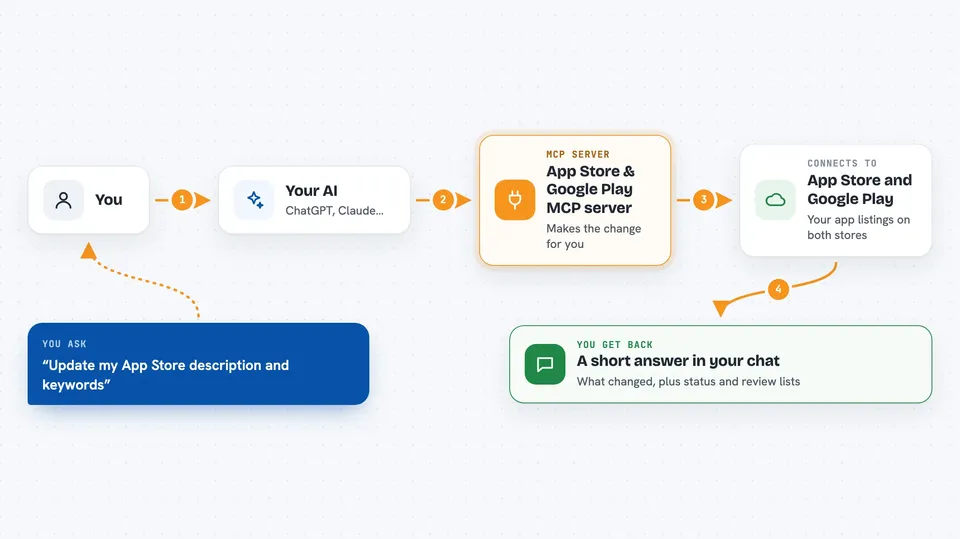
On its own, your AI can only chat. It cannot see your App Store or Play Console account. An MCP server is a small helper program that gives your AI a new skill, and here that skill is talking to App Store Connect and Google Play Console. So when you ask your AI to update your app listing or check a review, it goes through this helper, which talks to Apple or Google for you and brings the answer back.
What this MCP server does
You tell your AI what you want, like changing your app description or submitting a new version. The AI picks the right action from this helper and sends the request to Apple or Google. For example, it can upload a signed app file you already built, attach it to a version, and submit that version for review. It can also read back things like your current listings, your builds, your reviews, and your release status. You see the result as a short answer or a list right in the chat.
 Click to zoom
What you can do with it
- Update your App Store description, keywords, and other listing text
- Upload new screenshots for a specific device size
- Upload a signed app file and attach it to a version
- Submit a new version for review and check its status
- Reply to user reviews on Google Play
- Manage TestFlight beta groups and testers
- Create and manage in-app purchases and subscriptions on both stores
Try asking your AI
- “Update my App Store description for version 1.1.0 and add new keywords”
- “Upload these screenshots for iPhone 16 Pro”
- “Submit my new Android release to the beta track and check for errors”
- “Show me the latest reviews on Google Play and reply to the negative ones”
What it gives back to you
You get back plain answers and lists in the chat. For example, a list of your apps with their IDs, the current status of a version you submitted, or a summary of recent reviews. When it makes a change, like updating a description or submitting a version, it tells you what it did. For uploads it can also report whether the file was accepted and when it finished processing.
Before you start
What you need
- An Apple Developer account with an App Store Connect API key (a kind of password file you download from Apple)
- A Google Play developer account with API access set up (a service account file or a one-time sign-in)
- Node.js installed on your computer to run the server
- A signed app file you built yourself, like an .ipa or .aab
Good to know
This helper can change live store listings, submit versions for review, and remove items like screenshots or products, so check what your AI is about to do before you say yes.
Install it with your AI
Add App Store & Google Play MCP server to your AI, no technical skills needed
You don't install anything by hand. You copy one prompt, paste it into an AI that can work on your computer, and it checks, installs and connects the server for you, asking you when it needs something.
Sign in to get the install prompt
Members get a ready-made prompt that lets the Claude desktop app check App Store & Google Play MCP server, install it and connect it for them, step by step. You don't need any technical skills: you copy, paste and answer a few questions. Your connected AI can also find and install any of the 4,609 MCP servers here for you.
Who it's for
App developers, indie publishers, and release managers who already have apps on the App Store or Google Play and want to handle store chores by asking their AI instead of clicking through dashboards.



