
MCP server · Social media
Velog MCP server
by milcho0604
Lets your AI read, search, back up and draft posts on your Velog blog.
This is a small helper that connects your AI assistant to Velog, the Korean blogging site. Once it is set up, you can ask your AI to look up your posts, search your old writing, save a draft, or back everything up as files. It is handy if you already write on Velog and want your AI to do the boring parts for you.
What is an MCP server? The 30-second version
On its own, your AI can only chat. It cannot see your blog or touch anything outside the conversation. An MCP server is a small helper program that gives your AI one new skill, and here that skill is talking to Velog. You install it once, your AI calls on it when you ask, and the helper does the actual work on Velog for you.
What this MCP server does
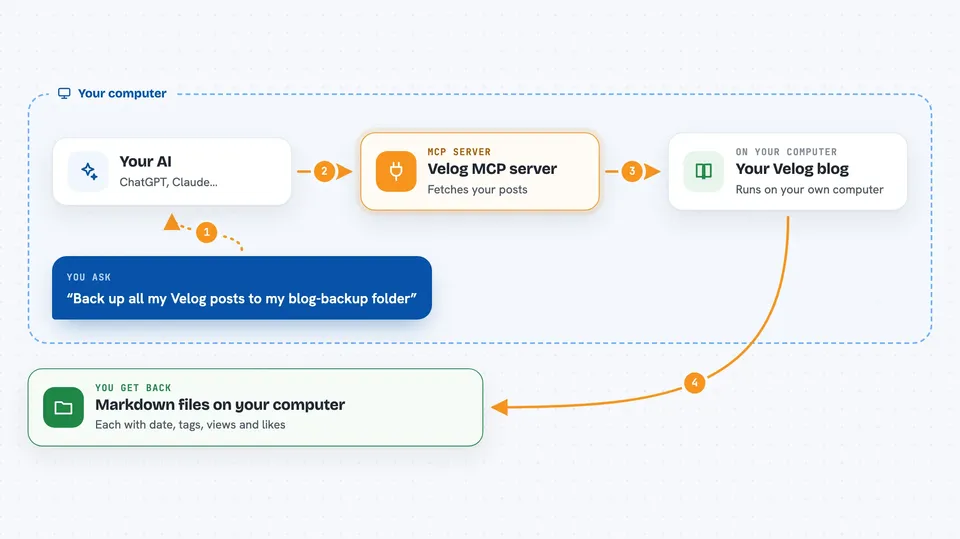
You ask your AI something about your Velog blog, like finding an old post or saving a draft. The AI passes your request to this helper program running on your own computer. The helper talks to Velog using your login, fetches or changes what you asked for, and hands the result back to the AI. The AI then shows it to you in plain language in the chat. For anything that changes your blog, the helper is careful and defaults to private or draft.
 Click to zoom
What you can do with it
- Read any public Velog post, including the full text
- Search posts by keyword, or search only inside one blog
- List a user's posts, tags, series and profile info
- Show trending and recent posts across all of Velog
- Save a new draft without publishing it
- Publish a post or a draft, private by default
- Back up all your posts as markdown files with details on top
- Draw a diagram or cover image and upload it to Velog
Try asking your AI
- “Find the post I wrote last year about HTTP/2”
- “Save today's bug fix notes as a Velog draft”
- “Show my top 10 posts by views and which tags got read most”
- “Back up all my posts to my blog-backup folder”
- “Publish that draft, keep it private for now”
What it gives back to you
You get answers in the chat: lists of posts with titles and links, search results, view and like counts, tag breakdowns, or the text of a post. When it saves or publishes something, it tells you what it did and gives you a link to the post or draft. Backups come back as markdown files saved on your computer, each with a small header of details like date, tags, views and likes.
Before you start
What you need
- Node.js 22.18 or newer
- A Velog account and its refresh token (a long code you copy from your browser cookies; the README shows where)
- An MCP client that runs servers locally, such as Claude Code, Claude Desktop or Cursor
Good to know
It can publish, edit or unpublish posts on your blog, and public posts cannot be fully taken back once they are out, so check what it is about to do before saying yes.
Install it with your AI
Add Velog MCP server to your AI, no technical skills needed
You don't install anything by hand. You copy one prompt, paste it into an AI that can work on your computer, and it checks, installs and connects the server for you, asking you when it needs something.
Sign in to get the install prompt
Members get a ready-made prompt that lets the Claude desktop app check Velog MCP server, install it and connect it for them, step by step. You don't need any technical skills: you copy, paste and answer a few questions. Your connected AI can also find and install any of the 4,361 MCP servers here for you.
Who it's for
Velog bloggers who want their AI to help with searching old posts, drafting, stats and backups.





