
MCP server · Developer tools
Elementor MCP server
by Mogacode-ma
Let your AI safely edit WordPress Elementor pages across several sites, with backups and undo built in.
This is a helper for people who manage WordPress sites built with Elementor, especially if you look after more than one site. It lets your AI assistant read pages, change text, swap widgets and take screenshots, while quietly making a backup before every change. It is made for agencies and freelancers who want to move faster without breaking a client site.
What is an MCP server? The 30-second version
On its own, your AI can only chat with you. An MCP server is a small helper program that gives your AI a new skill or a connection to another app. This one connects your AI to your WordPress sites that use Elementor, so it can look at pages and make changes there when you ask. You stay in charge: you tell it what to do, and it does the clicking for you.
What this MCP server does
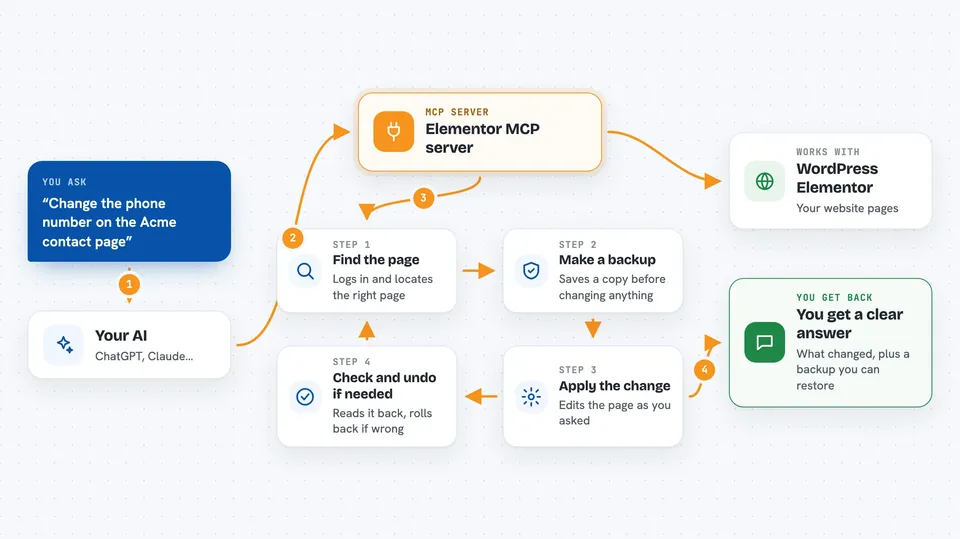
You ask your AI something like "change the phone number on the contact page of the Acme site". The AI passes that request to this helper. The helper logs into your WordPress site, finds the page, makes a backup first, then applies the change. After writing, it reads the page back to check the change really stuck, and if something looks wrong it rolls back to the backup. Then it tells you what it did.
 Click to zoom
What you can do with it
- List the Elementor pages and widgets on a site
- Find and replace text across one page, one site, or every site you manage
- Edit, add, move, duplicate or delete individual widgets
- Export a template from one site and import it into another
- Restore a page from a backup if something goes wrong
- Take a screenshot of a page and compare two screenshots
- Check which sites are running an outdated Elementor version
Try asking your AI
- “Show me all Elementor pages on the Acme site and their last modified date”
- “Replace the old phone number with the new one on every page of the Acme site, but show me a dry run first”
- “Export the homepage template from Acme and import it into the Beta site”
- “Take a screenshot of the Acme homepage and compare it with last week's”
What it gives back to you
You get back plain answers in the chat: lists of pages or widgets, a summary of what changed, and warnings if something did not go as planned. For edits, it reports whether the change was saved and verified, and it keeps a backup you can restore. Screenshots come back as image files. If a write did not actually stick, it tells you instead of pretending it worked.
Before you start
What you need
- A WordPress site with Elementor or Elementor Pro installed
- An administrator login on that site
- A WordPress Application Password (a special password you create in your WordPress profile page, under Application Passwords)
- Node.js installed on your computer (the free runtime that runs the helper)
- Optional: SSH access to your server, which unlocks extra tools and more reliable backups
Good to know
This tool can change and delete content on live WordPress sites, so always read the dry run and confirmation prompts carefully before saying yes.
Install it with your AI
Add Elementor MCP server to your AI, no technical skills needed
You don't install anything by hand. You copy one prompt, paste it into an AI that can work on your computer, and it checks, installs and connects the server for you, asking you when it needs something.
Sign in to get the install prompt
Members get a ready-made prompt that lets the Claude desktop app check Elementor MCP server, install it and connect it for them, step by step. You don't need any technical skills: you copy, paste and answer a few questions. Your connected AI can also find and install any of the 4,609 MCP servers here for you.
Who it's for
WordPress agencies, freelancers and site managers who look after Elementor sites, especially several client sites at once.



