
MCP server · Developer tools
User Feedback MCP server
by mrexodia
Lets your AI coding assistant pause and ask you for feedback before it calls a task done.
This is a small helper that lets your AI coding tool stop and check in with you before it says a job is finished. Instead of guessing whether its work is good, it asks you directly. It is handy if you use tools like Cline or Cursor and want a human in the loop.
What is an MCP server? The 30-second version
On its own, your AI can only chat with you. An MCP server is a small helper program that gives your AI a new skill or a connection to something else. This one gives your AI a way to ask you for feedback at the right moment. So when the AI is about to wrap up, it can turn to you first instead of just declaring victory.
What this MCP server does
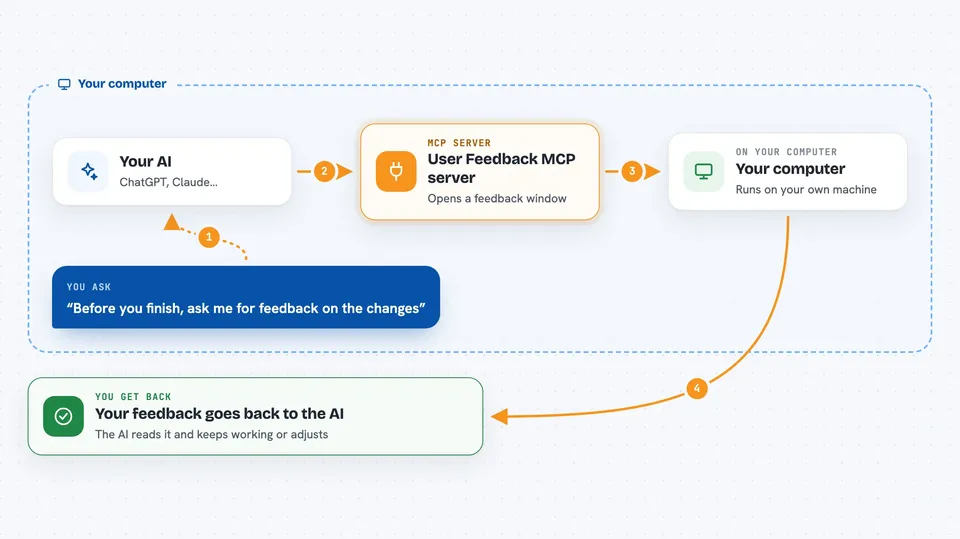
You ask your AI to build or change something in your project. Before it marks the task complete, it uses this helper to open a small feedback window and show you a short summary of what it did. You look at the result, run your app if you want, and type back what you think. Your reply goes straight back to the AI, which then keeps working or adjusts based on what you said.
 Click to zoom
What you can do with it
- Review your AI's work before it marks a task as done
- Run a command like your dev server so you can test the app yourself
- Type feedback that the AI reads and acts on
- Save your setup so the same command runs automatically next time
- Keep a human in the loop for desktop apps that are hard to test automatically
Try asking your AI
- “Before you finish, ask me for feedback on the changes you made.”
- “Show me a summary of what you changed and wait for my reply.”
- “Run the app and let me try it, then ask what I think.”
- “Don't mark this task complete until I have approved the result.”
What it gives back to you
You get a small window with a short summary of what the AI did, plus a box to type your reply. If you set a run command, you also get your app or dev server started so you can try it. Your typed feedback then goes back into the chat as the AI's next instruction.
Before you start
What you need
- An AI coding tool that supports MCP, like Cline or Cursor
- uv installed on your computer (a small tool that runs Python programs)
- The user-feedback-mcp files downloaded to a folder on your computer
Good to know
This helper can run a command you set (like your dev server) on your computer, so only point it at projects you trust.
Install it with your AI
Add User Feedback MCP server to your AI, no technical skills needed
You don't install anything by hand. You copy one prompt, paste it into an AI that can work on your computer, and it checks, installs and connects the server for you, asking you when it needs something.
Sign in to get the install prompt
Members get a ready-made prompt that lets the Claude desktop app check User Feedback MCP server, install it and connect it for them, step by step. You don't need any technical skills: you copy, paste and answer a few questions. Your connected AI can also find and install any of the 4,609 MCP servers here for you.
Who it's for
People who use AI coding assistants to build apps and want to check the result themselves before the AI calls it done.




