
MCP server · Developer tools
Git Context MCP server
Lets your AI explain why a line of code exists by tracing it back to its commit, pull request and issues.
This is a small helper that answers a question developers ask all the time: why is this line of code here? You point your AI at a file and a line, and it digs through your project's history to find the story behind it. It is handy for anyone who has ever stared at old code and wondered who wrote it and why.
What is an MCP server? The 30-second version
On its own, your AI can only chat with you. An MCP server is a small helper program that gives your AI a new skill or a connection to an app or service. This one connects your AI to your project's git history and to GitHub, so it can look up commits, pull requests and issues for you. You ask a question in plain words, and the helper goes and finds the answer.
What this MCP server does
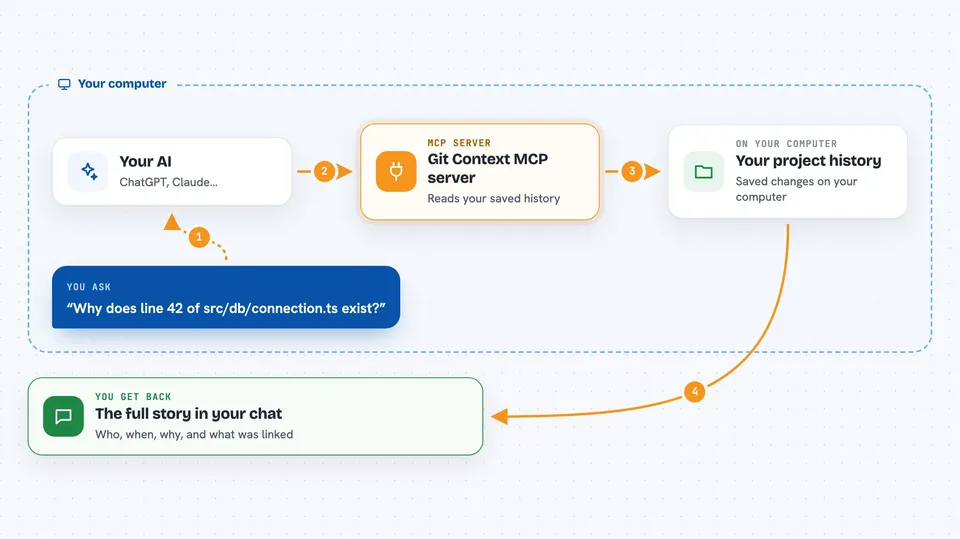
You ask your AI something like why a certain line of code exists. The AI passes that request to this helper. The helper looks at your project's saved history to find which change added that line, then checks GitHub for the pull request that brought it in and any issues linked to it. It gathers all of that into a tidy answer and hands it back to your AI, which shows it to you in the chat. You get the commit, the person, the date, the pull request description and the linked issues, all in one place.
 Click to zoom
What you can do with it
- Explain why a specific line of code exists
- Tell the full story behind a single commit
- List the recent changes to a file and the reason for each
- Search commits by keyword, like rate limit
- Show who has contributed most to a file
- Find the pull request and issues linked to a change
Try asking your AI
- “Why does line 42 of src/db/connection.ts exist?”
- “What's the story behind commit d4a8f91?”
- “Who owns the most of src/payments/stripe.ts?”
- “Show me the last 5 changes to src/api/auth.ts and why each was made”
What it gives back to you
You get a written answer in the chat. It usually includes the commit message, who made it and when, the pull request title and description, and any linked issues with their status. For contributor questions you get a ranked list of names with how many commits and lines they own.
Before you start
What you need
- A project with git history on your computer
- The Claude Code app or another AI tool that supports MCP servers
- The gh command line tool from GitHub, signed in, if you want pull request and issue details (without it, you still get commit info)
Good to know
It reads your project's history and asks GitHub for pull request and issue details, so make sure you are comfortable with that information being looked up.
Install it with your AI
Add Git Context MCP server to your AI, no technical skills needed
You don't install anything by hand. You copy one prompt, paste it into an AI that can work on your computer, and it checks, installs and connects the server for you, asking you when it needs something.
Sign in to get the install prompt
Members get a ready-made prompt that lets the Claude desktop app check Git Context MCP server, install it and connect it for them, step by step. You don't need any technical skills: you copy, paste and answer a few questions. Your connected AI can also find and install any of the 4,361 MCP servers here for you.
Who it's for
Developers, tech leads and anyone who reads old code and wants to understand its history without digging through logs by hand.





