
MCP server · Developer tools
Octocode MCP server
by bgauryy
Lets your AI search and read code on GitHub, npm, and your own computer to answer questions with real evidence.
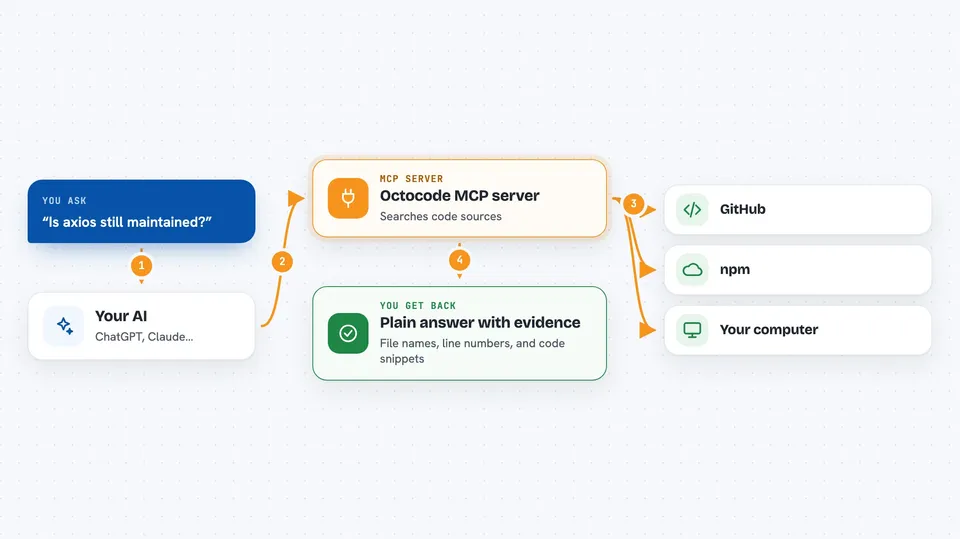
Octocode is a helper that lets your AI look at actual code instead of guessing. It can search GitHub repositories, pull requests, issues, and npm packages, and it can also look through code files on your own machine. It is handy for anyone who asks their AI questions about code and wants answers based on real files, not made-up ones.
What is an MCP server? The 30-second version
On its own, your AI can only chat with you using what it already learned. An MCP server is a small helper program that gives your AI a new skill or a connection to another place. This one connects your AI to Octocode, which can search GitHub, npm, and your local files. So when you ask a question about code, your AI can go look it up through Octocode and bring back real answers.
What this MCP server does
You ask your AI something like whether a library is still maintained or how a function is used in a project. Your AI sends that request to Octocode, which searches GitHub, npm, or your own files depending on what you asked. Octocode finds the matching files, lines, or package details and sends back a short, tidy result. Your AI reads that and writes you a plain answer, often with file names and line numbers so you can check it yourself.
 Click to zoom
What you can do with it
- Search code across GitHub repositories by keyword, file name, or extension
- Read a specific file or a range of lines from a GitHub repository
- Look up npm packages and see their details and source repository
- Search pull requests, issues, and commits in a repository
- Browse the folder structure of a repository before diving in
- Search and read code files on your own computer
- Find where a function is defined or used in a codebase
Try asking your AI
- “Find examples of how people use the axios library in real GitHub projects”
- “Is the package left-pad still being updated on npm?”
- “Show me the pull requests in the facebook/react repository from last month”
- “Search my local project folder for where the word authenticate appears”
What it gives back to you
You get back short, readable answers in the chat, often with file names, line numbers, and small code snippets. Lists of repositories, packages, pull requests, or issues come back as tidy bullet points. If you asked about your own files, it shows the matching lines from those files. It does not change anything on GitHub or in your files, it only reads and reports.
Before you start
What you need
- Node.js version 20.12 or newer installed on your computer
- An MCP client like Claude Desktop, Cursor, or VS Code
- A GitHub account token if you want to search private repositories or avoid rate limits (optional)
Good to know
If you turn on the local tools, your AI can read files on your own computer, so only enable that when you are comfortable with it looking through your project folders.
Install it with your AI
Add Octocode MCP server to your AI, no technical skills needed
You don't install anything by hand. You copy one prompt, paste it into an AI that can work on your computer, and it checks, installs and connects the server for you, asking you when it needs something.
Sign in to get the install prompt
Members get a ready-made prompt that lets the Claude desktop app check Octocode MCP server, install it and connect it for them, step by step. You don't need any technical skills: you copy, paste and answer a few questions. Your connected AI can also find and install any of the 4,361 MCP servers here for you.
Who it's for
Developers, technical writers, and anyone who asks their AI questions about code, packages, or open source projects and wants answers based on real files.





