MCP server · Research
MentionsAPI MCP server
by mukul-dutt
Ask your AI whether other AI assistants mention and recommend your brand, and get the ranking back.
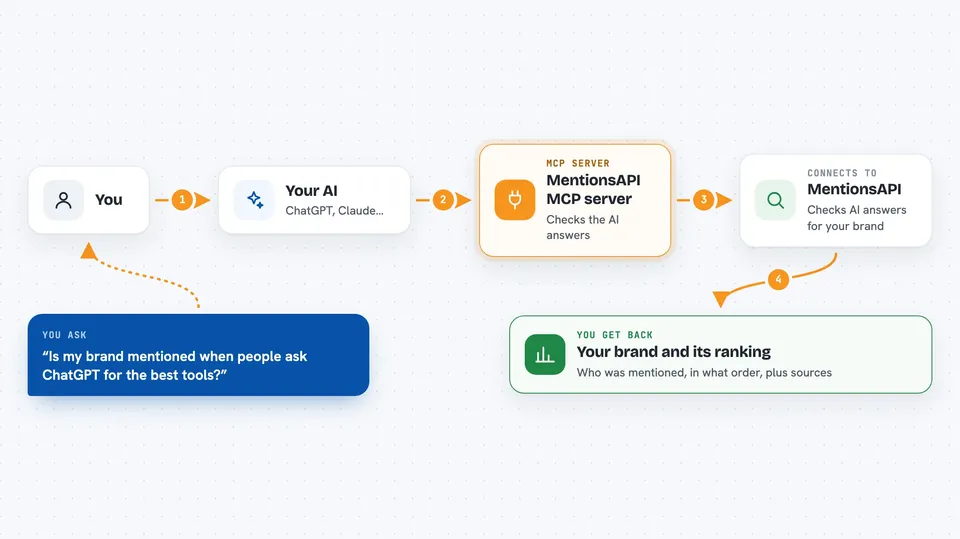
This is a helper that lets your AI check whether other AI assistants mention your brand. You ask a normal question, and it goes off and looks across ChatGPT, Claude, Gemini, Perplexity, Google AI Overviews and Bing Copilot. It is handy if you work in marketing or run a small business and want to know how visible you are in AI answers.
What is an MCP server? The 30-second version
On its own, your AI can only chat with you using what it already knows. An MCP server is a small helper program that gives your AI a new skill or a connection to another service. This one connects your AI to MentionsAPI, a paid service that tracks brand mentions across AI search tools. Once connected, your AI can look up that data for you whenever you ask, instead of guessing.
What this MCP server does
You ask your AI something like whether your brand shows up when people ask ChatGPT about your category. Your AI passes that question to this helper, which talks to MentionsAPI. MentionsAPI then runs the search across the AI tools you picked and collects what came back. The helper hands the result to your AI, which explains it to you in the chat, including whether you were mentioned, where you ranked, and which other brands showed up.
 Click to zoom
What you can do with it
- Check whether your brand is mentioned across ChatGPT, Claude, Gemini and Perplexity
- See which brands rank above and below you in an AI answer
- Run a live check on one specific surface, like Google AI Overviews or Bing Copilot
- Get a list of suggested queries worth tracking for your brand
- Compare two brands side by side to see the difference
- Set up a monitor that watches for changes and pings a webhook when something shifts
Try asking your AI
- “Is my brand mentioned when people ask ChatGPT for the best project management tools?”
- “Check across all four LLMs whether Notion appears for best CRM for startups”
- “What does Google's AI Overview say about accounting software, and is my company in it?”
- “Compare my brand against Salesforce for the query best CRM for small business”
What it gives back to you
You get a plain answer in the chat, usually with the brands that were mentioned and the order they appeared in. It can also include the extra questions the AI tool asked itself while searching, and any sources it cited. Some checks return a short summary, others a small table of results across the different AI tools.
Before you start
What you need
- A MentionsAPI account (free signup, no card, comes with $1 of free credit)
- An API key from MentionsAPI, which looks like lvk_live_... and you create it in your account
- Enough credit in your wallet, since each check costs a small amount
- An MCP-compatible AI app, such as Claude, Claude Code, Cursor or Windsurf
Good to know
Each check costs money from your MentionsAPI wallet, so a few big runs can add up, and the live modes cost more than the cached quick mode.
Install it with your AI
Add MentionsAPI MCP server to your AI, no technical skills needed
You don't install anything by hand. You copy one prompt, paste it into an AI that can work on your computer, and it checks, installs and connects the server for you, asking you when it needs something.
Sign in to get the install prompt
Members get a ready-made prompt that lets the Claude desktop app check MentionsAPI MCP server, install it and connect it for them, step by step. You don't need any technical skills: you copy, paste and answer a few questions. Your connected AI can also find and install any of the 4,361 MCP servers here for you.
Who it's for
Marketing people, founders and small teams who want to know how visible their brand is inside AI answers.