
MCP server · Research
Research Data Finder MCP server
by musharna
Search and download research datasets and papers from many archives, all through one request to your AI.
This is a helper that lets your AI search for research data and papers across many public archives at once. Instead of visiting Zenodo, PubMed, GEO, and a dozen other sites yourself, you ask your AI in plain words and it brings back matching records. It is handy for researchers, students, and anyone who needs to find or download scientific datasets.
What is an MCP server? The 30-second version
On its own, your AI can only chat with you. An MCP server is a small helper program that gives your AI a new skill or a connection to an app or service. This one connects your AI to many research archives, like Zenodo, PubMed, and NCBI, so it can look things up and pull files for you when you ask. You do not need to know how it works inside; you just talk to your AI as usual.
What this MCP server does
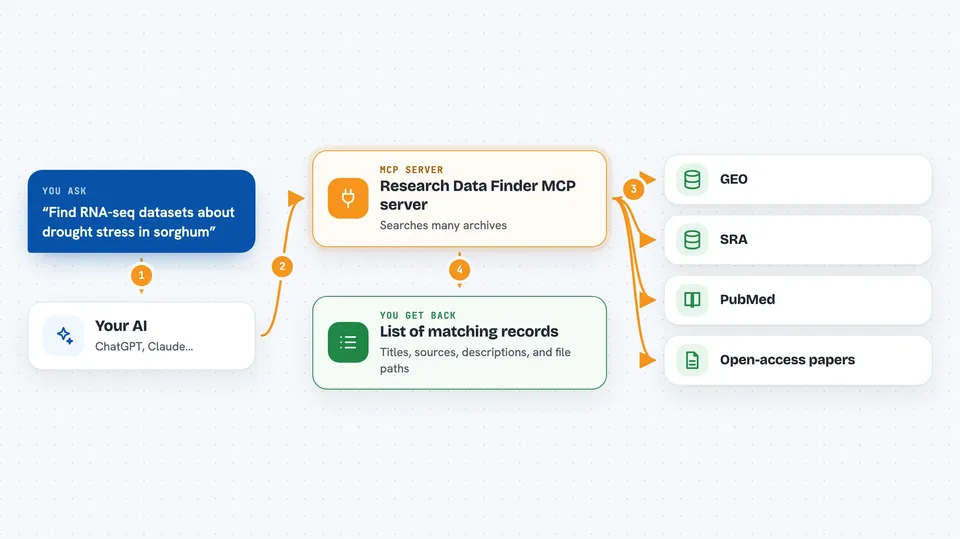
You type a request, like finding RNA-seq data for a certain plant. Your AI sends that request to this helper program. The helper then searches many research archives at the same time, removes duplicates, and lines up the results so they are easy to compare. It can also look up the files behind a record, show you a citation, and download the data to your computer. Then your AI shows you the list or the downloaded files in the chat.
 Click to zoom
What you can do with it
- Search many research archives at once with a single query
- Filter results by organism, disease, tissue, or publication year
- Resolve a record to see its files, citation, and access details
- Download datasets to your computer with checksum checks where available
- Find the data behind a paper, like GEO or SRA records
- Preview or query a remote data file without downloading it
- See how several records are connected to each other
Try asking your AI
- “Find RNA-seq datasets about drought stress in sorghum”
- “Show me open-access papers about CRISPR in rice from the last five years”
- “Download the files for this SRA record to my data folder”
- “What datasets are linked to this PubMed paper”
What it gives back to you
You get back a list of matching records, each with a title, source, and a short description. You can also get a citation, a list of files, access and license details, and download links. If you ask it to fetch, it saves the files to a folder on your computer and tells you the paths. Everything shows up right in your chat as text or file paths.
Before you start
What you need
- Python installed on your computer, or the uvx tool
- An optional free NCBI API key for faster searches (a kind of password you can request from NCBI)
Good to know
Downloading large datasets can use a lot of disk space and time, and some sources do not provide checksums, so those files are not verified.
Install it with your AI
Add Research Data Finder MCP server to your AI, no technical skills needed
You don't install anything by hand. You copy one prompt, paste it into an AI that can work on your computer, and it checks, installs and connects the server for you, asking you when it needs something.
Sign in to get the install prompt
Members get a ready-made prompt that lets the Claude desktop app check Research Data Finder MCP server, install it and connect it for them, step by step. You don't need any technical skills: you copy, paste and answer a few questions. Your connected AI can also find and install any of the 4,361 MCP servers here for you.
Who it's for
Researchers, students, data scientists, and anyone who needs to find or download scientific datasets and papers.





