
MCP server · Developer tools
Android ADB MCP server
by Neem2004
Let your AI read Android logs, inspect the screen layout, and list apps on a connected phone.
This is a small helper that connects your AI assistant to an Android phone or tablet plugged into your computer. It lets the AI peek at what the device is doing, like its logs and screen layout, without you copying anything by hand. It is handy for anyone testing or troubleshooting an Android app.
What is an MCP server? The 30-second version
On its own, your AI can only chat with you. An MCP server is a small helper program that gives your AI a new skill or a connection to another tool. This one connects your AI to an Android device over ADB, the standard way computers talk to Android phones. Once it is set up, you can just ask your AI to look at the device, and it will use this helper to fetch what you need.
What this MCP server does
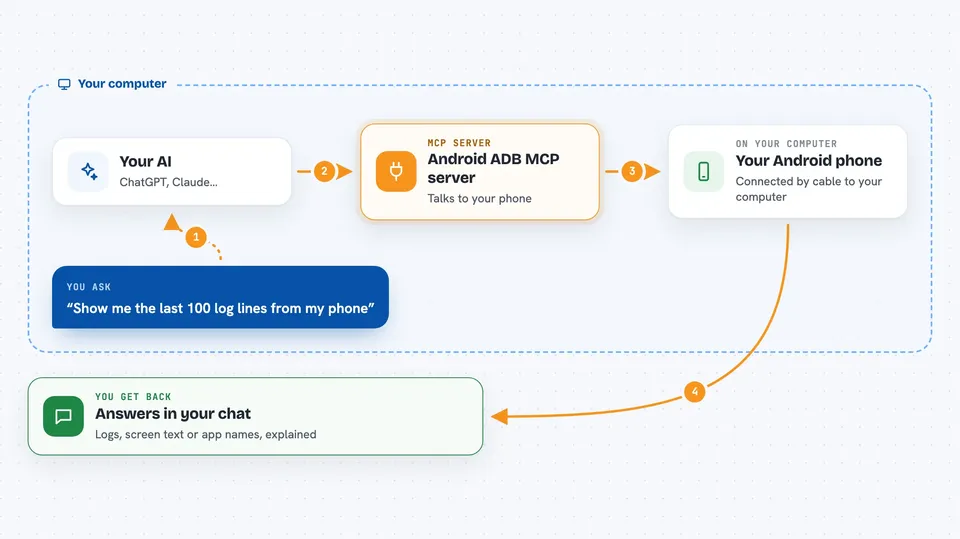
You ask your AI something about your Android device, like what errors just appeared. The AI passes that request to this helper program running on your computer. The helper talks to your phone through ADB, which is the official Android debugging bridge. It grabs the logs, the screen layout, or the list of installed apps and hands the result back. Your AI then explains it to you in the chat.
 Click to zoom
What you can do with it
- Read the latest Android logs from your device
- Clear the log buffer before a fresh test
- Inspect the current screen layout of an app
- List installed apps, with or without system apps
- Run a few safe, pre-approved shell commands like getprop or dumpsys
Try asking your AI
- “Show me the last 100 log lines from my phone”
- “What is on the screen right now in the app I am testing?”
- “List all apps installed on the device that contain the word maps”
- “Clear the logs, then tell me when it is done”
What it gives back to you
You get answers in the chat: log lines, a text version of the screen layout, a list of app names, or the output of a safe shell command. The AI usually summarizes or filters it for you, so you do not have to read raw output. If you ask it to clear logs, it just confirms the action.
Before you start
What you need
- Node.js version 18 or newer on your computer
- ADB installed and working on your computer (the Android platform tools)
- USB debugging turned on in your phone's developer options
- Your phone connected by USB and showing as authorized in adb devices
Good to know
It can read your device logs and screen contents, which may include private information, and clearing logs removes them, so use it on devices you are allowed to inspect.
Install it with your AI
Add Android ADB MCP server to your AI, no technical skills needed
You don't install anything by hand. You copy one prompt, paste it into an AI that can work on your computer, and it checks, installs and connects the server for you, asking you when it needs something.
Sign in to get the install prompt
Members get a ready-made prompt that lets the Claude desktop app check Android ADB MCP server, install it and connect it for them, step by step. You don't need any technical skills: you copy, paste and answer a few questions. Your connected AI can also find and install any of the 4,609 MCP servers here for you.
Who it's for
Android app testers, QA engineers, and developers who want their AI to look at a real device without leaving the chat.



