
MCP server · Analytics
Neo4j MCP servers
Let your AI ask questions of a Neo4j database, remember facts as a knowledge graph, and manage Aura instances.
This is a set of small helper programs that connect your AI assistant to Neo4j, a database that stores information as a web of connected things (a graph). It is handy if your team keeps data in Neo4j and you would rather ask questions in plain English than write database code yourself. There are four helpers here: one for asking questions of a database, one for remembering things, one for managing Neo4j's cloud service, and one for sketching data models.
What is an MCP server? The 30-second version
On its own, your AI can only chat with you. An MCP server is a small helper program that gives your AI a new skill or a connection to an app or service. This one connects your AI to Neo4j, so when you ask something about your data, the AI can go look it up in the database and come back with an answer. You do not need to know how the connection works; you just talk to your AI like normal.
What this MCP server does
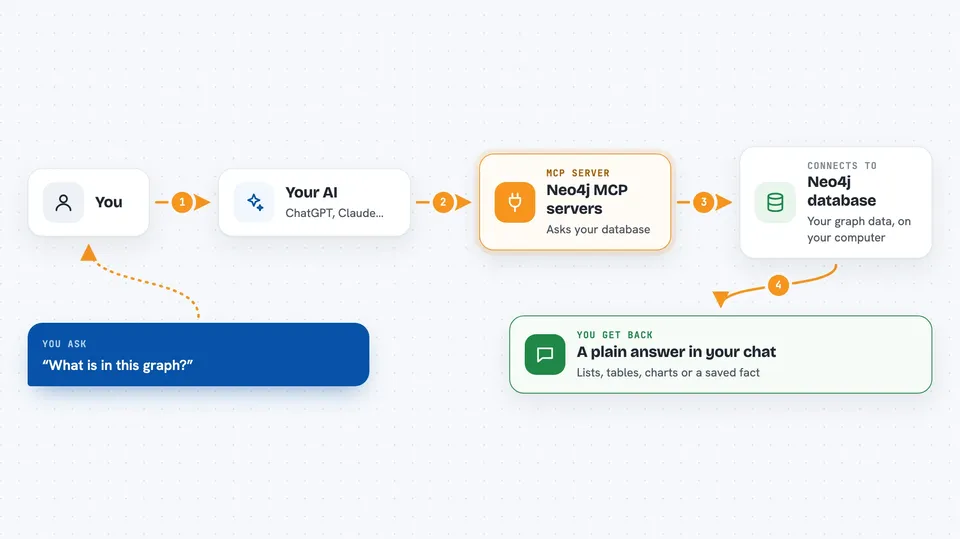
You ask your AI a question in plain words, like what is in this graph or list my instances. The AI passes that request to this helper program, which talks to your Neo4j database or your Aura cloud account. The helper sends back what it found, and the AI turns it into a normal answer in the chat. Depending on which helper you set up, it can read data, write new data, or even create and resize cloud databases for you.
 Click to zoom
What you can do with it
- Ask what is inside a Neo4j graph in plain English
- Run read and write queries against a database without writing code
- Store facts and relationships as a personal knowledge graph the AI can recall later
- List, create, resize, and delete Neo4j Aura cloud instances
- Turn a question into a chart of top products by sales
- Sketch and validate a graph data model, and import or export it from Arrows.app
Try asking your AI
- “What is in this graph?”
- “Render a chart from the top products sold by frequency, total and average volume”
- “List my Aura instances”
- “Store the fact that I worked on the Neo4j MCP servers today with Andreas and Oskar”
What it gives back to you
You get answers in the chat: lists of instances, summaries of what is in your graph, tables or charts built from query results, and confirmation messages when something was created or changed. If you asked the AI to remember a fact, it will tell you it saved it. The exact shape depends on which of the four helpers you set up and what you asked.
Before you start
What you need
- A Neo4j database (local or cloud) with the APOC plugin installed and enabled, for the query helper
- Your Neo4j connection details: the address, a username, and a password
- An MCP client such as Claude Desktop, VS Code, Cursor, Windsurf, or Gemini CLI
- For the Aura helper: a Neo4j Aura account and its client ID and client secret
Good to know
Some of these helpers can change or delete things, including writing to your database and creating or destroying cloud instances, so be careful with requests that modify data.
Install it with your AI
Add Neo4j MCP servers to your AI, no technical skills needed
You don't install anything by hand. You copy one prompt, paste it into an AI that can work on your computer, and it checks, installs and connects the server for you, asking you when it needs something.
Sign in to get the install prompt
Members get a ready-made prompt that lets the Claude desktop app check Neo4j MCP servers, install it and connect it for them, step by step. You don't need any technical skills: you copy, paste and answer a few questions. Your connected AI can also find and install any of the 4,361 MCP servers here for you.
Who it's for
People who already have data in Neo4j and want to explore or manage it by chatting instead of writing database code, including analysts, data teams, and developers who prefer plain English.


