
MCP server · Productivity
Mealie MCP server
by ni-c
Let your AI search, read, import and plan recipes in your own Mealie recipe collection.
This is a helper that connects your AI assistant to Mealie, the recipe manager you run yourself. Once it is set up, you can ask your AI in plain words to find a recipe, import one from a website, or plan your meals for the week. It is handy if you keep your recipes in Mealie and would rather chat than click around.
What is an MCP server? The 30-second version
On its own, your AI can only chat. An MCP server is a small helper program that gives your AI a new skill or a connection to an app. This one connects your AI to your Mealie recipe collection, so it can look things up and do things there when you ask. You stay in the chat; the helper does the talking to Mealie behind the scenes.
What this MCP server does
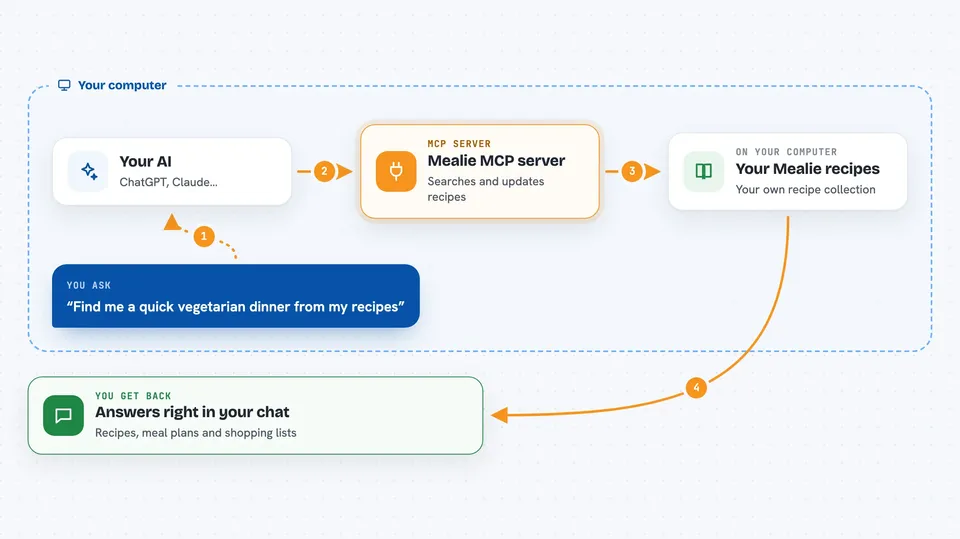
You ask your AI something like find me a pasta recipe or add this recipe to my shopping list. The AI passes your request to this helper program. The helper talks to your Mealie instance using a special password called an API token. Mealie sends the answer back, and the helper hands it to your AI, which shows it to you in the chat. For things that change your data, like deleting a recipe, the helper can ask you to confirm first.
 Click to zoom
What you can do with it
- Search your recipes and read their ingredients and steps
- Import a new recipe from a website link
- Import a recipe from a photo or from pasted text
- Plan meals for the week and see what is on today
- Build a shopping list from your meal plan
- Tidy up tags and categories
- Rate a recipe or leave a comment
Try asking your AI
- “Find me a quick vegetarian dinner from my recipes”
- “Import this recipe from this link and add the tag weeknight”
- “What meals do I have planned for today”
- “Add the ingredients for tonight's dinner to my shopping list”
What it gives back to you
You get answers in the chat: lists of recipes, the full ingredients and steps of one recipe, your meal plan for a day or week, or the contents of a shopping list. When it changes something, like adding items to a list or updating a recipe, it tells you what it did. Some results also come back as tidy structured data, so your AI can use them without guessing.
Before you start
What you need
- A Mealie account on an instance you can reach (your own or one you have access to)
- An API token from Mealie, found under Settings then API Tokens (this is a kind of password for apps)
- Node.js version 22 or newer on the computer where the helper runs
Good to know
It can change or delete things in your Mealie collection, so keep the read-only setting on if you only want to look, and confirm carefully when it asks.
Install it with your AI
Add Mealie MCP server to your AI, no technical skills needed
You don't install anything by hand. You copy one prompt, paste it into an AI that can work on your computer, and it checks, installs and connects the server for you, asking you when it needs something.
Sign in to get the install prompt
Members get a ready-made prompt that lets the Claude desktop app check Mealie MCP server, install it and connect it for them, step by step. You don't need any technical skills: you copy, paste and answer a few questions. Your connected AI can also find and install any of the 4,609 MCP servers here for you.
Who it's for
People who run their own Mealie recipe collection and want to search, import and plan meals by chatting with their AI instead of clicking through the app.





