
MCP server · Developer tools
Code Graph Indexer MCP server
Lets your AI map a TypeScript or React codebase and answer who calls, renders, or breaks what.
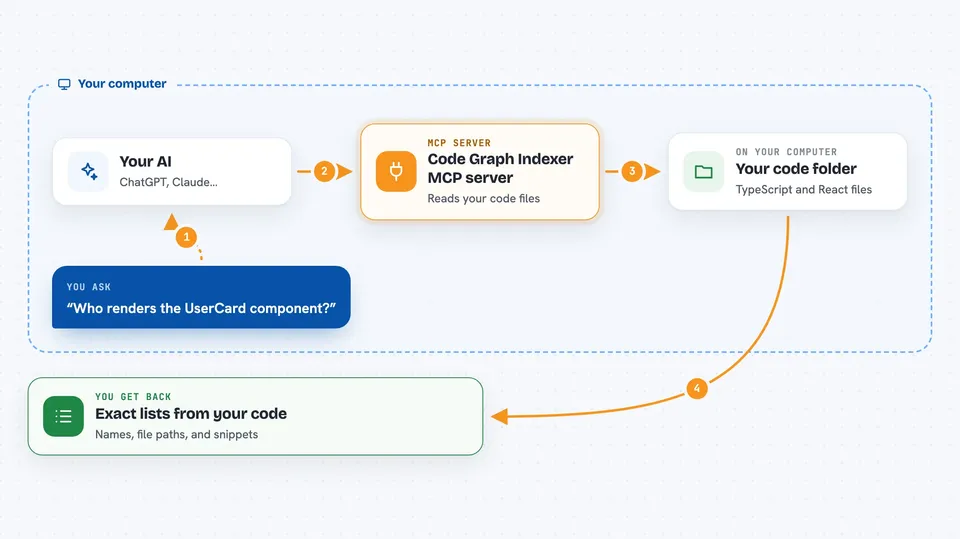
This is a helper that reads a TypeScript, React, or Next.js project and turns it into a map of everything in it: files, components, functions, and the lines between them. Once your AI is connected to it, you can ask questions about the code and get real answers instead of guesses. It is handy for developers, tech leads, and anyone who has to work in a codebase they did not write.
What is an MCP server? The 30-second version
On its own, your AI can only chat with you. An MCP server is a small helper program that gives your AI a new skill or a connection to another tool. This one connects your AI to a code graph of your project, so it can look up how pieces of code relate. When you ask a question about the code, your AI asks this helper, and the helper answers from the map it built.
What this MCP server does
You point it at a folder that holds your code. It reads every TypeScript and React file and builds a graph: which file contains which function, which component renders which other component, and which function calls which other function. Then your AI can ask it things like who calls this function or what breaks if I change this file. The helper answers with exact lists from the graph, not with text it guessed from reading files. You can also open a 3D picture of the graph in your browser if you want to see it.
 Click to zoom
What you can do with it
- Find out which components render a given component
- See who calls a specific function
- Check the blast radius of changing a file or function
- Spot circular dependencies in your project
- Find code that nothing uses anymore
- Search the code graph by name or keyword
- Get a context pack of the most relevant code for a task
Try asking your AI
- “Who renders the UserCard component?”
- “What breaks if I change the formatDate function in src/util.ts?”
- “Are there any circular dependencies in this repo?”
- “Find functions that nothing calls anymore”
What it gives back to you
You get back lists of names, file paths, and short summaries pulled straight from the code graph. For example, asking who calls a function returns the exact functions and files that call it. Asking for a blast radius returns the set of files and symbols that could be affected. It can also return a small pack of the most relevant code snippets for a task you describe.
Before you start
What you need
- Node.js 20.19 or newer
- pnpm 10 if you build from source (corepack enable picks it up)
- A TypeScript, React, or Next.js project folder to point it at
Good to know
The local server it can start is unauthenticated and can change things, so keep it on your own machine and do not expose it to the internet.
Install it with your AI
Add Code Graph Indexer MCP server to your AI, no technical skills needed
You don't install anything by hand. You copy one prompt, paste it into an AI that can work on your computer, and it checks, installs and connects the server for you, asking you when it needs something.
Sign in to get the install prompt
Members get a ready-made prompt that lets the Claude desktop app check Code Graph Indexer MCP server, install it and connect it for them, step by step. You don't need any technical skills: you copy, paste and answer a few questions. Your connected AI can also find and install any of the 4,361 MCP servers here for you.
Who it's for
Developers, tech leads, and reviewers who work in TypeScript or React codebases and want quick, accurate answers about how the code fits together.





