
MCP server · Security
DechoNet MCP server
by node-man
Check a website's security: DNS, SSL, email setup, open ports, and a simple health score.
DechoNet is a helper that lets your AI run security checks on any website or domain you own. You ask a question in plain words, and it looks up the technical details for you. It is handy for anyone who manages a website but is not a security expert.
What is an MCP server? The 30-second version
On its own, your AI can only chat. An MCP server is a small helper program that gives your AI a new skill or a connection to an app or service. This one connects your AI to DechoNet, a service that checks domain security. Once connected, your AI can look up things like SSL certificates or DNS records for you when you ask.
What this MCP server does
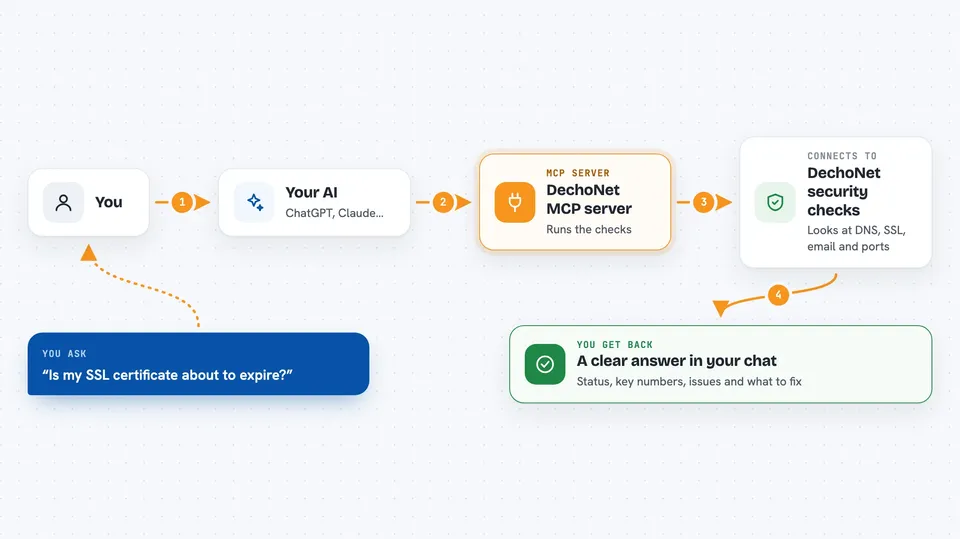
You ask your AI something like 'Is my SSL certificate about to expire?' The AI sends that question to this helper. The helper talks to DechoNet's public checks, which look at DNS, SSL, email settings, and more. DechoNet sends back a clear answer with a status, key numbers, any problems found, and what to do next. Your AI then explains it all to you in the chat.
 Click to zoom
What you can do with it
- Run a full security scan on a domain and get a health score
- Check if an SSL certificate is valid or about to expire
- See which email authentication records (SPF, DKIM, DMARC) are set up
- Find subdomains that are publicly visible
- Look for lookalike domains that might impersonate your brand
- Check if a website is ready to go live
- See what changed on a domain since the last check
Try asking your AI
- “Audit the security posture of example.com”
- “Is the SSL certificate for mysite.com about to expire?”
- “Which subdomains of example.com are exposed in CT logs?”
- “Are there registered lookalike domains of mybrand.com?”
- “Is example.com ready to go live?”
What it gives back to you
You get back a clear summary in the chat: a status like ok, warning, or bad, plus key numbers and a list of any issues with how serious they are. Each issue comes with a suggested fix. There is also a link to a full report on the DechoNet website if you want to see more.
Before you start
Good to know
This tool only reads public information and does not change anything on your domain, but the watch_domain tool does save a domain for daily checks, so use it only on domains you own or manage.
Install it with your AI
Add DechoNet MCP server to your AI, no technical skills needed
You don't install anything by hand. You copy one prompt, paste it into an AI that can work on your computer, and it checks, installs and connects the server for you, asking you when it needs something.
Sign in to get the install prompt
Members get a ready-made prompt that lets the Claude desktop app check DechoNet MCP server, install it and connect it for them, step by step. You don't need any technical skills: you copy, paste and answer a few questions. Your connected AI can also find and install any of the 4,609 MCP servers here for you.
Who it's for
Anyone who manages a website, like a small business owner, a web developer, or an IT person, who wants a quick security check without technical jargon.



